YouTube Shorts can create attention fast. That is the appeal. It is also the trap.
A lot of businesses publish Shorts, get a spike in views, and then realize nothing meaningful changed on their website. Qualified sessions do not increase. Signups stay flat. The content team learns very little about what to build next.
Usually, the issue is not the Short itself. It is the way Shorts are being used.
The more useful model is this: use Shorts to test hooks, angles, and pain points cheaply, then build owned assets around the topics that already proved they can hold attention. Shorts generate signals. Pages, landing paths, and downloadable resources create the long-term value.
Once you think about it that way, the goal is no longer “get clicks from every Short.” It becomes “figure out what deserves a page, an offer, and an email capture flow.”
Shorts are fast feedback, not the final asset
The strongest reason to use Shorts in 2026 is not that they drive huge amounts of direct traffic. In many cases, they do not.
The better reason is that they show what people respond to before you spend time building a full article, landing page, template, or tool. For lean teams, that matters. A solo consultant, SaaS marketer, or creator business usually does not need more content volume. It needs less wasted effort.
That is the core idea here: Shorts work best as a rapid topic-validation engine. The compounding asset is the long-tail page, resource, or lead capture flow you build from topics that already earned attention.
Why most Shorts strategies fail to create website traffic
Views are not the same as demand
A Short can get 50,000 views because the hook is broad, surprising, or emotionally charged. That does not mean the topic maps to buyer intent.
A creator might post “3 website mistakes killing conversions” and get strong reach. But if most viewers are general marketing spectators rather than people actively fixing a funnel, the business value is limited. Attention alone is weak evidence.
YouTube’s analytics make this distinction clearer. Shorts now have a public views count, but YouTube Analytics still preserves engaged views as the more useful signal for whether people chose to keep watching. Average view duration, watch time, and retention patterns matter more than raw views when you are judging topic quality.[^1][^2]
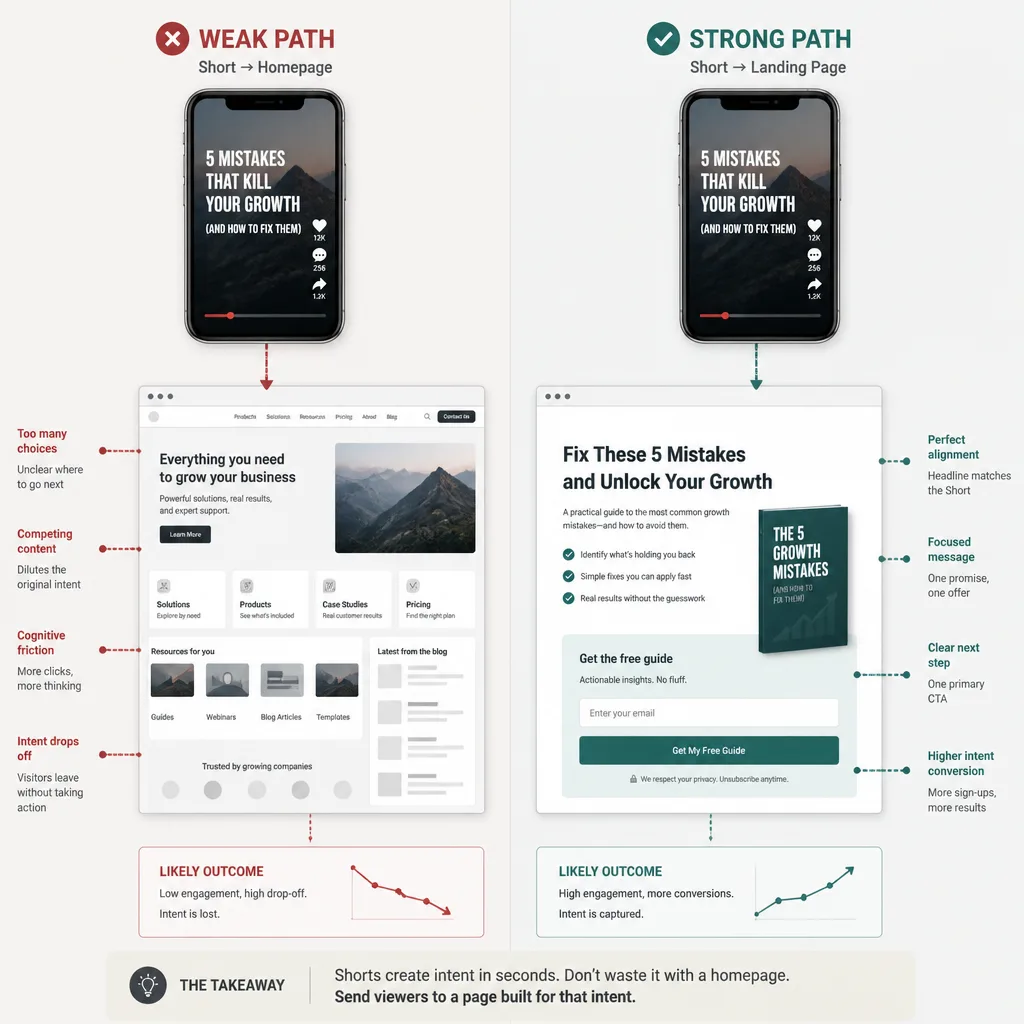
Homepage traffic wastes intent
If your Short promises a checklist, a framework, or a specific answer, sending viewers to your homepage is usually a mistake.
The reason is simple: message match breaks. The viewer responded to one narrow promise. Your homepage shows ten different options, broad brand language, and too many exits. That is not a traffic strategy. It is intent dilution.
A better destination is a page that continues the same conversation. If the Short is about “how to brief an SEO article in 10 minutes,” the next step should be that brief template, not your agency homepage.
Platform friction is real
This is the part many articles gloss over: standard URLs in YouTube Shorts descriptions and comments are non-clickable.[^3] So the usual “link in the description” advice is unreliable for Shorts.
YouTube does offer some clickable paths, including channel profile links and the “Related Videos in Shorts” route, but those are selective, not a universal outbound-link system.[^3]
That does not make Shorts useless. It just changes their role.
The 2026 workflow: Hooks -> Winners -> Long-tail pages
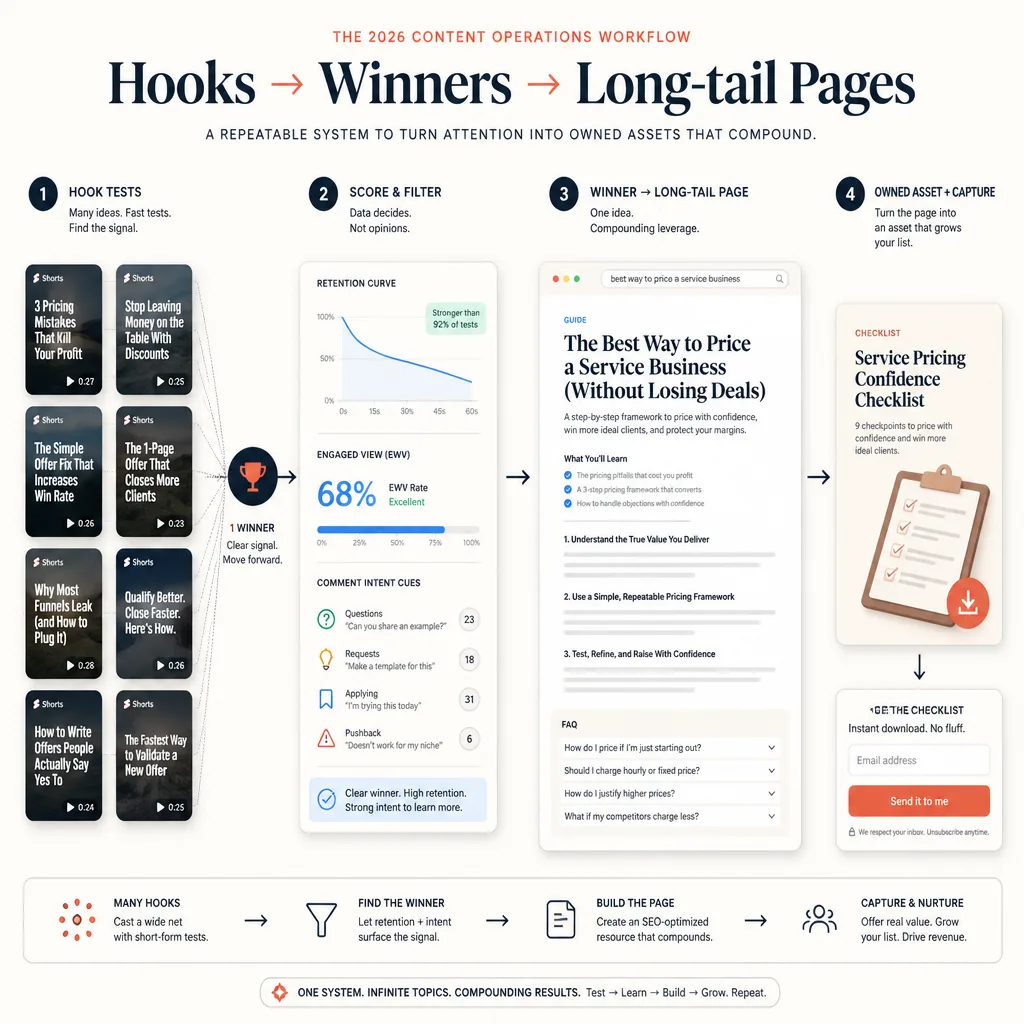
The operating model is simple.
Stage 1: Test narrow hooks with Shorts
Use Shorts to test specific ideas, not broad themes. You are not testing “SEO.” You are testing hooks like:
- “Why your service homepage kills search intent”
- “The 20-second offer test for landing pages”
- “What to fix before writing another blog post”
Each Short should isolate a problem, a promise, or an angle.
Stage 2: Identify winners using signal quality, not vanity metrics
A winning Short is not just one with high reach. It shows strong engaged viewing, decent retention, meaningful comments, and clear business relevance.[^1][^2]
The real question is not, “Did people watch?”
It is, “Did the right people care enough to want the next step?”
Stage 3: Expand winners into search-targeted pages
Once a topic wins, turn it into a page built for search intent or conversion intent.
That page might be:
- an article
- a landing page
- a checklist
- a template
- a calculator
- a lightweight tool
The format depends on what the audience needs next.
Stage 4: Add a downloadable asset to capture demand
If the topic implies action, give people something useful enough to save them time.
For example:
- SaaS topic: onboarding email template pack
- consultant topic: proposal checklist
- education topic: lesson plan worksheet
- creator topic: content repurposing SOP
The asset should deepen the page’s value, not function as generic email bait.
Stage 1: Use Shorts as a topic-testing system
What to test: problem, promise, angle, and audience
A strong testing system usually varies four things:
- Problem: the pain point being named
- Promise: the outcome being implied
- Angle: the framing that makes it distinct
- Audience: who the advice is for
Say you run a small CRO consultancy. One topic cluster could be “homepage conversion issues.” Instead of making one all-purpose Short, test several:
- “Why founders send paid traffic to the wrong page”
- “Your homepage is not your best lead-gen page”
- “One headline fix that reduces bounce risk”
- “When a homepage should stay broad”
That gives you better signal than one generic video.
A practical weekly cadence
For a small team, a realistic loop looks like this:
- Pick one topic cluster per week
- Publish 3 to 5 Shorts around that cluster
- Vary the hook, not the whole subject
- Review performance after 5 to 7 days
- Turn only the strongest angle into a page
This is manageable, and it reduces the chance that one unusually good or bad result skews your decisions.
How many Shorts per topic before judging
For most teams, 3 to 5 Shorts per cluster is enough to get directional feedback. That is not a universal benchmark. Performance varies by niche, audience size, and channel maturity.
Treat it as a comparison system inside your own channel, not a rule borrowed from someone else’s numbers.
Stage 2: What counts as a winner
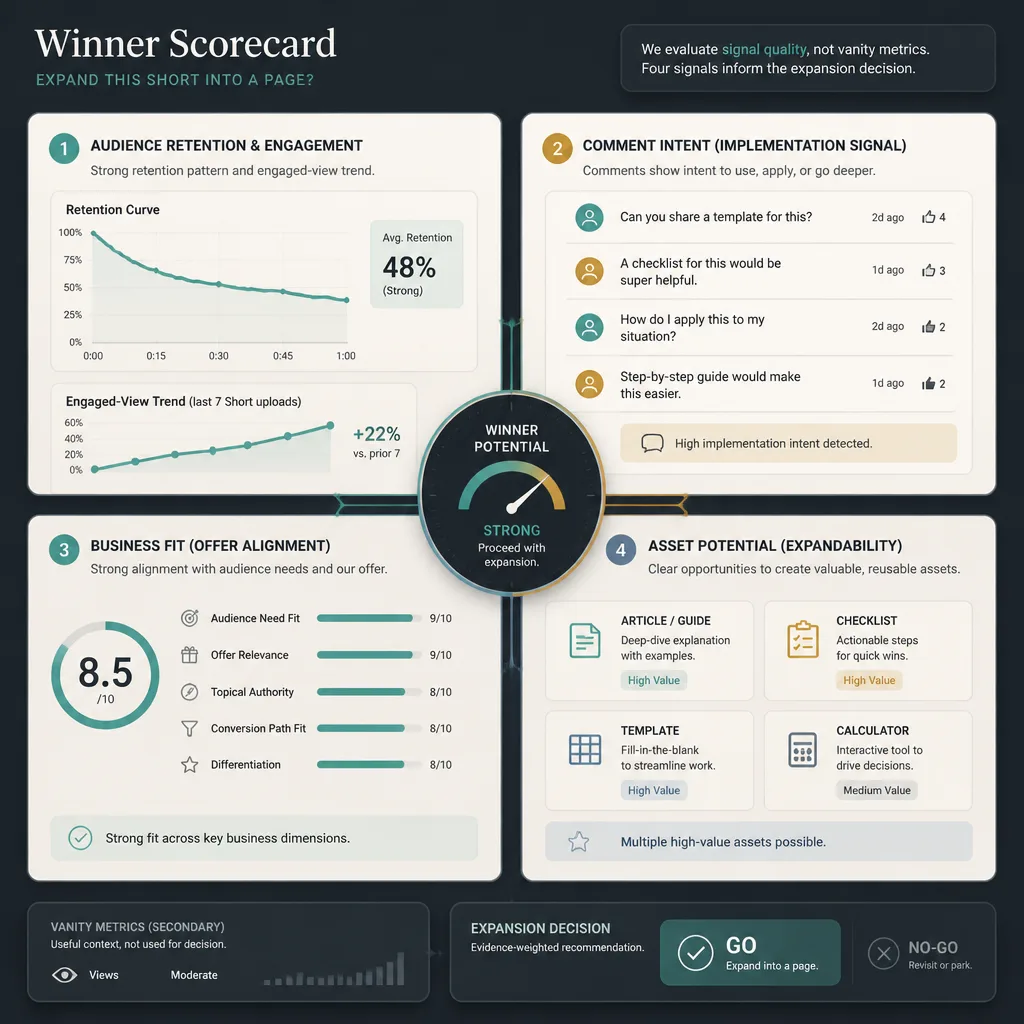
The metrics that matter most
YouTube recommends using engagement and retention reporting to understand how well viewers stay with your content. For Shorts, engagement reporting is tied to engaged views and corresponding watch time.[^1][^2]
The most useful signals are usually:
- engaged views
- average view duration
- retention shape
- comments per view
- likes per view
- profile visits
- downstream sessions or signups, where measurable
A Short with modest reach but strong retention and comments like “Do you have a template for this?” is often more valuable than a broad viral clip.
How to separate curiosity from buyer-relevant interest
This is where business judgment matters.
A topic may perform well because it is entertaining, controversial, or broadly relatable. That is not enough. Ask:
- Does this topic connect to a problem we actually solve?
- Do comments show implementation intent?
- Would a visitor from this topic plausibly want a page, template, or offer?
- Can this become a long-tail search query?
A finance educator, for example, might find that “why people stay broke” gets views, while “simple net worth tracker for couples” produces more actionable comments and better lead quality. The second topic is less flashy, but more useful commercially.
A simple winner scorecard
Use a lightweight scorecard from 1 to 5 across four categories:
| Signal | Question |
|---|---|
| Attention quality | Did engaged views and retention hold up relative to your baseline? |
| Intent quality | Did comments and reactions suggest real problem-solving interest? |
| Business fit | Does this topic connect to your offer, expertise, or email list goal? |
| Asset potential | Can this become a strong page, template, tool, or checklist? |
If a topic scores well across all four, it deserves expansion.
Stage 3: Turn winning Shorts into long-tail pages
From hook to search query
The mistake here is turning the script into a blog post word for word.
Instead, extract the underlying query. A Short hook like “Stop sending ad traffic to your homepage” might translate into page targets such as:
- when to use a landing page vs homepage
- why homepage traffic converts poorly
- best landing page for paid traffic
Comments often help refine this. If viewers ask, “What should I send cold traffic to instead?” that question may be a better H2, or even the page’s core angle.
What kind of page to create
Choose the format based on next-step utility.
Build an article when the audience needs explanation.
Build a landing page when the audience needs a focused next action.
Build a template, checklist, worksheet, or SOP when the audience needs execution support.
For example, if a consultant posts a Short on “client onboarding mistakes” and the comments show process confusion, the best next asset may not be a long article. It may be a downloadable onboarding checklist supported by a short article.
Preserve the same promise across Short and page
This is where many repurposing efforts fail.
If the Short promises speed, the page should feel fast. If the Short promises a framework, the page should present that framework early. If the Short promises a template, the page should not hide it under 1,500 words of generic setup.
Keep the promise consistent from hook to headline to CTA.
Stage 4: Add downloadable assets that convert attention into leads
When a downloadable asset makes sense
Not every page needs a lead magnet.
But if the topic implies repeated use, implementation, or team sharing, an asset usually makes sense. Good candidates include:
- checklists
- templates
- calculators
- worksheets
- prompt packs
- SOPs
- swipe files
Match the asset to the topic
The asset should fit the problem.
If the topic is diagnostic, offer a checklist.
If it is operational, offer a template.
If it is numerical, offer a calculator.
If it is strategic, offer a worksheet.
A SaaS team posting Shorts about activation metrics might build a simple onboarding KPI worksheet. A content agency posting about article briefs might offer a one-page brief template.
What to gate and what to leave ungated
Gate the asset, not the core answer.
The page should still be useful without an email opt-in. That builds trust and improves search value. The gated asset should save time, reduce effort, or package the process in a reusable format.
Tracking setup: UTMs, landing pages, and measurement
How to structure UTM parameters
GA4 supports campaign attribution through UTM parameters, including source, medium, campaign, and content.[^4] A clean naming model makes analysis much easier.
Use something like this:
utm_source=youtube
utm_medium=shorts
utm_campaign=homepage-vs-landing-page
utm_content=hook-variant-a
This lets you compare topic clusters and hook variants in GA4.[^4]
Why each campaign needs a dedicated landing path
Dedicated landing paths solve three problems at once:
- tighter message match
- cleaner attribution
- clearer conversion design
If all Shorts traffic lands on the same page, you lose context. If each cluster maps to its own page, you can compare sessions, engagement, and signups more honestly.
What to monitor in GA4 and YouTube Analytics
In YouTube Analytics, monitor:
- engaged views
- average view duration
- retention behavior
- comments and profile activity
In GA4, monitor:
- sessions by campaign/source/medium
- engaged sessions
- conversion events
- email signups
- assisted conversion patterns
GA4 attributes campaign values at the session level, which is why clean UTM structure matters.[^4][^5]
Cadence: A realistic 30-day operating model
Weekly publishing rhythm
A simple monthly cycle for a lean team:
Week 1: choose one topic cluster and publish 3 Shorts
Week 2: publish 2 more variations and review signals
Week 3: build one long-tail page from the strongest angle
Week 4: add one downloadable asset and refine the CTA path
That is enough to create momentum without turning content operations into a factory.
When to promote a topic into a page
Promote a topic when:
- it beats your cluster average on engagement quality
- comments reveal clear next-step intent
- the topic maps to a useful page or offer
- keyword research suggests search demand or adjacent long-tail opportunity
Shorts signals and keyword research should work together, not compete.
When to refresh, combine, or kill a topic
Refresh a topic if the problem seems strong but the hook underperformed.
Combine topics when comments reveal a better angle than your original framing.
Kill a topic when it repeatedly attracts low-intent attention or weak business fit, even if reach looks decent.
Common mistakes that break the system
Sending all traffic to the homepage
This is the fastest way to waste specific intent.
Scaling topics before signal quality is clear
One spike is not a system. Test variations before investing in a page.
Picking viral topics with weak business fit
Some topics attract viewers you cannot serve. Those topics may grow vanity metrics while weakening editorial focus.
Ignoring comments as search-intent data
Comments often contain the exact language that should shape your page headline, subheads, FAQ, and asset framing. They are not just engagement artifacts. They are research inputs.
Conclusion
The most useful way to think about this workflow is slightly counterintuitive.
Shorts are not valuable because every clip should drive clicks. They are valuable because they help you discover, quickly and cheaply, which problems, promises, and angles deserve a compounding asset on your site. That asset might be a long-tail article, a focused landing page, a template, or a downloadable resource.
The businesses that get the most from Shorts usually stop treating them as a vanity channel. They use them as a signal layer.
If you want to make this practical, start small: choose one offer, one topic cluster, one landing page, and one month of testing. That is enough to build a real workflow instead of another pile of views.
FAQ
Can YouTube Shorts actually drive website traffic in 2026?
Yes, but usually not in the simple way many creators expect. Shorts are better treated as a fast topic-validation channel than a frictionless click engine. They can still influence website traffic by generating interest, pushing viewers to your profile or related content, and revealing which topics deserve dedicated landing pages, blog posts, or lead magnets.[^3]
Why shouldn’t I send Shorts viewers to my homepage?
Because homepage traffic usually dilutes intent. If a Short promises a specific answer, framework, checklist, or tactic, the destination should match that promise closely. A focused landing page or content page preserves message match, improves attribution, and gives the visitor a clearer next step.
What makes a YouTube Short a winner worth expanding into a page?
A winner is not just a Short with high views. Look for stronger signals such as engaged views, retention, average view duration, comments that show real intent, profile visits, and downstream site actions where measurable.[^1][^2] The best winners combine attention with business relevance.
How many Shorts should I test before choosing a topic winner?
For most small teams, test several hook variations around the same topic before deciding. A practical approach is to publish 3 to 5 Shorts within one topic cluster, then compare their relative performance.
How should I track traffic from YouTube Shorts?
Use dedicated landing pages and consistent UTM parameters so sessions can be identified clearly in GA4. A simple naming model is utm_source=youtube, utm_medium=shorts, utm_campaign=topic-cluster, and utm_content=hook-variant.[^4] This makes it easier to compare topics, hooks, and conversion outcomes.
What kind of page should I build from a winning Short?
That depends on the intent behind the topic. If the viewer needs explanation, build an article. If they need a next step, build a landing page. If they need something practical, create a template, checklist, calculator, worksheet, SOP, or swipe file.
Should keyword research still matter if a Short performs well?
Yes. A strong Short suggests audience interest and strong framing, but it does not guarantee search demand or ranking potential. Use Shorts as a signal layer, then validate the topic with keyword research and SERP review before investing heavily in a long-tail page.
What is the biggest mistake in a Shorts-to-traffic strategy?
Treating views as proof of business value. Many Shorts attract broad curiosity without leading to qualified traffic, leads, or customers. The system works better when you score topics based on fit, intent, and conversion potential instead of vanity metrics alone.
[^1]: YouTube Help documents that Shorts engagement reporting includes engaged views and corresponding watch time, and that audience retention helps show where viewers keep watching, drop off, or rewatch content. (support.google.com) [^2]: YouTube Help notes that since March 31, 2025, Shorts public view counts changed, while YouTube Analytics continues to surface the prior metric as engaged views. (support.google.com) [^3]: YouTube Help states that standard URLs placed in YouTube Shorts comments and Shorts descriptions are non-clickable, while channel profile links and Related Videos in Shorts remain clickable paths. (support.google.com) [^4]: GA4 Help explains that UTM parameters map to campaign dimensions such as source, medium, campaign, and content. (support.google.com) [^5]: GA4 Help states that each session is associated with one campaign or traffic source, and session attribution is determined from values such as UTM parameters and referrer data. (support.google.com)