How to Find Low-Competition FAQ Keywords Using Support Tickets, Sales Calls, and On-Site Search Logs
Most FAQ keyword research starts in the wrong place.
It starts with a keyword tool, which means you only see questions that already made it into someone else’s dataset. That can be useful, but it misses a category of opportunities that matters to online businesses: recurring, high-intent questions customers ask in their own words before they buy, while they compare options, or when they’re trying to solve a specific problem.
A better source is often your own customer language. Support tickets, sales calls, and on-site search logs contain questions competitors usually can’t see. That doesn’t make every internal question an SEO opportunity. It does mean you have access to raw demand signals that keyword tools often underrepresent, especially for long-tail phrasing and niche workflows.[^1]
The advantage is not just finding hidden questions. It’s turning them into useful, well-placed content that matches intent, earns search visibility, and removes friction for visitors who are close to taking action.
Why low-competition FAQ keywords often stay invisible in keyword tools
Third-party keyword tools are estimation systems, not complete maps of human curiosity. They model demand from sampled data, aggregated terms, and reporting thresholds. That makes them good at broad patterns, but weaker at niche phrasing, low-volume questions, emerging language, and product-specific workflows.[^1]
That gap matters most for FAQ-style searches.
People rarely search the polished phrase you’d put into a content brief. They search the messy version:
- “can i cancel before charge date”
- “do you work with shopify basic or only plus”
- “how long before we can actually launch this”
Those searches can still be commercially meaningful. They may never appear clearly in a tool, or they may be folded into a broader parent term.
The distinction is simple:
Tool-visible demand is what external platforms can estimate.
Real-world demand is what your customers repeatedly ask when they’re confused, comparing options, or trying to move forward.
The best FAQ opportunities often live in that second category. They tend to be long-tail, intent-rich, and useful beyond SEO because a good answer can also improve conversion and reduce support friction.
Start with the right filter: what counts as an FAQ keyword worth publishing?
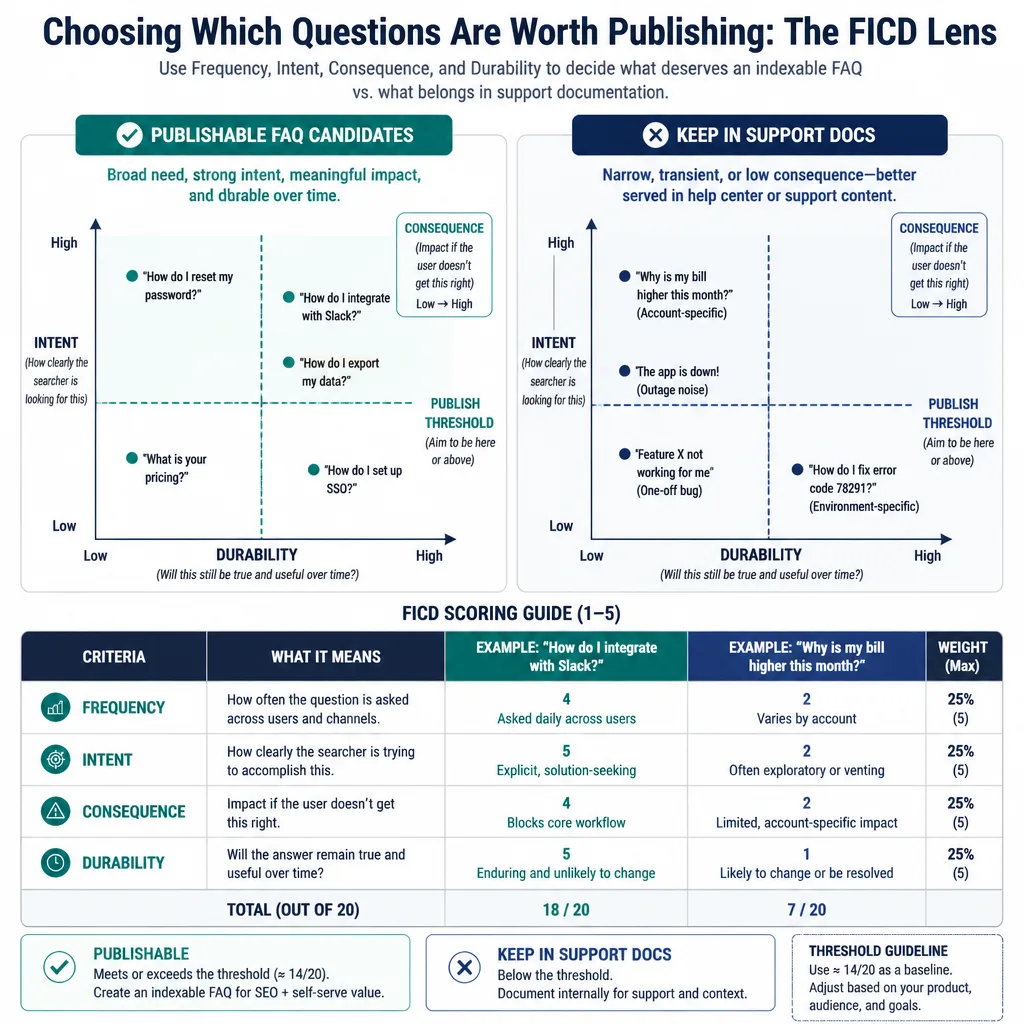
Before you mine data, set a filter. Otherwise, you’ll end up publishing pages for every stray customer question.
A practical FAQ keyword is usually:
- recurring
- clear in intent
- relevant to the business
- answerable in a way that stays useful over time
That last point is easy to miss. A question that matters for three days because of a temporary bug is not a strong candidate for indexable content.
Questions worth publishing vs. questions that belong in support docs
Publishable questions help more than one visitor and make sense outside a single account.
For example:
- Worth publishing: “Do you support Shopify Basic or only Shopify Plus?”
- Better in docs: “Why is invoice #48392 showing duplicate tax?”
The first has broader relevance and pre-purchase intent. The second is account-specific and unlikely to help future searchers.
In practice, many questions belong somewhere other than a standalone FAQ page. Some fit product pages. Some belong in a help center. Some need a blog post because the answer requires context, tradeoffs, or examples.
A simple scoring lens: frequency, intent, consequence, and durability
A useful way to prioritize is the FICD lens:
- Frequency: How often does this appear across tickets, calls, or site search?
- Intent: Is the user’s goal clear?
- Consequence: Does answering it affect revenue, conversion, churn, or support load?
- Durability: Will the answer still matter in six months?
This is a heuristic, not a formal research standard. But it works well for small teams because it stops you from overpublishing.
A low-frequency question can still be worth covering if the consequence is high. “How long does implementation take?” may not show up daily, but if it repeatedly slows deals, it deserves attention.
Source 1: Mine support tickets for recurring customer phrasing
Support data is messy, but it’s full of the language real people use when they hit friction.
If you use tools like Zendesk, Intercom, Help Scout, or Freshdesk, export the last 60 to 90 days of tickets first. That’s usually enough to spot patterns without getting buried in stale issues.
What to pull from your help desk
The most useful fields are usually:
- subject line
- first customer message
- tags
- issue category
- macros or saved replies used
- product area
- ticket count by tag or category
The first customer message matters most. That’s usually where the clearest raw phrasing lives.
Example:
Raw ticket phrasing: “do you work with shopify basic or only plus”
Possible publishable question: Do you support Shopify Basic or only Shopify Plus?
That keeps the intent while making the wording readable.
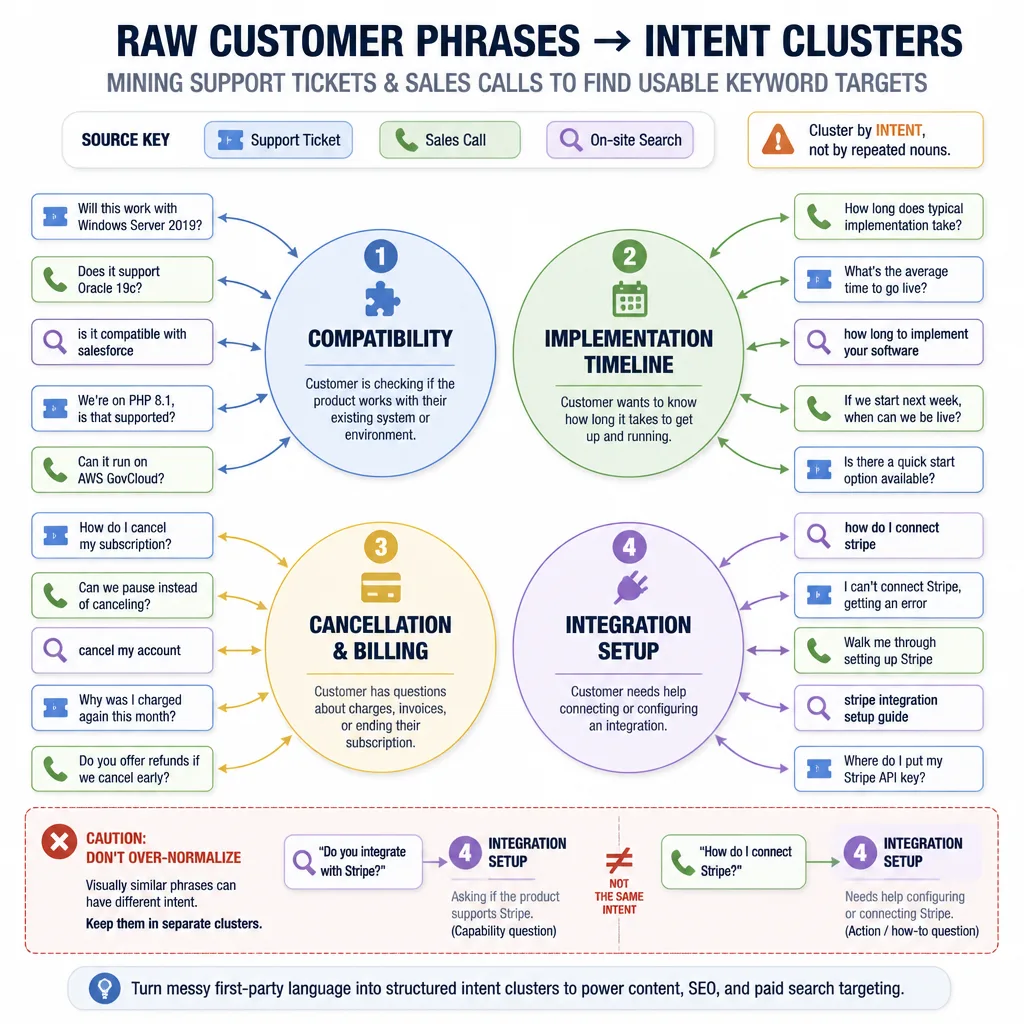
How to cluster similar questions without losing nuance
Don’t over-normalize.
“Do you integrate with Stripe?” and “How do I connect Stripe?” sound close, but they target different stages. One is capability validation. The other is setup help. Merge them and you may create a page that satisfies neither.
A simple rule: cluster by intent, not just by repeated nouns.
Good clusters often include:
- compatibility questions
- pricing and policy questions
- implementation timeline questions
- cancellation and billing questions
- setup and process questions
Keep the raw phrases in your sheet even after clustering. They often become useful subheadings, copy variants, or internal anchor text.
Red flags: one-off edge cases, account-specific issues, and product noise
Some support patterns should trigger product fixes, not SEO content.
Be careful with:
- outage-related noise
- temporary bugs
- one-off billing disputes
- account-specific troubleshooting
- questions created by confusing UI labels
Those issues may still deserve documentation or UX updates. They just don’t automatically deserve indexable FAQ pages.
Source 2: Use sales calls to uncover pre-purchase search intent
Sales calls are often better than support data for commercial FAQ content.
They reveal the questions people ask right before commitment: switching risk, rollout concerns, contract worries, integration fit, stakeholder objections, and expected time to value.
If your team uses HubSpot, Salesforce, Gong, or Chorus, review transcripts, summaries, and CRM notes from recent deals.
What sales conversations reveal that keyword tools miss
Keyword tools rarely capture the emotional and operational wording behind purchase hesitation.
You’ll hear questions like:
- “How long does implementation take?”
- “Can we migrate without losing historical data?”
- “Is this a fit for a small team or only enterprise?”
- “What happens if we need to cancel before renewal?”
These are not random objections. They’re search-intent clues.
They often work especially well as FAQ sections on product or service pages because the user is close to deciding and the answer supports conversion directly.
How to extract repeatable phrases from transcripts and notes
You don’t need an elaborate NLP workflow.
Start by highlighting repeated phrases across 10 to 20 calls:
- time-to-launch questions
- integration concerns
- comparison language
- pricing misunderstandings
- approval-process concerns
Then rewrite them into clear question formats without changing the meaning.
Raw sales note: “how long before we can actually launch this”
Better target: How long does implementation take?
That cleaner version usually works better as a heading, while the original phrasing can still appear naturally in the body copy.
How to separate true search questions from live-call context
Not everything spoken on a call maps to search.
“Can you walk me through that again?” is conversational filler.
“How long does implementation take?” is a durable question someone might search before booking a demo.
The test is simple: Would this still make sense if typed into Google by someone not on the call?
If yes, keep it. If no, discard it.
Source 3: Analyze on-site search logs for exact language people already use
On-site search logs are one of the cleanest first-party sources because users already expect your site to answer them.
If you track site search in Google Analytics 4 or use search tools like Algolia or Elastic, review the exact queries people enter, especially over the last 30 to 60 days.
Queries that signal FAQ opportunities
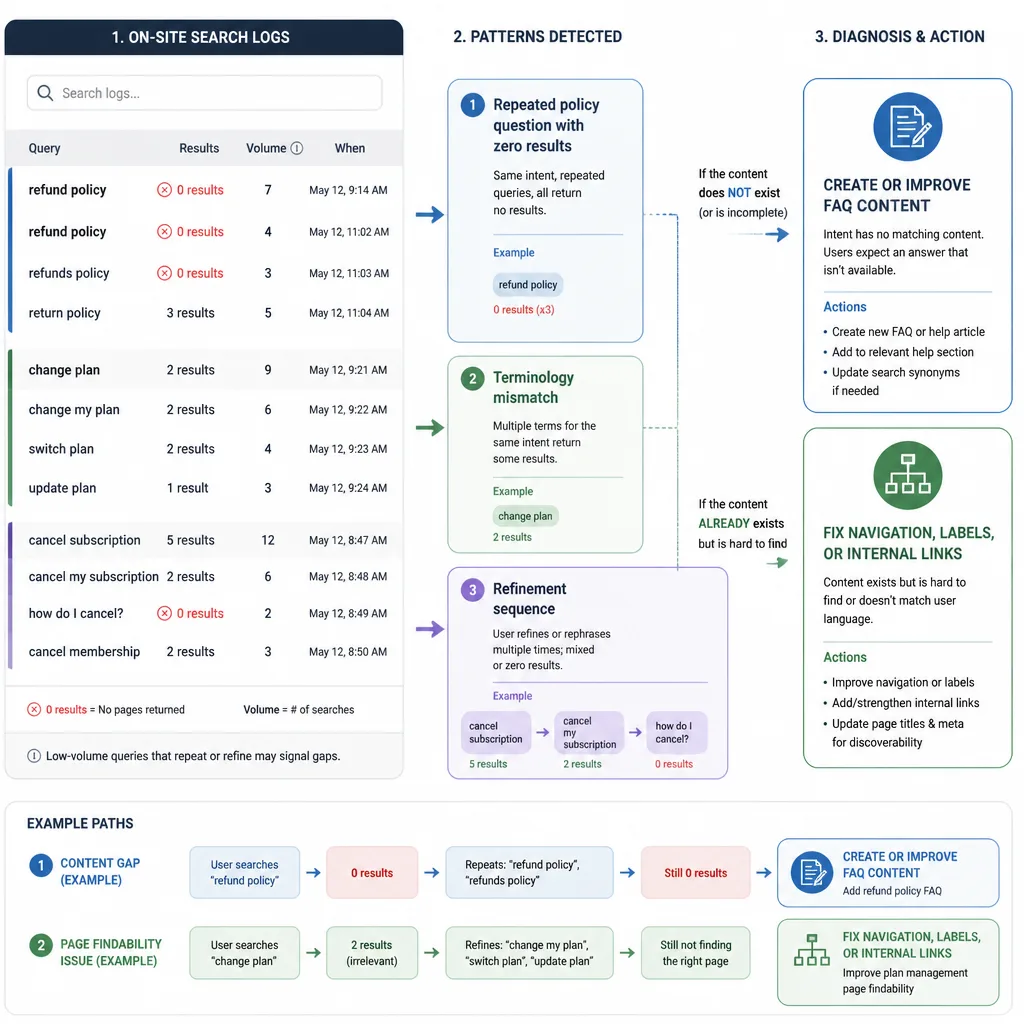
The best patterns are often small but recurring:
- repeated low-volume terms each month
- wording variants around the same question
- query refinements after a first search
- policy or capability questions
Example:
Raw site search: “cancel before charge date”
Possible FAQ target: Can I cancel before my next billing date?
That might belong in a help doc, an FAQ section on a billing page, or a standalone policy FAQ depending on depth and business importance.
What zero-result searches usually mean
Zero-result searches often point to one of three issues:
- a real content gap
- a terminology mismatch
- a navigation problem
If users search “refund policy” and no result appears, you may need a page. But if you already have a strong “returns and cancellations” page, the real problem may be wording.
Zero-result data is useful, but it shouldn’t automatically trigger new URLs.
When a search query points to a page problem, not a content gap
Sometimes the answer already exists and users just can’t find it.
If many people search for “change plan” while a clear billing page is already live, creating another FAQ page may make the site worse. The better fix could be:
- stronger internal linking
- better menu labels
- clearer product-page copy
- revised help-center naming
That distinction matters. Some search terms signal SEO opportunity. Others signal an information architecture problem.
Turn raw questions into publishable keyword targets
At this stage, the goal is not to “optimize” the wording into something unnatural.
The goal is to preserve intent while making the phrasing publishable.
Create a question bank with variants, source, and intent
Use a simple sheet with columns like:
- raw phrase
- normalized phrase
- source
- source count
- intent type
- business impact
- best page type
- existing page match
- status
This keeps the original language visible while still allowing editorial decisions.
Map each question to an FAQ section, standalone page, or existing commercial page
A simple rule:
- Use an FAQ section on a product or service page when the question supports a buying decision.
- Use a standalone FAQ page when the intent is distinct and the answer needs its own space.
- Use help docs or a knowledge base when the question is procedural or customer-only.
- Use a blog post when the answer needs explanation, comparison, or opinionated guidance.
Not every question deserves its own page. Many perform better when embedded on a stronger existing page.
Avoid duplicate intent across multiple FAQ pages
This is where FAQ programs often fall apart.
If you publish separate pages for:
- “Can I cancel before renewal?”
- “Can I cancel before my next charge?”
- “How do I stop auto-renewal?”
you may be creating three weak pages for one core intent.
Usually, one strong page or one well-developed section is better than several near-duplicates.
Validate demand with lightweight SERP checks
Don’t rely entirely on keyword volume tools to validate these opportunities. Do a quick manual SERP review instead.
What to look for in the SERP
Search the cleaned-up version and a close variant.
Then look for:
- question-style pages ranking
- forum results from Reddit or Quora
- pages that only partially answer the query
- outdated threads
- mixed intent in the top results
- broad pages ranking because no one built a better answer
Also check whether the ranking pages are genuinely useful or just adjacent.
Signs the query is underserved
A query may be underserved when:
- results loosely match rather than directly answer
- top pages bury the answer inside broader content
- discussion forums rank prominently
- no result appears clearly designed for the exact question
That’s a useful signal, not a guarantee. Low visible competition does not always mean easy rankings. Domain strength, internal linking, and page quality still matter.
Signs you should not publish a dedicated FAQ page
Don’t force a new page when:
- the intent fits better on an existing page
- the answer is too thin to stand alone
- the business relevance is weak
- the query is highly account-specific
- the SERP clearly rewards a broader parent topic instead
In those cases, update an existing URL or add an FAQ section instead.
Build FAQ content that actually performs
FAQ content works when it answers the question better than a one-line response and leads the visitor somewhere useful next.
That aligns with Google’s emphasis on helpful, people-first content.[^2] It also matters because FAQ rich results are no longer something you can count on, even when using FAQ structured data.[^3]
How long and detailed the answer should be
There is no ideal word count.
A good answer usually includes:
- a direct answer up front
- any key condition or exception
- a short example if needed
- a next step
For example, if the question is “Can I cancel before my next billing date?” the answer shouldn’t stop at yes or no. It should explain deadlines, exceptions, how to do it, and where to go next.
Where to place internal links so the FAQ can rank and convert
Internal linking is essential.
FAQ pages often underperform because they are orphaned. Link them from:
- relevant product and service pages
- pricing or policy pages
- help center or resource hubs
- blog posts that mention the same issue
Then link out from the answer to the next-step page: setup docs, demo requests, plans, billing settings, or policy details.
When to add FAQ sections to product, service, or blog pages instead
A lot of commercial FAQ content works better inside existing high-intent pages.
If the question is “How long does implementation take?” a service page or product page may be the best destination. If the question is broader, such as “What should you prepare before a migration?” that may deserve a blog post or guide instead.
Page type should follow intent, not habit.
When FAQ content backfires
FAQ content usually fails for predictable reasons.
Most of the time, the problem isn’t the question. It’s the way the content is packaged.
Thin content that answers the question too weakly
A one-sentence answer rarely deserves a standalone page.
If the page exists only to target a phrase and offers no real depth, it is unlikely to help users or perform well in search. It can also dilute site quality.
Cannibalization and duplicate-question sprawl
FAQ content is especially vulnerable to duplication because similar questions can be phrased in several ways.
Without editorial discipline, you end up with overlapping pages that compete with each other, confuse internal linking, and create maintenance debt.
Publishing FAQs no one can find from the rest of your site
Orphaned FAQ pages usually go nowhere.
Even if the question is valid, the page often struggles when it isn’t linked from the pages where that question naturally comes up. Visibility and conversion both suffer.
A simple workflow you can run every month
Most teams do not need a large content ops system. They need a repeatable habit.
Monthly extraction and review
Once a month:
- export the last 30 to 60 days of support, sales, and site search data
- pull repeated questions into one sheet
- cluster by intent
- score with FICD
That’s enough to surface strong candidates without overcomplicating the process.
Prioritization and publishing
Next:
- check whether a strong page already exists
- decide the best page type
- run a quick SERP check
- publish a new answer or improve an existing one
- add internal links immediately
That last step is where many teams slip. Publishing without integration wastes much of the opportunity.
Measurement: rankings, clicks, assisted conversions, and support deflection
Use Google Search Console to monitor impressions, clicks, and query variation.[^4]
Then look at:
- assisted conversions in analytics
- engagement on the destination page
- lead quality if relevant
- directional drops in tickets related to that question
Be careful with support deflection claims. Fewer tickets can be influenced by many factors, so treat that as directional rather than proven causation.
Conclusion
The best low-competition FAQ opportunities usually do not come from better dashboards. They come from better listening.
Support tickets, sales calls, and on-site search logs reveal the phrasing your market actually uses when trying to understand, compare, or move forward. That matters because competitors often can’t see it, and keyword tools often flatten or miss it.
But hidden questions are only half the opportunity. The real win comes from choosing selectively, validating lightly, matching the right page type, and making the content easy to find through internal links.
If you remember one thing, make it this: customer language becomes a competitive advantage only when you turn it into useful, durable content that matches how people actually search and decide.
FAQ
Why are low-competition FAQ keywords often missing from keyword tools?
Many FAQ-style queries are long-tail, low-volume, emerging, or phrased in niche customer language. Third-party keyword tools estimate demand from incomplete datasets, so they often miss the exact wording real users employ in support tickets, sales calls, or on-site search.
What makes a customer question worth publishing as FAQ content?
A strong FAQ target is recurring, has clear intent, matters to the business, and can be answered in a durable way. If the answer is too thin, too temporary, or too account-specific, it usually belongs in support docs or product UX instead of an indexable page.
How do support tickets help with FAQ keyword research?
Support tickets reveal recurring phrasing customers use when they are confused, evaluating capabilities, or trying to complete a task. Export ticket subjects, first messages, tags, and categories, then cluster similar questions without merging different intents.
What do sales calls reveal that support tickets usually do not?
Sales calls are especially useful for pre-purchase questions, objections, implementation concerns, switching risk, pricing confusion, and comparison language. Those questions often map well to conversion-supporting FAQ sections on product or service pages.
How can on-site search logs uncover SEO opportunities?
On-site search logs show the exact words visitors already expect your site to answer. Repeated searches, refinements, and zero-result queries can reveal missing FAQ content, terminology gaps, or page-level UX issues.
Should every recurring question become its own FAQ page?
No. Some questions work better as FAQ sections on existing product, service, or blog pages. Others belong in help docs or a knowledge base. A standalone page makes sense only when the question has distinct intent, enough substance, and real business value.
How do you validate an FAQ keyword without heavy keyword research?
Run a lightweight SERP check. Look for weak or partial answers, forum-heavy results, mixed intent, outdated threads, and a lack of pages clearly built for the exact question. That does not guarantee easy rankings, but it can signal an underserved query.
Why does FAQ content often fail?
FAQ content usually underperforms when answers are too thin, multiple pages target the same intent, or the pages are orphaned with weak internal linking. Publishing lots of shallow FAQs can also create index bloat and maintenance overhead.