How to Launch a 48-Hour Search Ads Sprint Without Burning Your Budget
If you need traffic quickly, search ads can help. But most short-run campaigns fail for familiar reasons: too many keywords, loose match types, generic landing pages, and no clear way to interpret the data.
A 48-hour sprint can work, but only if you treat it like a controlled learning exercise, not a rushed version of a full PPC launch. In a short window, there is no time for a messy campaign to “learn.” You need clean signals early.
That changes the goal. You are not trying to maximize reach. You are trying to capture immediate intent, limit waste, and leave the test knowing whether to stop, refine, or scale. In practice, tighter constraints usually produce better answers.
A 48-hour sprint is not a compressed full campaign
A weak short test often looks like this: 30 mixed keywords, broad match, nationwide targeting, a generic homepage, and no negatives.
A disciplined setup looks almost opposite: 5 to 15 closely related keywords, mostly exact and phrase match, narrow geography, limited schedule, a focused landing page, and a negative keyword list in place before launch.
That matters because the scarce resource in a short sprint is not budget alone. It is observation. Every irrelevant click takes money away from the searches that could actually teach you something.
So the mindset is simple: you are not building your final campaign in 48 hours. You are answering one commercial question with as little noise as possible.
Start with the decision you need to make
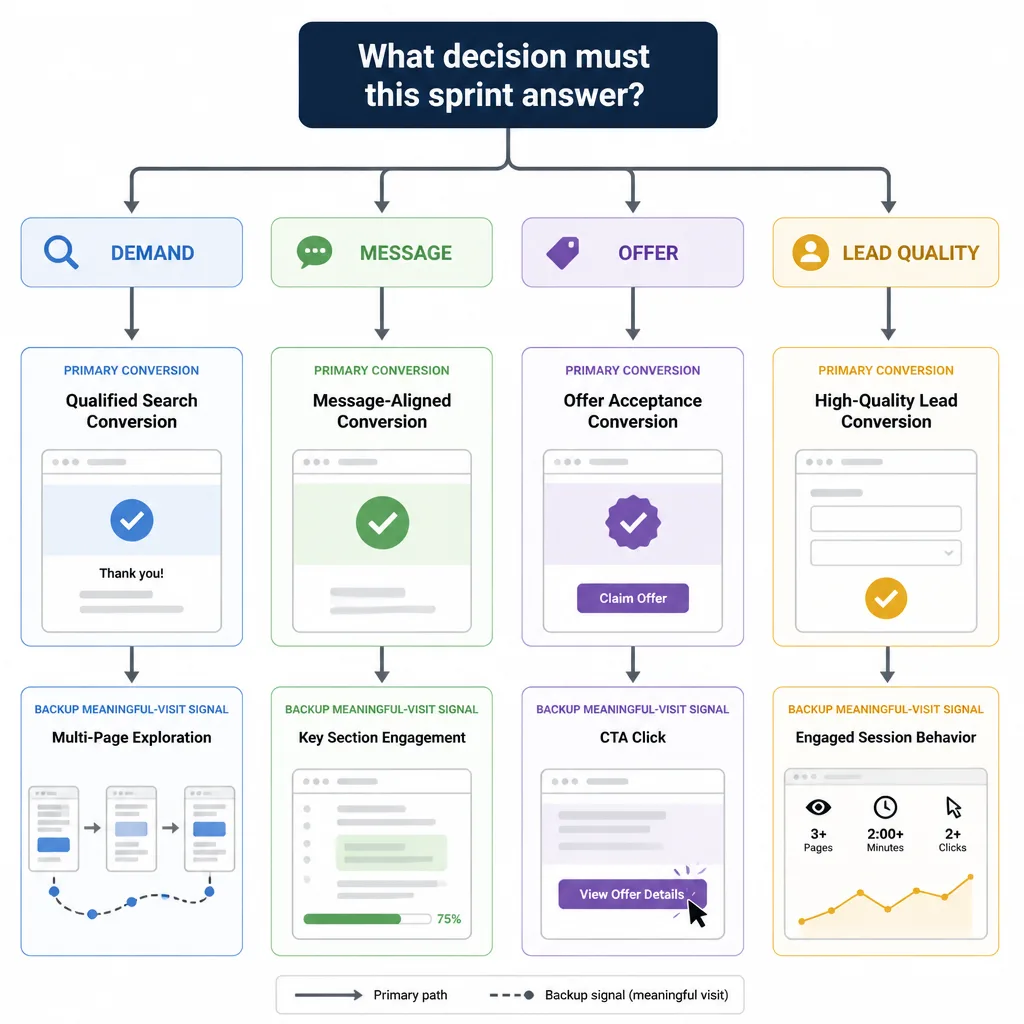
Before opening Google Ads or Microsoft Ads, decide what the sprint is meant to answer.
Are you testing demand, message, offer, or lead quality?
These are different tests.
If you are testing demand, you want to know whether people with buying intent are actively searching for your solution.
If you are testing message, you want to see which angle gets better engagement or stronger leads. For example, “bookkeeping for ecommerce brands” may beat “small business bookkeeping” because it signals a better fit.
If you are testing offer, the question may be whether “free consultation” pulls low-intent leads while “book a paid audit” filters better.
If you are testing lead quality, clicks and form fills are not enough. You need to know whether those leads are actually sales-worthy.
Define one primary conversion and one backup signal
Choose one primary conversion:
- booked call
- lead form submission
- demo request
- purchase
Then choose one backup signal in case 48 hours is too short to produce enough conversions.
That backup should reflect real commercial interest, not vanity engagement. Good examples include:
- reaching the pricing section
- clicking a “book demo” CTA
- spending enough time on a service page to understand the offer
- visiting multiple high-intent pages from a target location
This is important because a sprint can still be useful with low conversion volume. If search terms are relevant and meaningful visits are strong, the issue may be the page or offer, not the channel.
Choose only fast-intent keywords
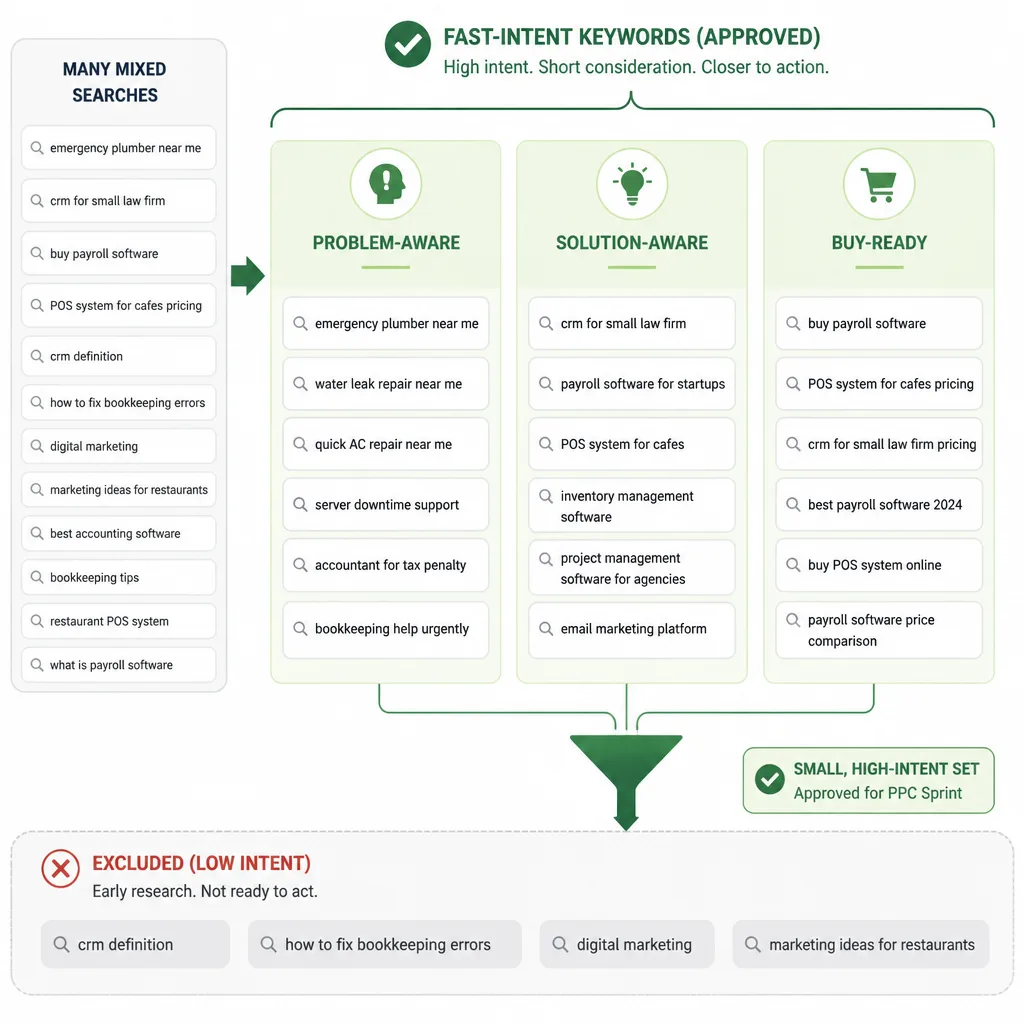
Most wasted budget in short PPC tests comes from keywords that are too broad or too early in the buying journey.
What fast intent looks like
Fast intent means the search suggests commercial urgency, category awareness, or buying readiness now.
Someone searching “what is payroll software” is probably not your 48-hour audience.
Someone searching “buy payroll software” might be.
Someone searching “crm for small law firm” is usually more valuable than someone searching “crm.”
Use three keyword buckets
A simple filter helps:
Problem-aware terms show an urgent or costly issue.
Examples:
- emergency plumber near me
- water damage cleanup service
- payroll errors help small business
Solution-aware terms show the user already understands the category.
Examples:
- crm for small law firm
- bookkeeping service for ecommerce
- fleet tracking software for contractors
Buy-ready terms include clear transactional modifiers.
Examples:
- buy payroll software
- demo applicant tracking software
- POS system for cafes pricing
One nuance: words like “best” or “top” are not automatically low intent. In some markets, “best POS system for cafes pricing” is still highly commercial. But in a tight sprint, keep those only when the buying context is obvious.
What to exclude
Leave out anything that usually needs nurturing over time:
- broad category terms
- definitions
- how-to searches
- educational queries
- vague problem statements
- early research terms
That usually means avoiding terms like:
- digital marketing
- crm definition
- marketing ideas for restaurants
- how to fix bookkeeping errors
A practical starting range is 5 to 15 tightly related keywords or themes. Beyond that, spend often gets diluted before patterns appear.
Use match types that protect the budget
Why exact and phrase usually work best
Modern match types are looser than they used to be. Exact and phrase can still expand into close variants and related intent, which is why search term reviews still matter.
Even so, they usually provide enough control to make a short test useful.
For a 48-hour sprint, exact and phrase are the safest defaults. They reduce random expansion without killing reach.
Why broad match is usually the wrong default
Broad match is not inherently bad. It is just expensive when used carelessly.
It tends to work best when an account already has strong conversion history, reliable signals, and enough budget for automation to learn. A cold test usually has none of those conditions.
That is why broad match plus automation is often a poor setup for a lean sprint. The platform may optimize for expansion before relevance is established.
A simple starting structure
Keep the structure intentionally plain:
- one campaign per offer or market
- small ad groups built around closely related intent
- exact and phrase match only at the start
- one or two ad variants per ad group
The same logic applies in Microsoft Ads. In some B2B or desktop-heavy markets, Microsoft Ads can deliver lower CPCs than Google Ads, though usually at lower volume.
Build your negative keyword shield before launch
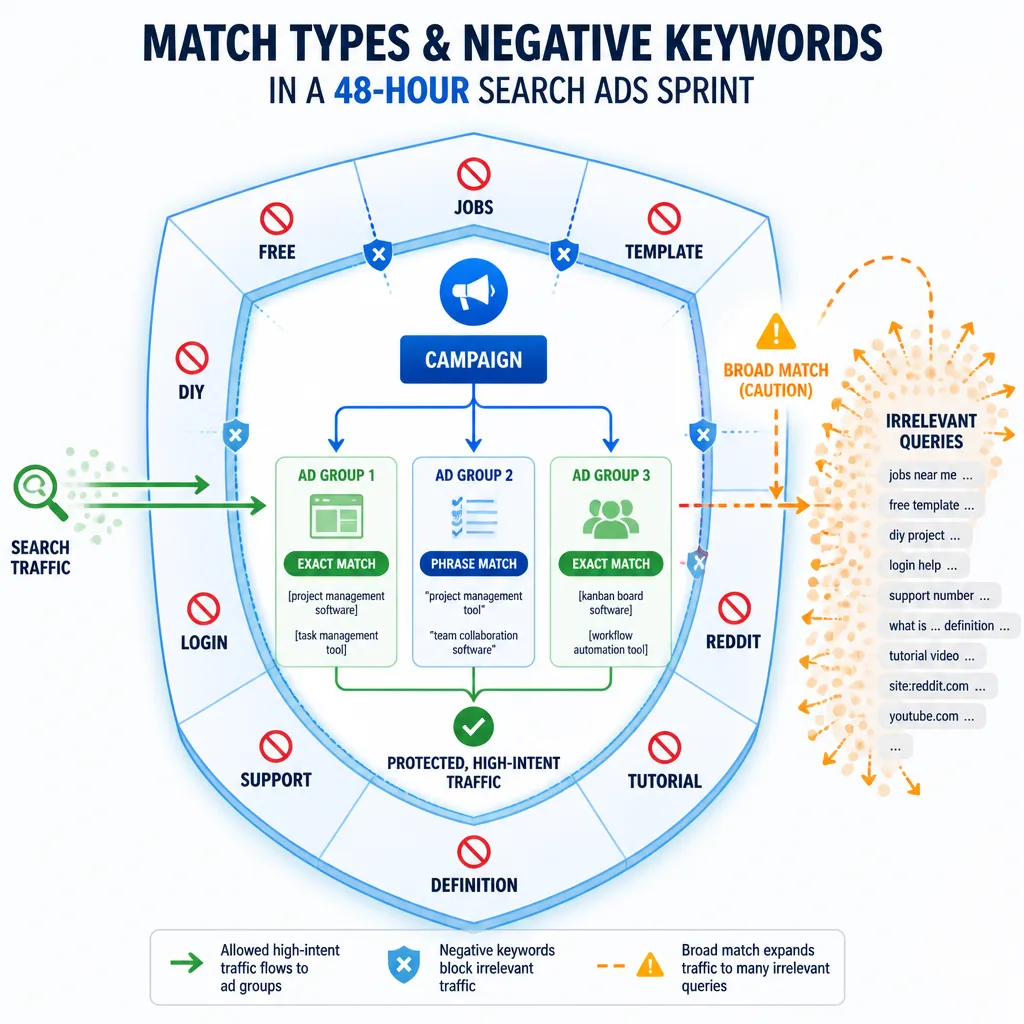
Negative keywords are not cleanup. They are part of campaign design.
Common negatives to review
Useful starting categories include:
- jobs, career, salary
- course, training, certification
- free, template, example, pdf
- diy, how to, tutorial
- definition, meaning
- support, login, download
- Reddit, YouTube
These block a lot of predictable waste.
Use judgment, not a copied list
Some modifiers look harmless but can wreck intent in short lead-gen tests.
“Review” is a good example. In some SaaS markets, it can still be commercial. In others, it mainly attracts comparison shoppers who are not ready. The same goes for “cheap.” If your offer wins on price, excluding it could be a mistake.
Competitor terms need the same judgment. If conquesting is part of the test, keep them. If not, exclude them deliberately.
Review search terms during the sprint
If CPC is high or budget is tight, check the search terms report several times on day one, then again on day two.
In a short test, a few bad queries can distort results quickly. The more expensive the traffic, the more often you should review it.
Keep the ad and landing page tightly aligned
Why message match matters more in a short test
In a longer campaign, some noise can average out. In a 48-hour sprint, it usually just ruins the signal.
If someone searches “CRM for small law firm,” your ad and page should confirm that fit immediately.
A headline like “Powerful CRM Software for Growing Teams” is too generic. “CRM Built for Small Law Firms” is far clearer and gives the visitor a reason to continue.
What the landing page should answer right away
The first screen should answer four questions fast:
- Am I in the right place?
- What exactly is being offered?
- What should I do next?
- Why should I trust this?
That usually means:
- a headline that mirrors search intent
- a clear offer
- one obvious CTA
- trust cues such as testimonials, ratings, certifications, or concise proof points
Avoid false negatives from page mismatch
Teams often blame keywords when the real problem is the page.
If CTR is decent but visitors bounce, the keyword may be fine and the page may be weak. If engagement is strong but leads are weak, the friction may be in the form, CTA, or offer.
A simple example: sending “emergency plumber near me” traffic to a generic services page is risky. Sending it to a page with emergency-response language, service area confirmation, a tap-to-call CTA, and trust signals is much more likely to produce useful data.
Set budget and bidding to buy signal, not volume
How to think about budget
There is no universal test budget because CPCs vary widely.
A better method is to work backward:
- Estimate likely CPC.
- Decide how many relevant clicks you need to judge intent.
- Multiply the two and add a buffer for inefficiency.
If CPC is around $8 and you want 25 to 40 relevant clicks, you may need roughly $200 to $320 just to get enough signal. In legal, software, or finance markets, the budget may need to be much higher.
If you cannot afford enough relevant clicks to learn anything, narrow the keyword set further. Do not pretend a tiny budget will still be informative.
Manual control vs. automation
For a cold sprint, simple control often beats sophistication.
Manual CPC, or at least a tightly controlled bidding setup, is usually easier to trust when conversion data is sparse. Smart bidding can work extremely well in mature accounts, but in a short test it may optimize toward weak signals or expand too aggressively.
Constrain geo, device, and schedule
Do not default to “all.”
Limit geography to places you can actually serve well. If your business only performs in a few states, nationwide targeting will muddy the result.
Think about device as well. Emergency local services may perform best on mobile. Certain B2B offers often convert better on desktop.
Scheduling matters too. If your team cannot respond quickly after hours, traffic during those periods may underperform for operational reasons rather than marketing ones.
Use a simple stop-refine-scale framework
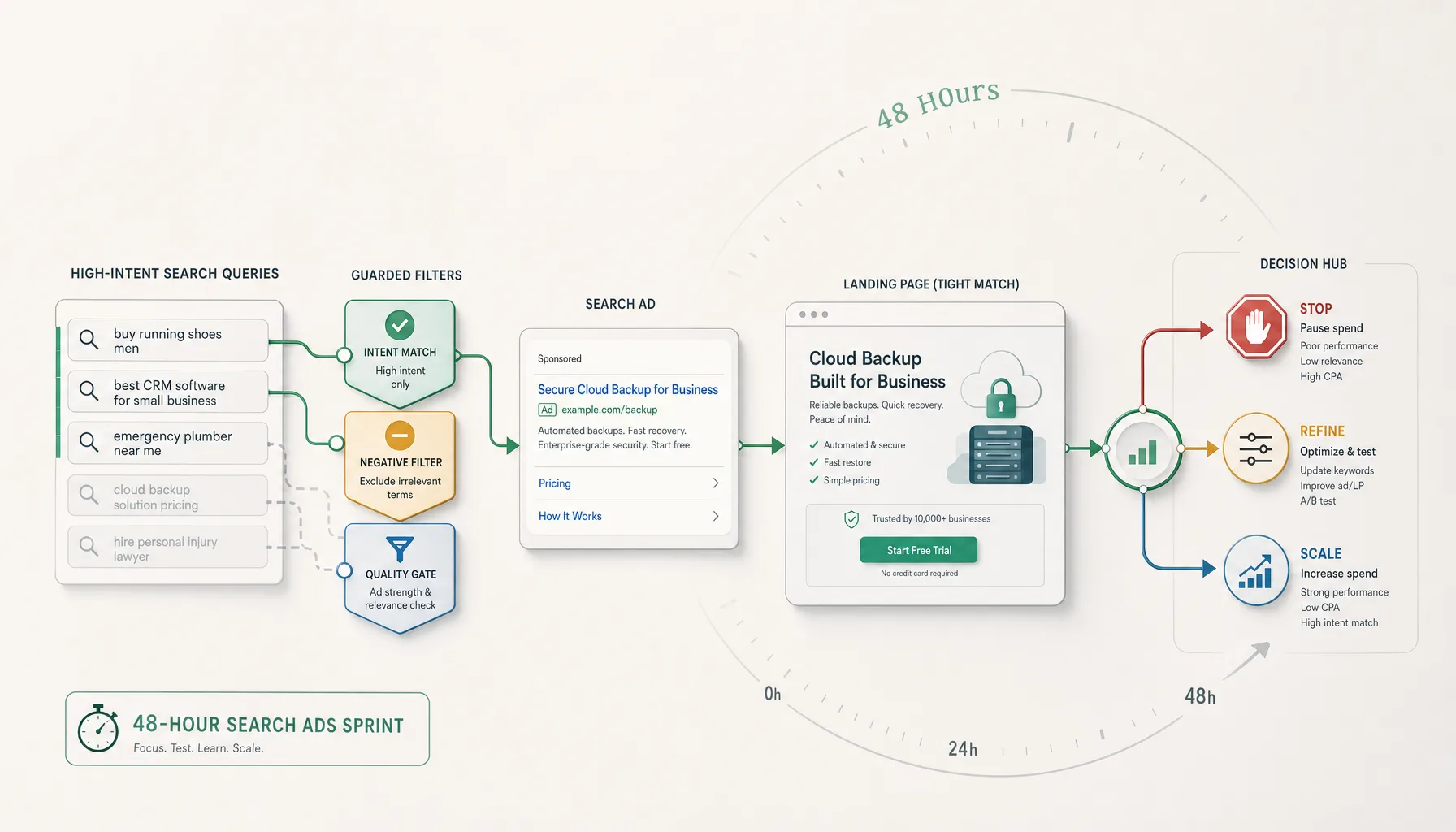
This is where a sprint either becomes useful or becomes expensive.
The minimum metrics to watch
Prioritize metrics in this order:
- search term relevance
- meaningful visits
- lead quality
- CPC against expectations
- CTR as a softer message-match signal
- primary conversions, if there is enough volume
Notice what is missing from the top of the list: clicks.
How to use cost per meaningful visit
When conversions are sparse, use cost per meaningful visit (CPMV):
CPMV = ad spend / number of meaningful visits
If you spend $240 and generate 12 meaningful visits, your CPMV is $20.
That number only matters in context. If those visits come from highly relevant searches and typically turn into qualified leads later, $20 may be strong. If the traffic is weak and engagement is shallow, it may already be too expensive.
When to stop, refine, or scale
Use this rule:
Stop when search terms are off-target, negatives are not containing waste, or CPMV is clearly unsustainable with weak visit quality.
Refine when intent looks good but conversion friction is obvious. That often means improving the ad, tightening the page, changing the CTA, reducing form friction, or isolating the strongest keyword theme.
Scale when search terms are highly relevant, meaningful visits are arriving at an acceptable cost, and early lead quality suggests the economics can work.
Scale slowly. Increase budget in steps. Expand phrase coverage carefully. Open adjacent keyword themes one at a time.
What to do right after the sprint
The sprint is not just a traffic test. It is also a positioning and language test.
Turn search term data into structure
Promote proven queries into tighter exact-match groups. Add negatives based on real waste. Break out high-performing themes so they stop competing with weaker ones.
If one niche angle outperforms a broader category term, that is not a side note. It may be your real entry point.
For example, if “bookkeeping service for ecommerce” clearly beats “bookkeeping service,” you may have found a better positioning strategy, not just a better keyword.
Apply the insights beyond paid search
The best search terms often reveal how buyers describe their own problems. That language should shape your ads, landing pages, sales scripts, and SEO content.
If the sprint validates the channel and you need help turning it into a broader acquisition system, this is where outside support may make sense. For advertisers and business owners looking to scale paid acquisition more systematically, services like Traffics.io can be useful once the initial signal is clear.
Conclusion
A 48-hour search ads sprint works when you stop treating it like a rushed full campaign and start treating it like a disciplined decision tool.
The core idea is straightforward: narrow intent, strong constraints, close monitoring, and a clear stop-refine-scale rule will usually teach you more than a broader campaign in the same amount of time.
If you remember one thing, make it this: in short paid search tests, control creates insight. Use fewer keywords. Add negatives before launch. Match the page tightly to the query. Judge the sprint by relevance and meaningful visits, not click volume.
That is how you get fast traffic without paying unnecessary tuition to the ad platform.
FAQ
How do you test Google Ads without wasting money?
Treat the test as a controlled sprint, not a full campaign launch. Start with 5 to 15 high-intent keywords, use exact and phrase match, add negative keywords before launch, narrow geography and schedule, and send traffic to a highly relevant landing page. Judge performance by search term relevance, meaningful visits, and lead quality rather than clicks alone.
What keywords should you use in a 48-hour search ads sprint?
Use fast-intent keywords only. The safest buckets are problem-aware terms, solution-aware terms, and buy-ready terms. Examples include searches like emergency plumber near me, crm for small law firm, or buy payroll software. Avoid broad category terms, definitions, how-to searches, and early-stage research keywords.
Should I use exact match, phrase match, or broad match in a short PPC test?
Exact and phrase match are usually the best defaults because they give you more control over query relevance while still allowing enough reach to gather signal. Broad match can work in mature accounts with strong conversion history and tight controls, but it is usually a poor default for a cold 48-hour sprint.
How many keywords should I start with?
In most short-run tests, smaller is better. A practical starting point is 5 to 15 tightly related keywords or themes. Too many keywords spread spend too thin and make patterns harder to spot.
How many negative keywords should I add before launch?
There is no perfect number, but you should add enough to block obvious waste before the first click. Common categories include jobs, free, cheap, template, course, tutorial, login, support, definition, meaning, Reddit, YouTube, and DIY. The right list depends on your offer, so use judgment.
What counts as a meaningful visit if conversions are sparse?
A meaningful visit is a session that shows qualified commercial interest even if it does not convert yet. Examples include reaching a pricing section, clicking a book-demo CTA, spending enough time on a service page to understand the offer, or visiting multiple high-intent pages from a target location.
How do I calculate cost per meaningful visit?
Use a simple formula: ad spend divided by the number of meaningful visits. If you spend $240 and get 12 meaningful visits, your cost per meaningful visit is $20. That helps you judge whether the test is buying qualified interest efficiently when conversions are still sparse.
What metrics matter most in the first 48 hours?
Prioritize search term relevance first, then meaningful visits, lead quality, CPC, and CTR as a softer message-match signal. Early conversion numbers can help, but in a short window they are often too limited to interpret confidently on their own.
What should I do if I get clicks but no leads?
Do not assume the channel failed. First check whether the search terms are relevant. If they are, review the ad-to-page match, offer clarity, trust cues, page speed, form friction, and CTA strength. If CTR is healthy but engagement is weak, the landing page is often the problem. If engagement is strong but leads are weak, the offer or conversion ask may need work.
How often should I review search terms during the sprint?
Review them often enough to catch waste early. If CPC is high or budget is limited, check several times on day one and again on day two. In a short sprint, a small number of irrelevant clicks can distort the result quickly.
How do I know whether to stop, refine, or scale after 48 hours?
Stop if search terms are clearly off-target, negatives are not containing waste, or cost per meaningful visit looks unsustainable. Refine if intent is relevant but the page, CTA, or offer appears to be creating friction. Scale if query relevance is strong, meaningful visits are arriving at an acceptable cost, and early lead quality suggests the economics can work.
Is Microsoft Ads worth testing for a short campaign?
It can be, especially in B2B, desktop-heavy, or lower-volume niches where Microsoft Ads may offer lower CPCs than Google Ads. The same sprint logic applies, but volume and audience behavior may differ, so budget and expectations should be adjusted.