Paid Search After AI Overviews: The 2026 Keyword Strategy Shift From “Queries” to “Problem States”
Paid search still works after AI Overviews. What changed is the click.
For years, many accounts could profit from a simple pattern: buy broad informational queries, send traffic to a relevant page, and let volume offset inefficiency. That model is under more pressure now. Google ads can still appear around AI Overviews, but users often click after an AI-generated summary has already handled the basic education stage.[^1] At the same time, Google is expanding AI-driven search term matching through features like AI Max, which can increase reach but also widen ambiguity when controls are weak.[^2]
So the issue is not that keywords stopped mattering. It is that keyword relevance by itself is no longer enough.
A better 2026 model is to organize paid search around problem states and decision progress. In practice, that means separating demand into Learn, Compare, and Switch buckets, then aligning bids, landing pages, exclusions, creative, and measurement to what the user is actually trying to do.
Introduction: Paid search did not die, but click behavior changed
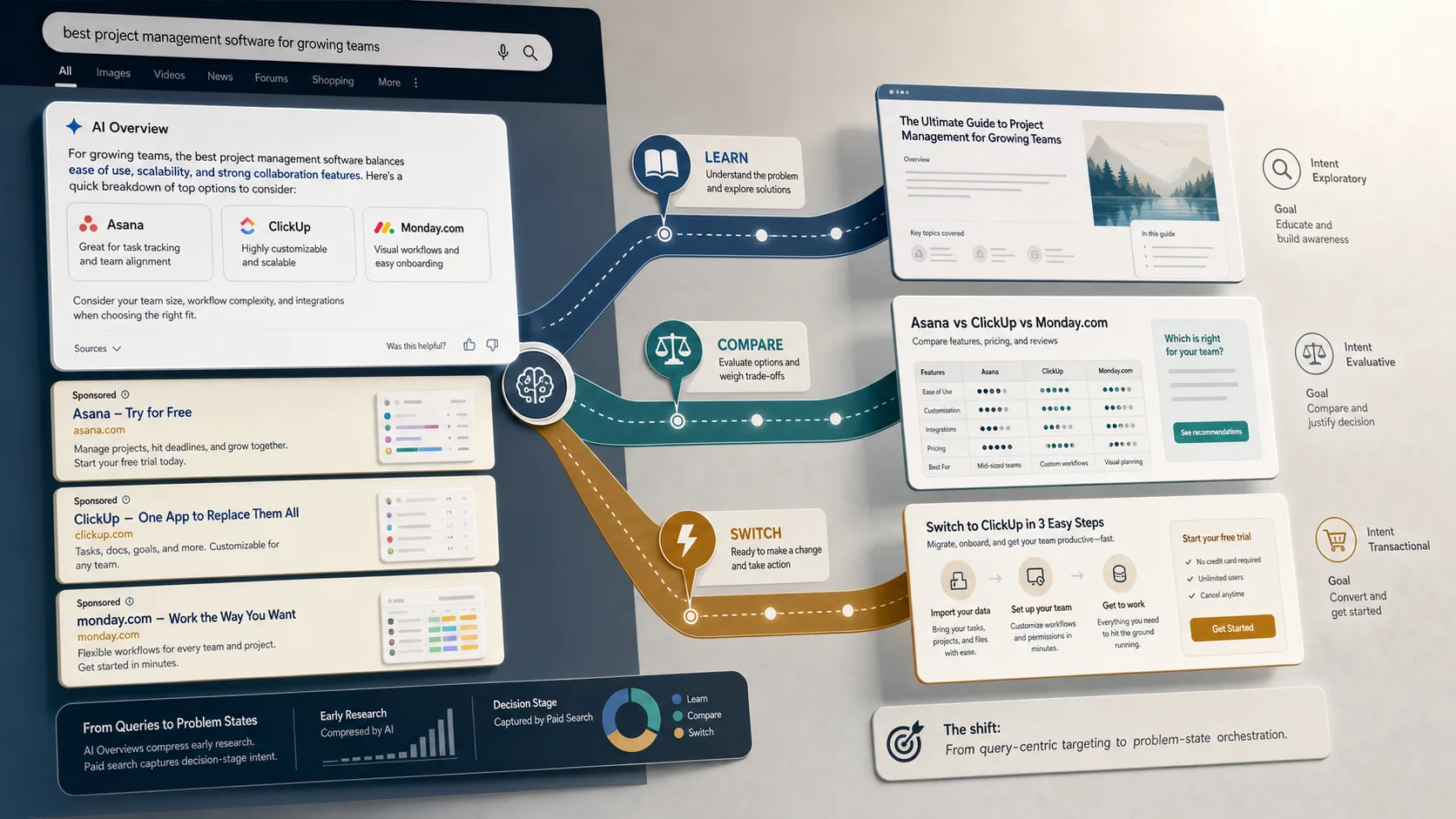
AI Overviews compress informational intent before the visit. A user who once clicked several articles to understand a category may now arrive with a rough summary already formed. That changes what they need from both the ad and the landing page. Generic “what is X” relevance is often too shallow.
Google’s own documentation supports the practical version of this shift. Ads remain eligible around AI Overviews, and ad serving can take into account both the query and the content of the AI Overview itself.[^1] Search ads still matter. The context around them has changed.
That is why the strategic unit needs to change too. Do not treat the query as the whole story. Start with the user’s situation: are they trying to understand a problem, compare options, or replace something?
What “problem states” means in paid search
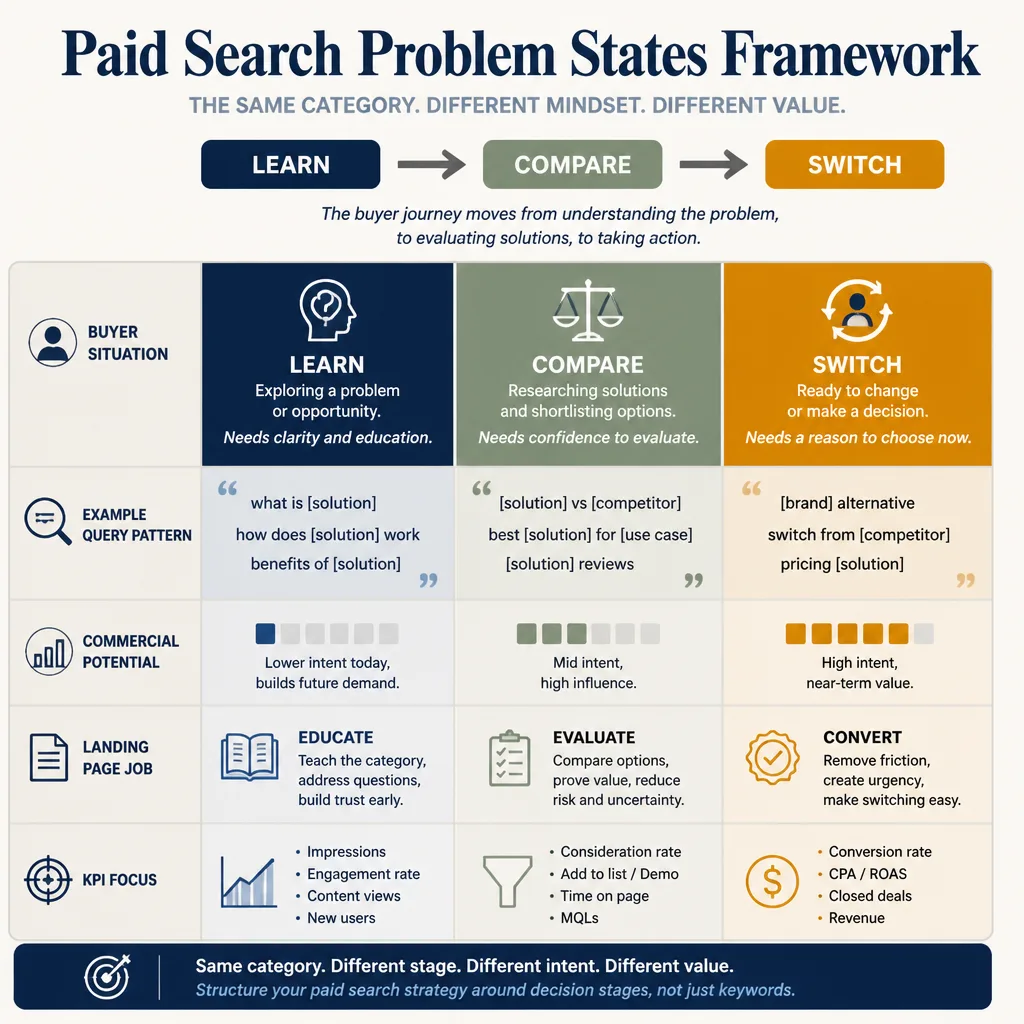
A problem state is the buyer’s current situation, not just the words they typed.
Two searches can mention the same product category and still have very different commercial value:
- “best CRM for small sales team”
- “HubSpot vs Pipedrive for 5 reps”
- “migrate from Salesforce to Pipedrive”
All three belong to the same category. They should not sit inside the same campaign logic.
From keyword buckets to user situations
Traditional keyword grouping often flattens intent. Campaigns get organized by topic, while the real buying signal sits inside the decision context.
Problem-state segmentation fixes that. It asks a more useful question: What decision is this person trying to make right now?
A simple mental model: Learn, Compare, Switch
This is not a Google taxonomy. It is an operating framework.
- Learn: The buyer is diagnosing or framing the problem.
- Compare: The buyer accepts the category and is evaluating options.
- Switch: The buyer is ready to change tools, providers, or systems.
The value of this model is practical. It makes budget, copy, landing page, and KPI decisions much clearer than a flat topical structure.
The 2026 account structure: separate demand by decision stage
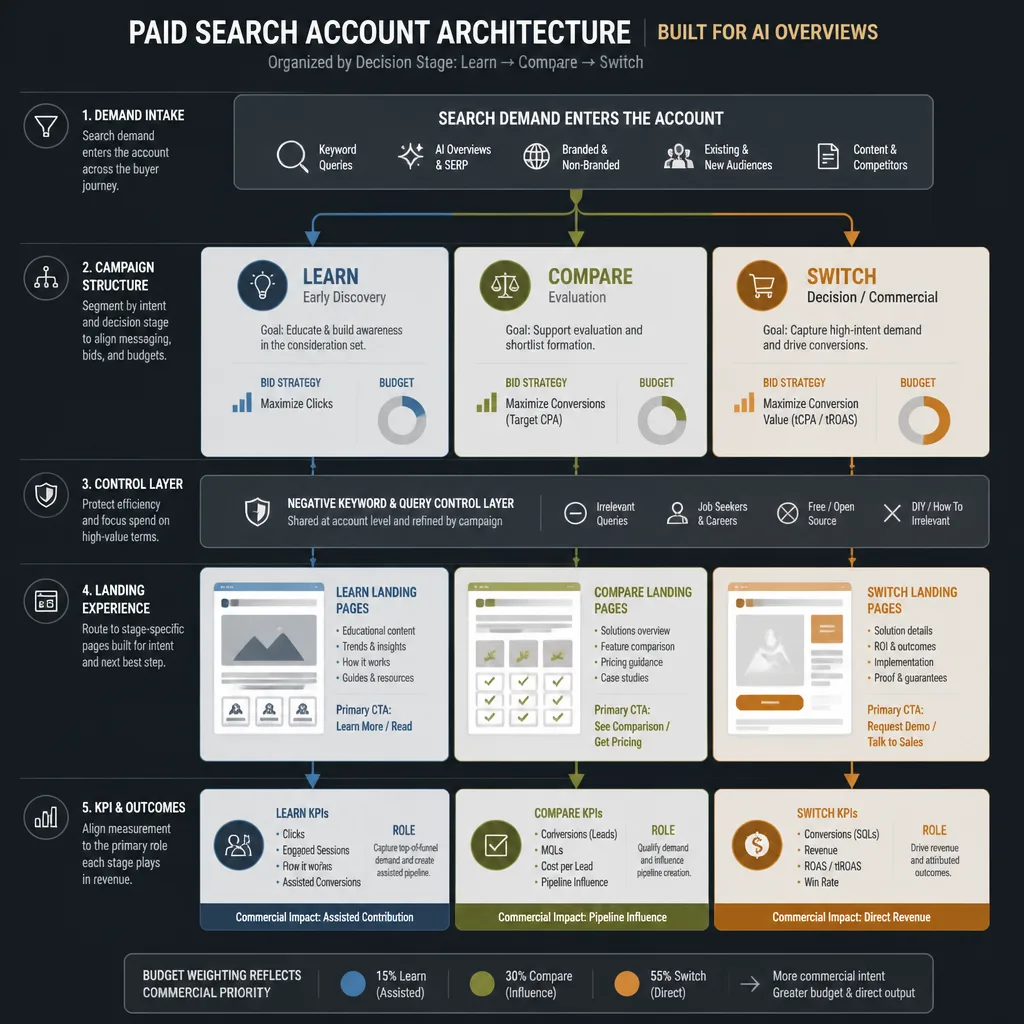
If AI-expanded matching can widen reach based on keywords, creatives, URLs, and landing pages, your account structure needs stronger intent boundaries, not weaker ones.[^2]
Learn campaigns: exploratory and diagnostic intent
These campaigns cover searches like:
- “why pipeline reporting is inaccurate”
- “how to reduce demo no-shows”
- “best way to track offline conversions”
- “sales attribution problems in GA4”
Learn campaigns usually need:
- lower budgets
- softer conversion goals
- stricter query review
- more patience in attribution
Do not force these campaigns to hit the same CPA target as bottom-funnel demand. If you do, you will either shut them off too early or let automation chase low-quality micro-conversions.
Compare campaigns: evaluation and category framing
This is often the most important middle layer. Examples include:
- “best call tracking software”
- “HubSpot alternatives”
- “Marketo vs Pardot”
- “best PPC agency for B2B SaaS”
Compare campaigns work when they reduce uncertainty. The user is not looking for basic education anymore. They want distinctions, proof, and help making a decision.
Switch campaigns: replacement and migration intent
These are the most direct commercial searches:
- “replace Mailchimp”
- “migrate from GA4 to enterprise analytics”
- “Salesforce alternative for SMB”
- “cancel legacy call tracking provider”
This traffic usually deserves the clearest commercial path and, in many accounts, the most aggressive bidding. It is close to active change behavior.
How to budget and bid across the three buckets
Do not hold all three buckets to the same efficiency standard.
| Bucket | Campaign goal | Landing page goal | Primary KPI |
|---|---|---|---|
| Learn | Capture qualified early demand | Move the visitor to the next decision step | Assisted conversions, qualified lead rate |
| Compare | Win evaluation traffic | Reduce uncertainty and prove fit | MQL/SQL rate, opportunity rate |
| Switch | Capture active buying intent | Remove migration and buying friction | CPA, pipeline value, close rate |
If you import offline stages into Google Ads, use them. AI-driven bidding becomes much more useful when it can optimize toward SQL, opportunity, or pipeline value instead of a raw form fill. Google’s attribution and path reporting tools are built for this kind of multi-touch view, not just last-click counting.[^3][^4]
Landing pages built for decision progress, not just keyword matching
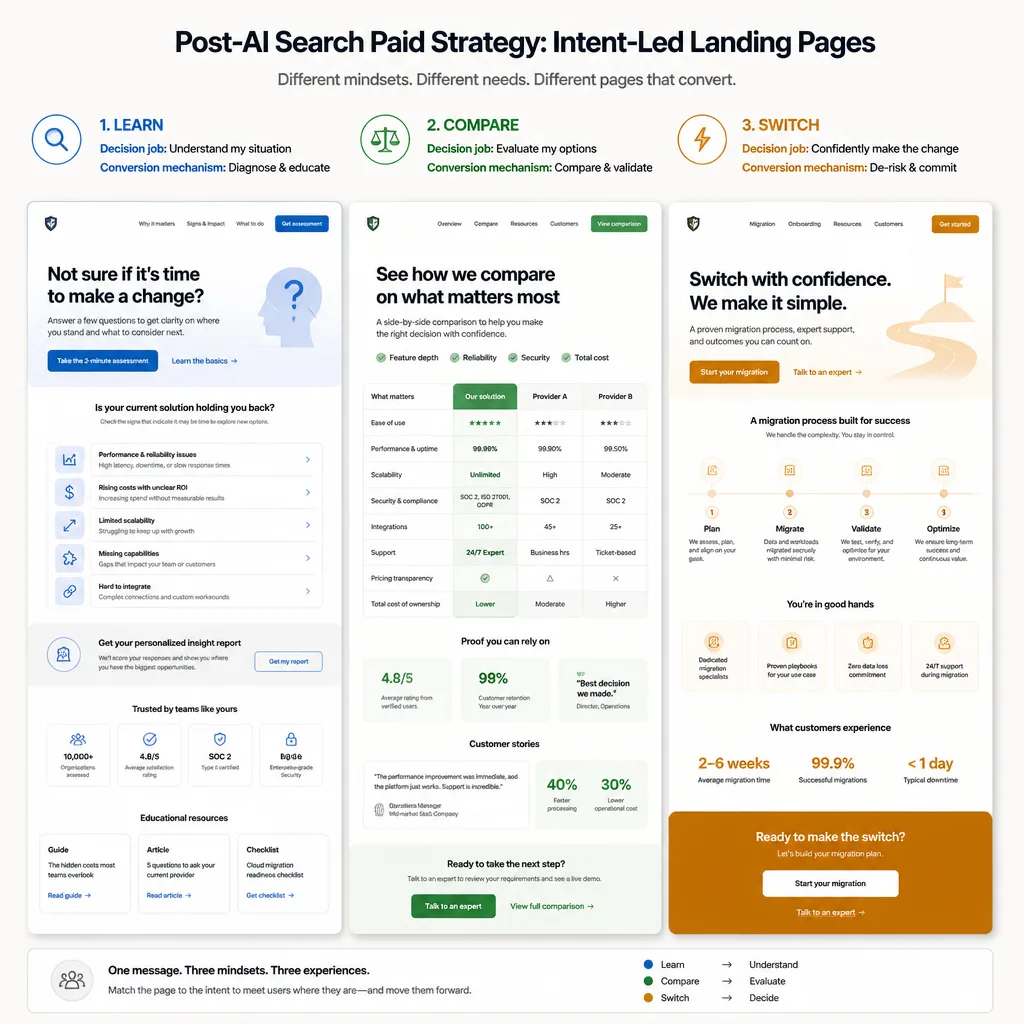
In a pre-AI-search world, keyword relevance often carried more of the load. In an AI-summary world, relevance is table stakes.
The real question is: what should this visitor do next?
Why relevance alone is too shallow
If a user has already seen a summary of the category, they do not need another page that spends six paragraphs restating definitions. They need help progressing.
That does not mean educational content is dead. It means the page should be built around the next decision, not just a topical match.
What a Learn page should do
A Learn-stage page should orient and qualify.
Useful elements include:
- a short “is this your problem?” framing section
- a self-assessment or diagnostic checklist
- clear examples of when the problem becomes expensive
- a soft CTA such as a calculator, guide, or tailored audit
For example, a B2B attribution vendor might send “offline conversion tracking issues” traffic to a page that helps the user spot broken CRM-to-ads handoffs, then offers a measurement audit instead of pushing an immediate sales demo.
What a Compare page should do
Compare pages should reduce uncertainty.
That often means:
- alternatives pages with honest tradeoffs
- category comparison tables
- proof points tied to buying criteria
- implementation clarity
- pricing philosophy, even without full pricing
A weak compare page says, “We are the leading platform.”
A strong one says, “If your team needs X, choose us. If you need Y, another category may fit better.”
What a Switch page should do
Switch pages should remove transition risk.
That usually means addressing:
- migration effort
- data portability
- onboarding time
- team training
- contract concerns
- integration disruption
If someone searches “Klaviyo alternative,” they are not mainly asking what email automation is. They are often asking, “How painful will switching be?”
Conversion elements that move users forward
Across all three buckets, the best pages make the next step obvious:
- staged CTAs instead of one hard sell
- proof matched to intent stage
- short forms for early-stage pages
- stronger buyer enablement on compare and switch pages
- visible trust elements near the CTA
Negative keyword strategy after AI-expanded matching
This is where many 2026 accounts quietly lose money.
Google’s direction is clear: broader matching, more AI-assisted expansion, and more automation layered into Search campaigns.[^2] Google also continues recommending broad match with Smart Bidding for reach and learning, but that is product guidance, not proof that every lead-gen account will get better-quality traffic from expansion alone.[^5]
Why broader matching increases ambiguity
AI Max can expand reach using broad match and keywordless technology, learning from your existing keywords, creatives, and URLs.[^2] That is useful for discovery. It is also a recipe for drift if your exclusions and page intent are vague.
Build negatives around low-buying-context patterns
Do not stop at obviously irrelevant terms. Build negative systems around low-commercial patterns such as:
- definitions
- jobs
- free-only intent
- support queries
- academic research
- DIY intent
- templates
- troubleshooting
- community or forum language
Google’s negative keyword rules are also less forgiving than many advertisers assume. Negative keywords do not work like semantic positive targeting; they often require explicit variants and regular maintenance.[^6]
Use search term reports to separate curiosity from decision intent
Review both the Search terms report and Search Terms Insights themes regularly.[^7] In practice:
- check Switch campaigns several times per week during active scaling
- check Learn campaigns for theme drift, not just isolated bad queries
- promote useful discoveries into their own stage bucket instead of leaving them in mixed traffic
When to allow discovery and when to tighten control
Allow more discovery when:
- you have enough budget to learn
- offline quality data is flowing back
- landing pages are stage-specific
- your review process is disciplined
Tighten control when:
- CPL looks fine but SQL rate is falling
- campaign themes are mixing Learn and Switch intent
- broad match is pulling support, research, or job-seeking traffic
- sales feedback says leads are confused rather than qualified
Ad creative that matches the post-AI search context
If users have already consumed a summary, your ad does not need to act like they are starting from zero.
It needs to meet them where they are.
Message patterns by problem state
Learn: Reflect the problem clearly.
Example: “Offline conversions not reaching Google Ads? Find the break in your CRM-to-ad flow.”
Compare: Make the decision criteria easier.
Example: “HubSpot alternative for lean sales teams. Simpler setup, clearer reporting.”
Switch: Reduce switching friction.
Example: “Migrate in weeks, not months. White-glove onboarding for teams leaving legacy platforms.”
Angles worth testing
Three useful patterns stand out:
Problem acknowledgment
Speak to the mess the buyer is already dealing with.Decision simplification
Reduce complexity instead of making broad claims.Transition safety
Especially important in Switch campaigns.
This often works better than repeating category jargon because the user already has category context before the click.
Measurement: stop over-crediting the last click
This is where many teams misread the channel.
Google Ads attribution reports include conversion paths, assisted conversions, path metrics, and model comparison to show how campaigns work together before conversion.[^3] GA4’s Attribution Paths report also shows which channels initiate, assist, and close key events, along with days and touchpoints to conversion.[^4]
Why single-touch reporting is less trustworthy now
AI-assisted search journeys can compress research, expand consideration, and spread decision-making across more touchpoints. A Learn click may not convert that day, but it may be the first qualified touch in a 45-day sales cycle.
If you only report last-click ROAS, you will bias spend toward obvious bottom-funnel capture and gradually starve the campaigns that create qualified future demand.
How to evaluate Learn campaigns without forcing them to behave like Switch campaigns
Use different scorecards by stage.
For Learn:
- assisted conversion rate
- downstream MQL/SQL rate
- influenced pipeline
- time to conversion
- touchpoints to conversion
For Compare:
- MQL rate
- SQL rate
- opportunity creation
- cost per qualified opportunity
For Switch:
- CPA
- pipeline value
- close rate
- sales cycle compression
For many B2B teams, the most practical stack is Google Ads + GA4 + offline CRM stages. That is usually enough to see path contribution without turning attribution into a science project.
When to use a managed traffic partner like Traffics.io, and when DIY is smarter
This is not really an ideological decision. It is a bottleneck decision.
I have not seen independent evidence in the research provided that proves Traffics.io outperforms in-house management across categories, so it is better treated as an example of a managed traffic partner, not a guaranteed shortcut.
Use a partner when speed is the bottleneck
A managed partner can make sense when you need:
- fast campaign launches
- higher testing volume
- more creative throughput
- landing page iteration support
- extra hands for search term cleanup and experiment velocity
This is especially useful when your internal team understands positioning but cannot operationalize enough tests per month.
Use DIY when context is the advantage
In-house is usually smarter when you have:
- strong first-party data
- tight sales feedback loops
- nuanced market positioning
- complex qualification logic
- a real ability to import offline outcomes and act on them
In those environments, message quality and funnel understanding often matter more than outsourced speed.
A simple decision rule
Choose a partner if your main constraint is execution capacity.
Choose DIY if your main advantage is customer knowledge and control.
If you are unsure, start with a hybrid model: keep Switch campaigns in-house, where quality control matters most, and outsource rapid Learn and Compare testing, where volume and iteration speed matter more.
Conclusion
The edge in paid search is no longer “more keywords” or “more coverage.” It is better intent design.
AI Overviews changed the shape of search behavior, not the value of commercial intent. Paid search still works. But it works best when you stop treating every query in a topic as equal and start structuring the account around what the buyer is actually trying to do: learn, compare, or switch.
If you are restructuring this quarter, start small. Audit search terms by decision stage. Split mixed campaigns into Learn, Compare, and Switch. Match each bucket to a page built for decision progress. Tighten negatives around low-buying-context language. Then fix reporting so early-stage influence becomes visible.
That is the shift. Not from search to no search. From query matching to problem-state orchestration.
FAQ
Is paid search still worth investing in after AI Overviews?
Yes, but the strongest opportunities are shifting away from generic informational clicks and toward higher-intent searches tied to active problems, comparison, and switching behavior. Paid search still works when campaigns are structured around decision stage rather than only keyword themes.
What does problem-state keyword strategy mean?
It means organizing campaigns around the situation the buyer is in instead of treating every query in a topic cluster the same. A problem-state model groups searches by decision progress, such as Learn, Compare, and Switch, so bidding, messaging, landing pages, and KPIs match actual intent.
How should Google Ads campaigns be segmented in this model?
A practical structure is to separate campaigns into Learn, Compare, and Switch intent buckets. Learn captures exploratory and diagnostic searches, Compare targets evaluation and alternatives, and Switch focuses on replacement, migration, pricing, and vendor-change intent.
Why is keyword relevance alone less effective now?
Because users may arrive after reading AI-generated summaries that already compress basic information. A landing page often needs to move the visitor forward in their decision, not just repeat a relevant keyword or introductory explanation.[^1]
What should a Learn-stage landing page do?
It should help visitors orient themselves, diagnose the problem, and take a low-friction next step. That might mean guided comparisons, self-qualification prompts, ROI framing, or softer calls to action instead of pushing a bottom-funnel demo request too early.
How do Compare-stage landing pages differ from Switch-stage pages?
Compare pages should reduce uncertainty by clarifying category differences, alternatives, tradeoffs, and proof points. Switch pages should remove transition risk by addressing migration effort, implementation time, pricing clarity, support, onboarding, and contract concerns.
How should negative keyword strategy change after AI Overviews and AI-driven matching?
Negative keyword strategy needs to focus more on low-buying-context language patterns, not just obviously irrelevant terms. That includes filtering themes such as definitions, jobs, free-only research, academic intent, support queries, DIY intent, and low-commercial templates when they do not fit campaign goals.[^6][^7]
Does broad match become more risky in this environment?
It can. Broader and AI-assisted matching may increase discovery, but they can also introduce ambiguous traffic and budget drift. Use search term reports, theme-level review, layered negative lists, and intent-based campaign segmentation to control that risk.[^2][^7]
What kind of ad copy works better when users have already seen an AI summary?
Creative usually works better when it mirrors the problem language users bring into the search rather than simply echoing category terms. Messaging that acknowledges confusion, comparison criteria, implementation concerns, or switching friction is often stronger.
What metrics should replace pure last-click reporting?
Use assisted conversions, attribution paths, time to conversion, touchpoints to conversion, and CRM pipeline stages such as MQL, SQL, opportunity, and pipeline value.[^3][^4]
How should Learn campaigns be measured if they rarely convert on the first click?
They should be evaluated on contribution to progression, not forced to behave like bottom-funnel campaigns. Useful metrics include assisted conversion rate, downstream qualification rate, influenced pipeline, time to conversion, and presence in multi-touch paths.[^3][^4]
When should a business use a managed traffic partner like Traffics.io?
A managed partner can make sense when speed, creative throughput, landing page testing volume, or campaign launch capacity is the main bottleneck. It is most useful when the team needs rapid experimentation and does not have the in-house bandwidth to run many tests at once.
When is DIY paid search management the smarter choice?
DIY is often smarter when the company has strong first-party data, tight sales feedback loops, nuanced positioning, and the internal skill to iterate consistently. It is especially useful when message control, funnel complexity, and close alignment with CRM outcomes matter more than raw testing speed.
Is Learn, Compare, and Switch just another funnel relabel?
Partly, yes. But the difference is operational. The framework creates clearer decisions around budgets, bids, offers, landing page goals, exclusions, and measurement standards than a flatter keyword-bucket structure usually does.
[^1]: Google Ads Help, “About ads and AI Overviews”; Google states ads may appear above, below, or within AI Overviews in supported contexts, and ad serving considers both the user query and AI Overview context. [^2]: Google Ads Help, “How AI Max for Search campaigns works”; Google states AI Max is an optimization layer for Search campaigns and can expand matching using broad match and keywordless technology, learning from keywords, creatives, and URLs. [^3]: Google Ads Help, “About attribution reports”; Google documents assisted conversions, conversion paths, path metrics, and model comparison for understanding how campaigns contribute across the path to conversion. [^4]: Google Analytics Help, “[GA4] Attribution paths report”; GA4 documents path reporting for initiating, assisting, and closing touchpoints, plus days and touchpoints to key events. [^5]: Google Ads Help, “Grow your Smart Bidding campaigns with broad match” and related broad match guidance; useful for understanding platform direction, though not neutral proof of lead-quality improvement in every account. [^6]: Google Ads Help, “About negative keywords” and “Fix issues with negative keywords”; Google notes operational limitations and maintenance requirements for negatives. [^7]: Google Ads Help, “About the search terms report” and “About Search Terms Insights”; both are relevant for reviewing actual query themes and ongoing exclusion decisions.