Many content teams are seeing the same pattern: impressions hold up, rankings look fine, but clicks are softer and traffic growth is harder to sustain. That is not just a feeling. Search behavior is increasingly shaped by zero-click results, where people get enough of an answer directly in search results or AI interfaces and never visit the publisher site.[^1]
That does not make content less useful. It changes the economics.
If fewer people click, each visit has to matter more. For many online businesses, that means treating informational posts not only as traffic assets, but as subscriber and lead assets. The job of an article is no longer just to rank. It is to help the right reader take the next step.
The practical shift is straightforward: design posts around conversion paths, not pageviews alone. When the offer matches intent, the CTA appears at the right moment, and testing stays simple enough to repeat, informational content can still grow your email list even when traffic is flat.
Why zero-click changes the game, but not the value of content
What zero-click actually changes for publishers
Zero-click means more searches end without a visit to the open web. Multiple industry analyses point in that direction, even if the exact percentages vary by methodology.[^1] The important part is the trend: strong visibility no longer guarantees proportional traffic.
This hits informational content hardest. If someone searches for a definition, a quick how-to, or a lightweight comparison, they may get enough before they ever click through.
But zero-click does not remove demand. It compresses it.
People still need depth, examples, tools, decision support, and implementation help. Search engines can summarize an answer. They are much worse at helping someone complete a task.
The better question: not more clicks, but more value per click
A more useful metric now is value per visitor.
If a post gets 5,000 monthly visits and converts 0.4% of visitors into subscribers, that is 20 signups. If traffic stays flat but conversion rises to 1.2%, the same post produces 60 signups.
That does not happen automatically. Better conversion depends on traffic quality, offer relevance, and execution. Still, the principle holds: flat traffic can still drive lead growth if the page captures more of the demand it already earns.
When informational content still deserves investment
Informational content still pulls its weight when at least one of these is true:
- it consistently attracts the right audience
- it creates a clear next step into your email list, product, or service
- it builds trust before a harder conversion
- it compounds into owned audience growth over time
If a post gets almost no traffic, attracts the wrong reader, or has no credible next step, CTA tweaks will not save it. In those cases, distribution and topic selection matter more.
The core shift: design for subscriber intent, not just reader intent
Why top-of-funnel visitors still convert
A common mistake is assuming informational visitors are too early to convert.
Often they are not too early. They are just being offered the wrong thing.
Someone searching for “how to write an SEO content brief” may not be ready to buy software today. But they may be very ready to download a content brief template and join your list if it helps them do the work faster. The conversion happens because the next step is useful, not because the reader suddenly became bottom-of-funnel.
The three-part conversion equation
Most content CTAs succeed or fail on three variables:
- Intent match: the offer continues the task the reader came to solve
- Friction reduction: the offer saves time, lowers effort, or reduces uncertainty
- Timing: the CTA appears when the reader is most likely to want help, not just when it is most visible
That is why generic newsletter forms often underperform. They ask for a broader commitment with a weaker immediate payoff. Strong editorial brands can make newsletters work, but for most business blogs, a task-specific offer is easier to say yes to.
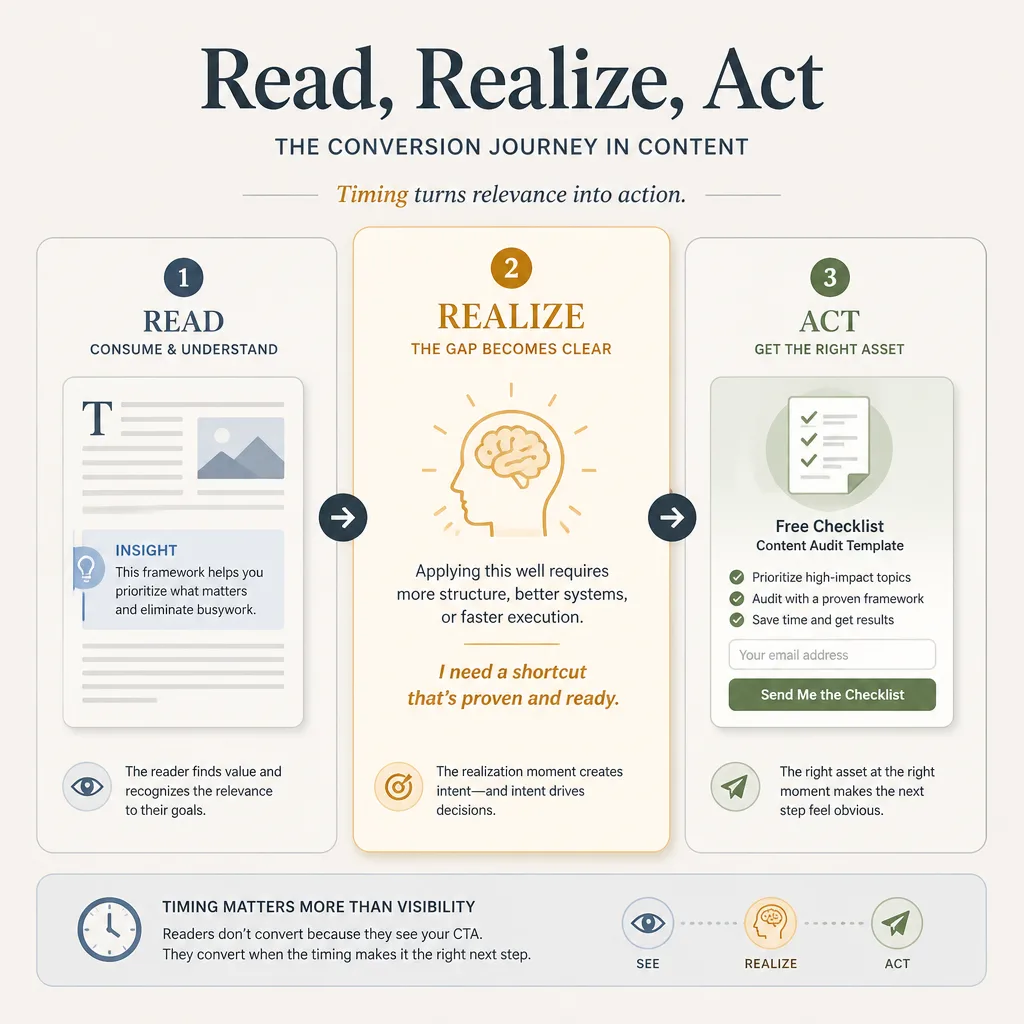
A simple mental model: Read, Realize, Act
A useful way to think about CTA timing is Read, Realize, Act.
First, the reader reads enough to know the article is relevant. Then they realize something: this is useful, but applying it will take work, judgment, or structure. That is the opening. Then they act if the CTA feels like the easiest next step.
The best in-article CTAs are built around that realization moment.
Which lead magnets still work
The best lead magnets do one thing well: they continue the work the article started.
Templates: best when the reader wants to execute quickly
Templates work when the reader understands the task and wants a head start.
A post about SEO content briefs should not offer a broad “SEO ebook.” It should offer the brief itself. “Download the exact content brief template” is stronger because it keeps the task intact.
This works especially well for SaaS, marketing, operations, and creator workflows.
Checklists: best when the task has risk or complexity
Checklists convert well when readers are worried about missing a step.
An article on planning an email campaign can naturally lead to a pre-send checklist, launch checklist, or QA checklist. The value is not novelty. It is risk reduction.
That matters most in execution-heavy topics where forgetting one thing is expensive.
Calculators and estimators: best when the reader needs help deciding
Calculators work when the real problem is not information, but judgment.
A pricing strategy post can pair well with a pricing worksheet or calculator. A reader may understand the theory but still need help modeling tradeoffs. The calculator bridges learning and decision-making.
These assets can perform well, but they cost more to build and maintain. They make the most sense when the decision itself sits near the center of your funnel.
Swipe files and examples: best when the reader needs pattern recognition
If readers are asking what good looks like, examples usually beat abstraction.
A post on lifecycle emails can offer a swipe file of subject lines, campaign structures, or real examples. A positioning article can offer messaging examples or teardown samples.
This format is especially effective when the audience needs pattern recognition, not just instruction.
Why generic newsletters and broad ebooks often underperform
Often is the key word.
A generic newsletter CTA usually loses because the payoff is delayed and vague. A broad ebook often has the same problem. It bundles too much value too loosely.
They can still work when the publication has a strong point of view or distinctive analysis. But if your blog is converting task-oriented traffic, narrower offers usually perform better.
How to match the offer to intent stage
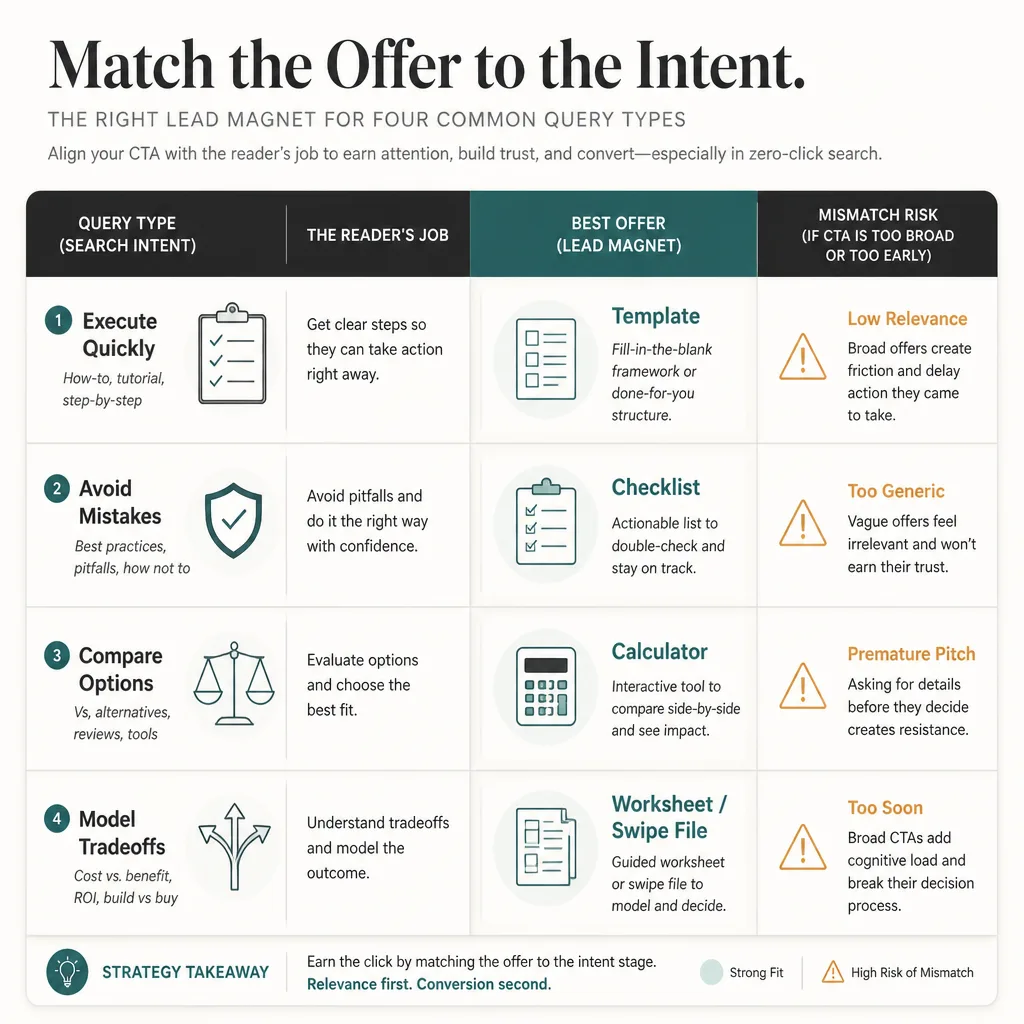
Topic match matters. Intent-stage match matters more.
Early-stage intent: simplify and diagnose
Early-stage readers are still orienting themselves. They may not want a full implementation template yet.
Better offers here include:
- short checklists
- self-assessments
- mini email courses
- simple calculators
If someone searches a broad query like “why email campaigns underperform,” they may need diagnosis before implementation.
Mid-stage intent: help readers compare or plan
Mid-stage readers are evaluating options or building a plan.
This is where comparison worksheets, buyer checklists, planning tools, and ROI calculators tend to work well.
A “best email marketing platforms” article usually should not push a setup template first. A scoring sheet or evaluation worksheet fits better.
Late informational intent: help readers implement
Late informational readers are still searching, but they are closer to action.
This is where templates, SOPs, worksheets, and exact examples usually perform best. Think “how to create,” “how to set up,” or “how to launch” queries.
A simple offer-matching matrix
| Query type | Reader’s job | Best offer | CTA angle | Mismatch risk |
|---|---|---|---|---|
| “How to write an SEO content brief” | Execute quickly | Template | Use the exact brief template | Newsletter feels abstract |
| “Best email marketing platforms” | Compare options | Evaluation worksheet | Compare tools with this scoring sheet | Implementation asset is too early |
| “SaaS pricing strategy” | Model tradeoffs | Calculator or worksheet | Model your price points | Broad ebook feels generic |
| “Email campaign planning” | Avoid missing steps | Checklist or swipe file | Use this campaign checklist | Demo CTA feels premature |
The underlying rule is simple: match the offer to the reader’s job, not just the topic.
Where in-article CTAs should go
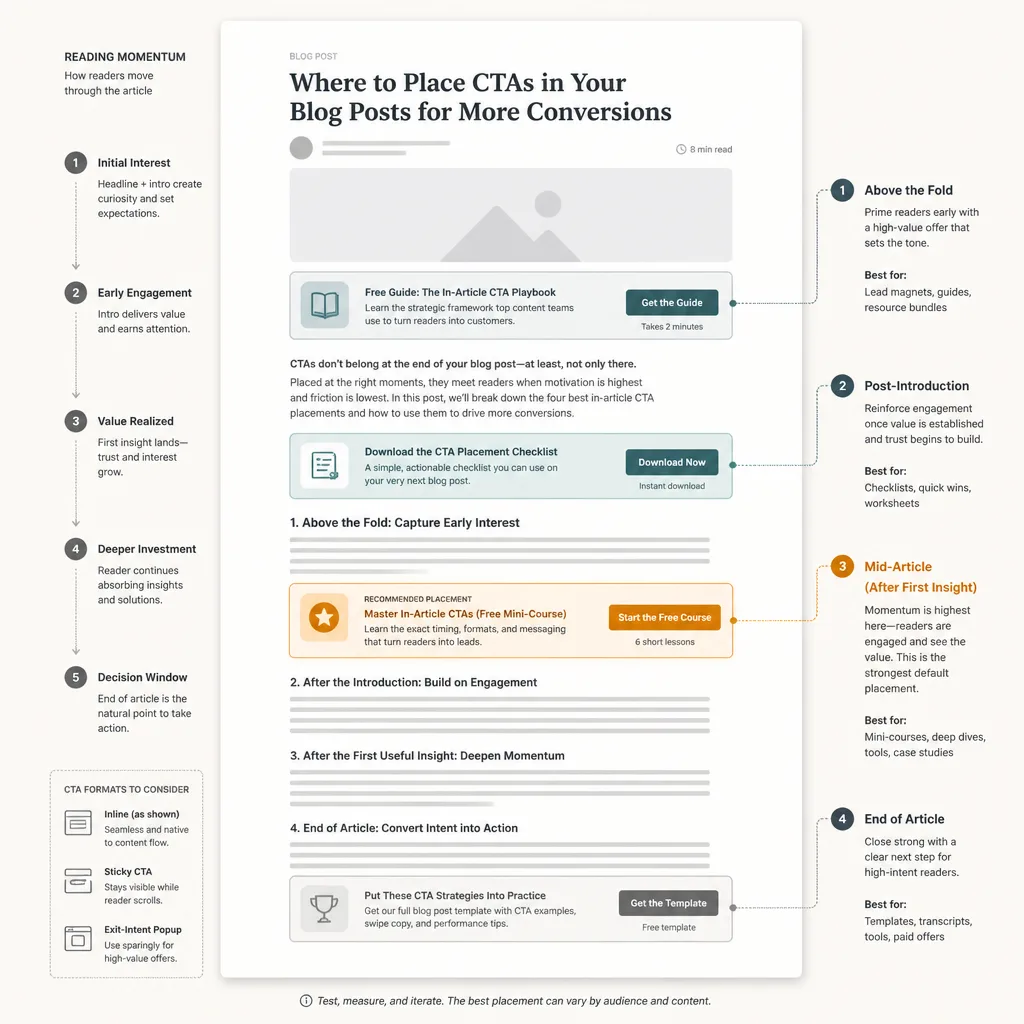
CTA placement is not mainly a visibility problem. It is a momentum problem.
Above the fold: helpful in some cases, distracting in others
An above-the-fold CTA can work when the query is highly practical and the offer is immediately obvious.
For example, on a post called “SEO Content Brief Template,” offering the template early makes sense. The reader already knows what they want.
But on strategic or trust-dependent topics, early CTAs often interrupt before the article earns attention. If the reader has not reached a realization moment, the CTA feels premature.
Post-introduction CTA: the best default for most informational posts
For many posts, this is the safest default.
By the end of the introduction, the reader usually knows whether the article is relevant. That makes it a good place for a soft, tightly matched CTA.
Not a giant banner. Just a clear next step.
Mid-article CTA: often the strongest placement
This is often the highest-leverage placement.
Once the article has delivered one concrete framework, example, or useful takeaway, the reader is more likely to think, “I can use this, but I’d like help applying it.”
That is the moment to offer the template, checklist, calculator, or worksheet.
Bottom-of-article CTA: best for engaged readers
Readers who finish a full article are more engaged by definition.
End-of-post CTAs often produce lower volume than earlier placements, but the intent can be stronger. This is a good spot for higher-friction offers like demos, consultations, or implementation assets.
In B2B and services, fewer but better-qualified conversions may matter more than total email volume.
Sticky bars, slide-ins, and popups: useful, but easy to overdo
These formats are not inherently bad. They are just easy to misuse.
Popups can increase total captures in some environments. But they also interrupt the reading experience, and many uplift claims come from vendors with promotional incentives. Treat those results as directional, not universal.
A practical rule:
- use inline CTAs when context and trust matter most
- use popups or slide-ins when list growth is the main goal and audience tolerance is proven
- avoid stacking every CTA format at once, because it increases noise and makes testing harder to interpret
Example page structures for conversion-first posts
Tactical how-to article
A post about SEO content briefs might look like this:
- Short intro framing the execution problem
- Post-intro CTA: “Get the brief template”
- First framework: what a strong brief needs
- Mid-article CTA after the first concrete section
- Step-by-step explanation
- End CTA: template plus related product or service
The template works because it closes the gap between understanding and doing.
Comparison or alternatives article
A comparison post should create evaluation clarity early.
For a “best email marketing platforms” article:
- Intro that clarifies the decision stakes
- Criteria section first
- CTA after criteria: “Use this vendor scoring sheet”
- Tool-by-tool tradeoff analysis
- End CTA to demo, buyer guide, or consultation
The worksheet fits because the reader is not trying to learn in the abstract. They are trying to decide.
Strategic thought-leadership article
Strategic articles need more trust before the CTA.
For a pricing strategy piece:
- Intro with the core problem
- Build the argument
- Present a decision framework
- CTA after the framework: “Model your price points with this worksheet”
- Illustrate with examples
- End CTA to product, assessment, or advisory call
Here the CTA should appear after the key insight lands, not before.
A testing plan most teams can actually run
Start with one page type and one conversion goal
Do not test your entire blog at once.
Pick one type of post, one conversion goal, and ideally three existing pages with enough traffic to matter. Search Console’s Performance report can help you find posts with meaningful visibility and steady clicks.[^2]
Test only two variants at a time
For most small teams, two variants are enough:
- current CTA vs. new offer
- post-intro CTA vs. mid-article CTA
- generic newsletter vs. task-specific asset
Do not test five things at once. You will not know what caused the result.
Run for two weeks, or until you have directional confidence
Two weeks is a practical rule, not a statistical law.
If you have decent traffic, two weeks may give you enough signal. If traffic is low, extend the test. Most small blogs will not reach formal statistical certainty quickly, so use directional judgment and repeatable patterns rather than pretending tiny samples are definitive.
What to measure
Keep measurement simple:
- CTA CTR: clicks on the CTA divided by article views or CTA impressions
- Opt-in rate: completed signups divided by CTA clicks or form visits
- Post-to-list conversion: total signups attributed to the page divided by page sessions
If you use Google Analytics 4 conversion events, keep event naming clean from the start.[^3] Attribution will still be somewhat directional because it is rarely perfect.
Why your baseline matters more than benchmarks
There is no universal benchmark that travels well across niches.
Content posts may convert at well under 1% or several percent depending on traffic source, audience fit, brand trust, and offer quality. That is why your own baseline matters more than internet averages.
A move from 0.4% to 1.1% on the same article is usually more useful than any benchmark slide from a vendor deck.
Common failure modes
Offer-topic mismatch
The article is about execution. The CTA offers generic education. Conversion stalls.
Too many competing CTAs
Inline form, popup, sticky bar, slide-in, end banner. More visibility can mean less trust, more distraction, and worse data.
Asking for too much too early
A reader at the start of a broad informational article is rarely ready for a demo request. They may be ready for a checklist.
Treating design changes as strategy
Button color is not the problem if the offer is weak.
Test offer relevance first, then copy, then placement, then design.
Drawing strong conclusions from weak data
If a post gets 80 visits a month, it is not a reliable testing environment. In that case, improving distribution or choosing a better topic matters more than fine-tuning CTA placement.
The practical takeaway
If resources are limited, do not start by redesigning your whole blog.
Start with three existing posts that already get steady traffic and reflect clear task intent. Build one tightly matched asset for each. A template, checklist, worksheet, or swipe file is usually enough. Place one CTA after the intro and another after the first real insight. Then test one meaningful variable at a time for two to four weeks.
That is the bigger shift underneath all of this: owned audience growth is one of the clearest ways to protect content value in a zero-click environment. Search can still create demand. But if your content stops at the pageview, too much of that demand goes uncaptured.
Zero-click does not kill content. It punishes content with no next step.
FAQ
Can informational blog posts still convert in a zero-click world?
Yes. Informational posts can still generate subscribers and leads when the next step matches the reader’s immediate task. The key is not just getting traffic, but creating more value from each visit through relevant offers, low-friction opt-ins, and well-timed CTAs.
Which lead magnets work best for informational content right now?
Usually templates, checklists, calculators, worksheets, and swipe files. They work because they help readers continue the task they already came to solve. Generic newsletters and broad ebooks can still work, but they often underperform when the value feels vague or delayed.
Where should I place CTAs inside a blog post?
There is no universal best spot. For most informational posts, strong placements are just after the introduction, after the first genuinely useful insight, and at the end of the article. CTA placement tends to work best when it follows the reader’s momentum instead of interrupting it too early.
Are popups better than inline CTAs?
Not always. Popups may increase total email captures because they demand attention, but inline CTAs usually preserve context and trust better. The right choice depends on your audience, your brand’s tolerance for interruption, and whether you care more about total signups or a cleaner reading experience.
How do I match a lead magnet to search intent?
Match the offer to the reader’s job, not just the topic. Early-stage queries often work better with assessments, simple checklists, or mini courses. Mid-stage queries tend to fit comparison worksheets or calculators. Late informational queries often convert best with templates, SOPs, or implementation checklists.
What is a realistic blog post conversion benchmark?
It varies widely by niche, traffic source, offer quality, and CTA design. A safer approach is to benchmark against your own baseline instead of relying on broad internet averages. If a post moves from 0.4% to 1.1% visitor-to-subscriber conversion, that is usually more useful than comparing yourself to a generic benchmark.
How many CTAs should a blog post have?
Usually fewer than teams expect. One strong in-context CTA and one end-of-post CTA are often enough. Adding too many CTAs can split attention, reduce trust, and make it harder to learn what is actually driving conversions.
What should I test first on a low-traffic blog?
Start with the offer itself before testing design details. For most teams, the best order is offer relevance, then CTA copy, then placement, then format or design. Run only two meaningful variants at a time and use directional judgment if traffic is too low for formal statistical certainty.
When should I optimize conversions instead of focus on getting more traffic?
If a post already gets meaningful traffic and serves a clear reader task, conversion optimization is worth doing. But if traffic is extremely low, improving distribution, topic selection, or content-market fit usually matters more than tweaking CTA placement.
Do all blog posts need a lead magnet?
No. Some posts are better used to send readers to product education, commercial pages, demos, consultations, or free tools. The right next step depends on your business model, reader intent, and where the article sits in the journey.