Agentic Marketing Ops for Small Teams: A Safe Workflow Pattern That Won’t Spam Your CRM
Most advice about AI agents focuses on what they can do. That part is easy. The harder question is whether they can do useful work inside a real marketing operation without creating cleanup, compliance risk, or avoidable mistakes.
For small teams, that difference matters. A bad workflow does not fail quietly. It sends the wrong email, launches a sloppy ad, duplicates records, or produces a report that sounds confident but should not be trusted. And when there are fewer people around to catch the damage, the fallout feels bigger.
The good news is that small teams do not need heavy governance to use agentic automation well. They need narrow workflows, limited permissions, visible checkpoints, and a clear separation between drafting work and executing it.
That is the real promise of agentic marketing ops: not autonomy for its own sake, but safe leverage.
Agentic marketing ops only works when it is constrained
Agentic marketing ops means using AI agents inside repeatable workflows that can gather information, generate outputs, and sometimes trigger actions. The important distinction is not whether the system feels autonomous. It is whether it operates inside clear rules, permissions, and review stages.
Small teams usually get hurt by over-automation faster than larger ones. That is not a universal law, but it is a practical pattern: fewer reviewers, less operational redundancy, and less tolerance for cleanup mean one bad send can consume an entire afternoon. One looping workflow can clutter a CRM or burn through automation tasks quickly.
So the goal is not maximum automation. It is faster throughput with bounded risk.
That usually means starting with the least dangerous version of a workflow:
- Read-only when the value is synthesis
- Draft-only when the output is customer-facing
- Approve-to-execute when money, reputation, or policy risk is involved
That permission ladder matters more than prompt cleverness.
The safe workflow pattern: Draft → Review → Approve → Execute
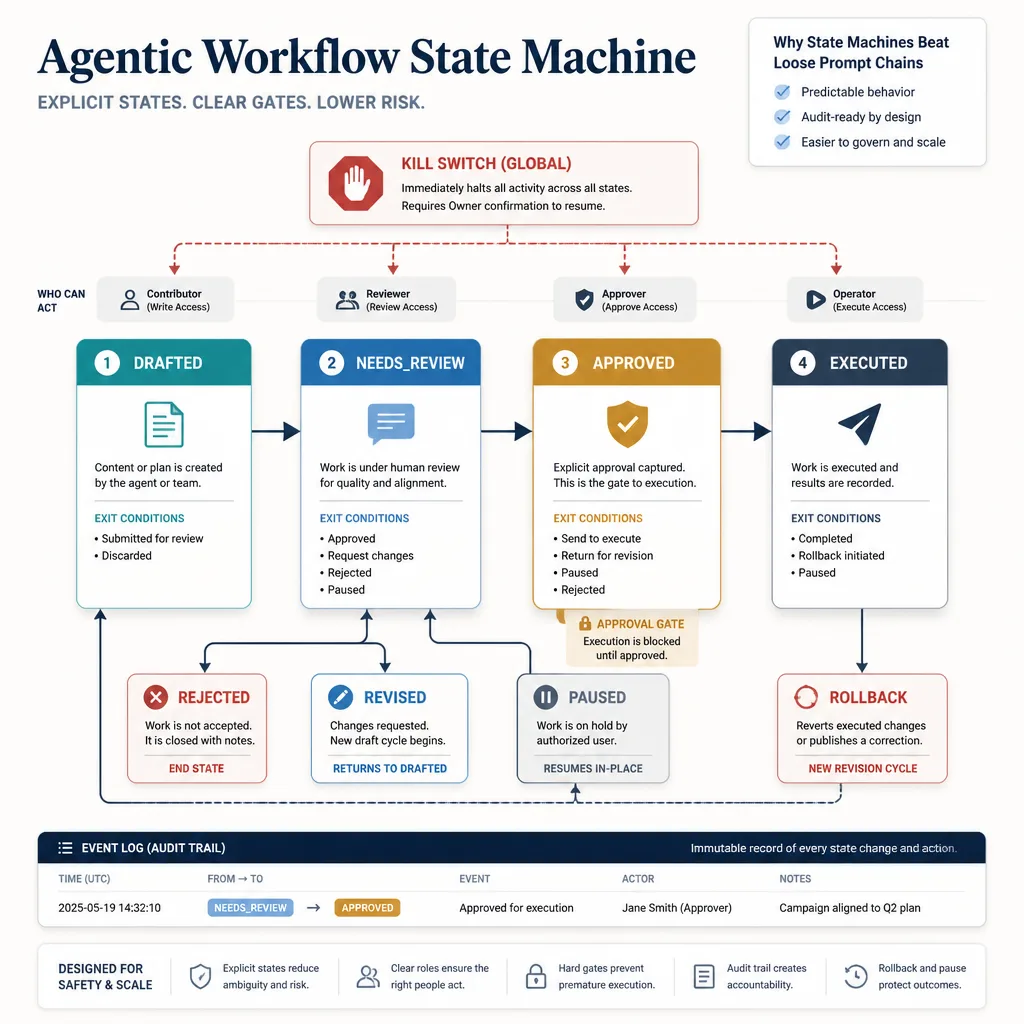
The cleanest operating model for small teams is simple:
- Draft: the agent gathers inputs and produces a structured output.
- Review: a person checks it for accuracy, context, tone, and policy fit.
- Approve: a person explicitly authorizes the next action.
- Execute: the workflow publishes, sends, updates, or launches.
This can look conservative until you compare it with the alternative: loose prompt chains passing freeform text from step to step with no stable state, no visible handoff, and no obvious stopping point.
What each stage does
Draft is where the agent earns its keep. It can summarize CRM context, generate email variants, assemble ad hypotheses, or pull weekly metrics.
Review is where a human checks the work before it changes a system of record or reaches a customer.
Approve is the explicit gate for higher-risk actions.
Execute should be the narrowest stage. If a workflow reaches this point, the action should be expected, logged, and easy to stop before the next run.
Why state machines beat loose prompt chains
You do not need a computer science lecture, but you do need explicit states.
A workflow that moves through statuses like drafted, needs_review, approved, and executed is easier to trust than one that simply keeps going.
That is the point. Explicit state beats implied intent.
How bounded permissions keep mistakes small
A model with read access to analytics is one thing. A model that can send emails, update contact records, and launch campaigns is something else entirely.
The practical lesson is straightforward: if an agent can technically do something, that does not mean it should be allowed to do it alone.
Five guardrails that make agentic workflows usable
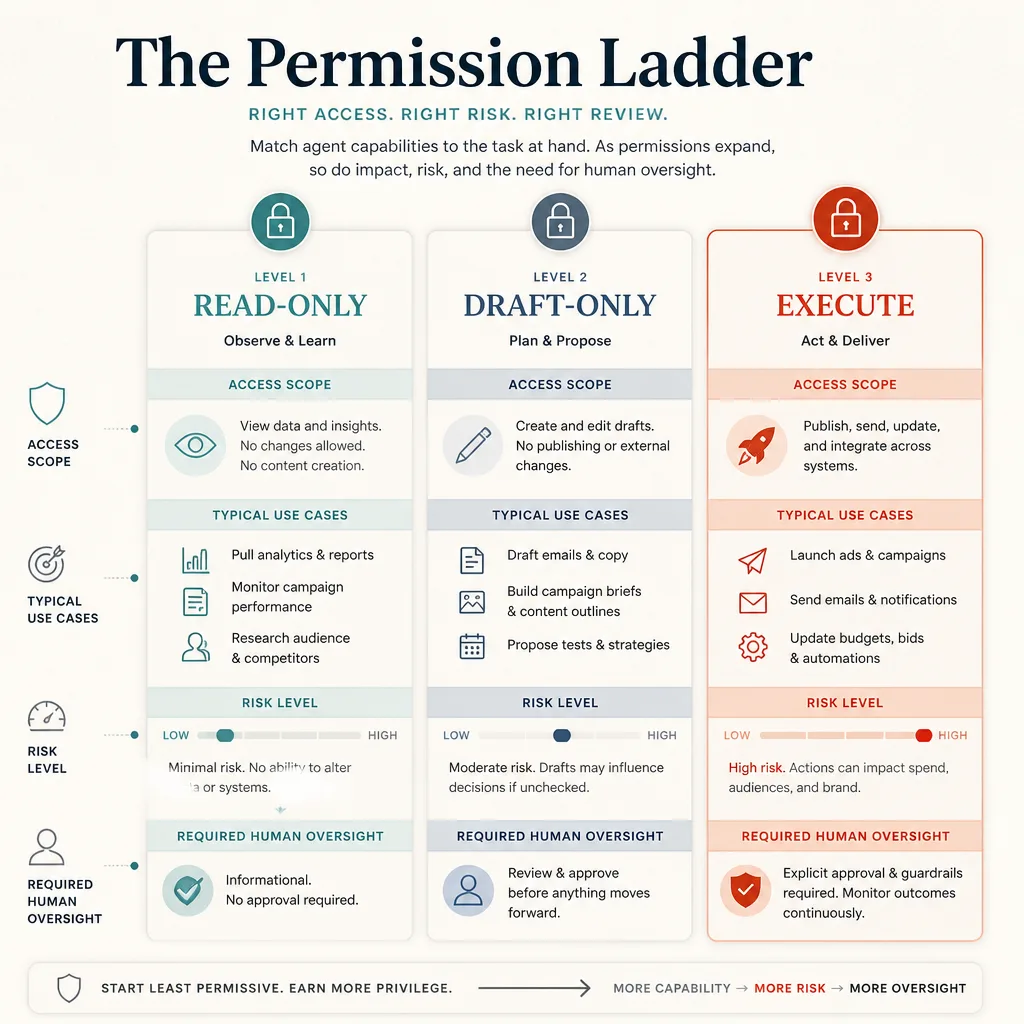
Good agentic workflows are usually boring in the best way. They are predictable, inspectable, and hard to misuse.
Structured outputs instead of freeform text
Structured outputs are not a technical nicety. They are what make review possible.
For a marketer, the implication is simple: it is easier to approve a defined object with fields like audience, offer, cta, risk_flags, and rationale than a polished paragraph that hides assumptions inside smooth prose.
Read-only, draft-only, and execute permissions
This is the permission ladder:
- Read-only: can fetch analytics or CRM context, but cannot change anything
- Draft-only: can create candidate outputs, but cannot send or publish
- Execute: can take action, but only after approval
Most small teams should spend longer in the first two levels than they expect.
Human approval queues for high-impact actions
Approval queues are not bureaucracy. They are what make automation usable in real operations.
If a workflow can send a marketing email, launch ad spend, or update high-value CRM records, it should pause for human review first.
Audit trails and event logs
At minimum, you want to know:
- what ran
- when it ran
- which inputs it used
- what output it produced
- who approved it
- what happened next
Visibility is part of safety, not a separate compliance project.
Rollback plans and kill switches
Not every marketing tool supports true rollback. Do not design around an imaginary undo button.
A better rule is this: high-risk actions should be reversible, delayed until review, or easy to stop before the next execution cycle. Every workflow should also have a kill switch someone on the team can use without asking an engineer for help.
Workflow 1: Lead follow-up email drafting without auto-send
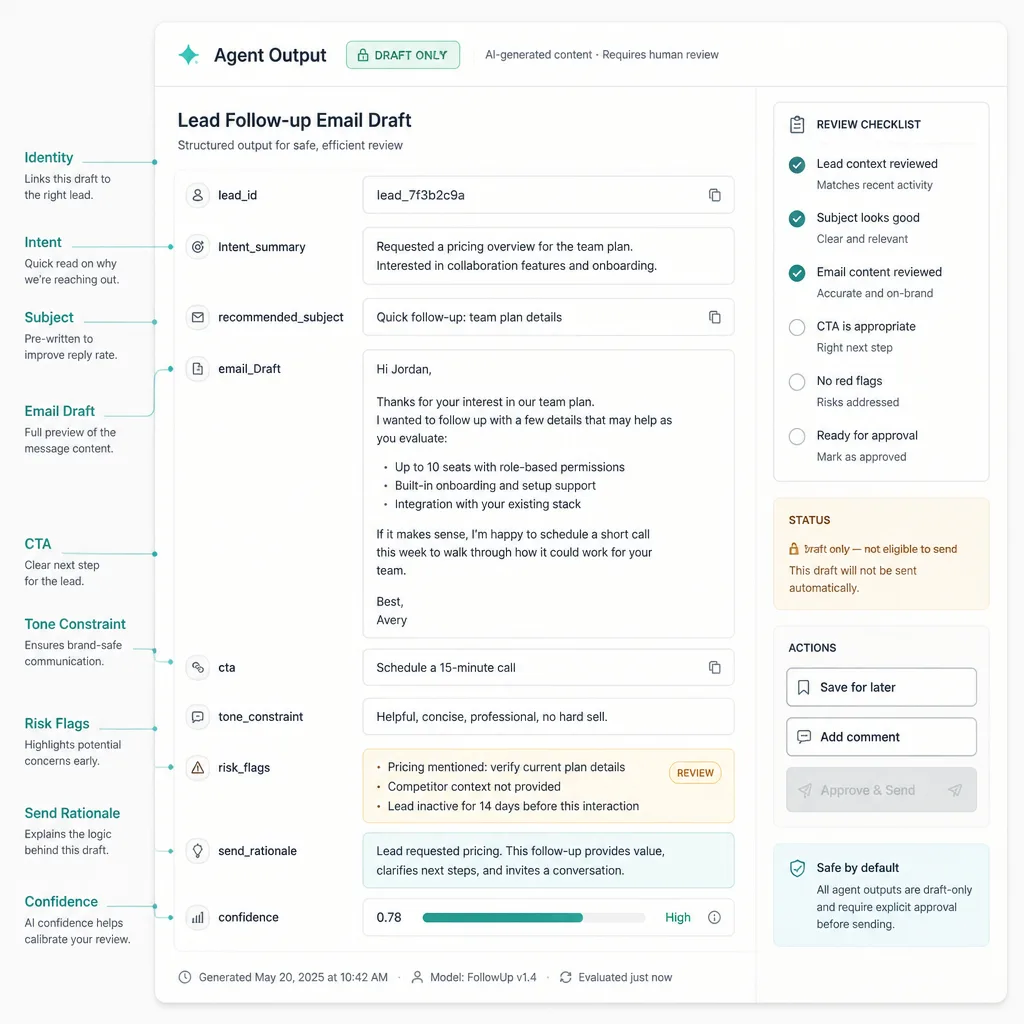
This is one of the best first workflows because it is useful and restrained.
What the agent can access
Give it read access to a narrow set of fields:
- lead source
- last touchpoint
- product or service interest
- lifecycle stage
- owner name
- recent notes
- allowed offer constraints
- tone rules
Do not give it permission to send the email or change contact status automatically.
What the agent produces: structured draft plus send rationale
A practical output might look like this:
{
  "lead_id": "12345",
  "intent_summary": "Downloaded pricing guide and requested demo",
  "recommended_subject": "Quick follow-up on your pricing questions",
  "email_draft": "Hi Sarah, ...",
  "cta": "Book a 15-minute demo",
  "tone_constraint": "Helpful, direct, no pressure",
  "risk_flags": [],
  "send_rationale": "Recent high-intent action, no reply in 5 days, owner requested follow-up",
  "confidence": "medium"
}
This is better than a loose paragraph because the reviewer can scan it quickly. They can challenge the CTA without rewriting everything. They can spot weak reasoning. They can see whether a risk flag is missing.
Human review checklist before anything enters the CRM
Before approval, check:
- Is this the right contact?
- Is the offer accurate?
- Is the tone appropriate for the last interaction?
- Does the CTA match the funnel stage?
- Is there any duplicate or recent outreach that makes this unnecessary?
- Is the workflow trigger clean, or could it fire twice?
That last point matters. Weak trigger logic is how teams create accidental bulk outreach.
Workflow 2: Ad experiment generation with approve-to-launch gating
This is where agentic workflows become tempting and dangerous at the same time.
Inputs: offer, audience, constraints, channels, exclusions
The agent should receive a strict brief, not a vague request to “make some ads.” Include:
- offer
- target audience
- excluded audiences
- approved value propositions
- banned claims
- budget range
- destination URL
- channel
- naming convention
- tracking template
Outputs: ad variants, test hypothesis, required checklist
A useful output package includes:
- 3–5 ad variants
- one test hypothesis per variant
- channel fit notes
- likely policy flags
- landing-page alignment check
- required UTM parameters
- recommended budget range
The model is good at generating options. That is different from being allowed to launch them.
Why no campaign should launch without approval and policy review
A simple launch checklist should cover:
- claim safety
- landing-page alignment
- audience exclusions
- naming conventions
- budget sanity
- tracking parameters
- compliance or legal review if needed
This is where some people complain that approvals kill speed. Usually they mean bad approvals kill speed. Good approvals are short, specific, and placed at the last responsible moment.
Workflow 3: Weekly performance summaries from read-only analytics access
If you want a lower-risk starting point, this is it.
What the agent should pull
Keep the workflow read-only and focused on a defined reporting packet:
- sessions or clicks
- leads
- spend
- conversions
- CPA or CPL
- top campaigns
- largest week-over-week changes
- anomalies worth checking
How to separate metrics from interpretation
This is where many teams make a subtle mistake. The risk is not usually the numbers. It is the story layered on top of them.
A cleaner format separates:
metricschanges_vs_prior_periodanomalies_detectedpossible_explanations
That last field should always be tentative. The model can suggest plausible reasons. It should not pretend to know causation from a weekly snapshot.
Where human judgment still matters
A marketer still needs to answer questions like:
- Was the spike caused by creative, seasonality, or tracking noise?
- Did lead quality improve, or just volume?
- Does this warrant budget reallocation, or just monitoring?
Read-only summaries save time because they reduce assembly work. They do not eliminate judgment.
What should never be fully automated
Some actions do not deserve autonomous execution.
Compliance and regulated claims
If a claim touches legal, regulated, or policy-sensitive territory, keep a human in the loop. That includes ads, email promises, disclaimers, and any copy that could create compliance exposure.
Pricing promises and discount exceptions
Pricing errors create the kind of cleanup customers remember. Do not let an agent improvise discounts, quote exceptions, or make promises that sales or finance would not approve.
Customer support edge cases and emotionally sensitive replies
Escalations, complaints, refund disputes, and emotionally charged messages need human judgment. A polished reply can still be the wrong reply.
Any action that can trigger irreversible customer-facing damage
The general rule is simple: if an action can spend money, publish risky claims, contact customers at scale, or alter a system of record in ways that are hard to unwind, it should not be fully autonomous.
A lightweight tooling stack for non-enterprise teams
Do not start with a “best tools” list. Start with functions.
A practical stack by function
A lightweight stack usually needs five parts:
- Model layer for structured generation
- Workflow layer for triggers, branching, and pauses
- Data sources such as CRM and analytics tools
- Approval layer for high-risk actions
- Logging or trace layer for visibility
What matters most is not the exact vendor mix. It is whether the workflow is narrow, observable, and easy to control.
What to choose first if you are starting small
If your team is early, pick one workflow and keep it narrow:
- one model or provider with structured outputs
- one automation layer with pause or review steps
- read-only connections first
- one approval destination, such as email or a task queue
- one simple log destination
That is enough to learn a lot.
The mistake to avoid
Teams often try to solve a workflow problem with more architecture. Usually the opposite is needed.
If the human process is fuzzy, the agent will make it fail faster.
How to start without breaking anything
Start where the downside is small.
Start with read-only or draft-only workflows
The best early wins are often the least autonomous ones. Weekly summaries, campaign recap drafts, and follow-up email drafts are useful precisely because they create leverage without creating immediate damage.
Add approvals before execution rights
Do not give an agent send or launch permissions just because the draft quality looks good for a week. Add approvals first. Watch where errors show up. Tighten the schema. Clean the trigger logic.
Measure saved time, error rates, and intervention frequency
Track three simple operational metrics:
- time saved
- correction or error rate
- intervention frequency
If intervention stays high, the workflow probably needs a narrower scope, better inputs, or stricter output structure. If error rates stay low and approvals become quick, you may have earned the right to automate one step further.
Conclusion
The first win in agentic marketing ops is not a fully autonomous system. It is a reliable one.
For small teams, the safest pattern is also the most practical: Draft → Review → Approve → Execute. Give agents bounded permissions. Use structured outputs. Add visible checkpoints. Keep high-risk actions human-controlled. Log what happened. Make it easy to pause.
That may sound less exciting than “set up an AI agent to run your marketing.” It is also far more likely to survive contact with reality.
Good automation should not just save time on a clean day. It should keep working when the inputs are messy, the stakes are real, and no one wants to clean up a preventable mistake.
FAQ
What is agentic marketing ops?
Agentic marketing ops is the use of AI agents inside repeatable marketing workflows that can gather information, generate outputs, and sometimes trigger actions. What matters is not whether the system feels autonomous, but whether it operates within clear rules, permissions, and review steps.
Why should small teams use a Draft → Review → Approve → Execute workflow?
Because small teams usually need leverage without cleanup chaos. This workflow keeps AI useful while limiting the blast radius of mistakes. It lets agents prepare work quickly while humans stay in control of customer-facing sends, ad launches, and other high-risk actions.
What tasks are safest to automate first?
Start with read-only summaries and draft-only content generation. Weekly analytics summaries, campaign recap drafts, and lead follow-up email drafts are strong early use cases because they create output for review without changing records, spending money, or contacting customers automatically.
What should never be fully automated in marketing ops?
Anything that can create irreversible customer-facing damage should remain human-controlled. That includes compliance-sensitive claims, pricing promises, discount exceptions, emotionally sensitive support replies, and campaign launches that spend budget or publish risky copy.
Why do structured outputs matter in agentic workflows?
Structured outputs make review faster and safer. Instead of receiving a blob of text, the reviewer gets defined fields such as audience, offer, CTA, claim flags, rationale, and confidence notes. That makes approvals more consistent and reduces the chance that risky assumptions stay hidden inside polished prose.
Do approval steps make AI automation too slow?
Not usually. For small teams, the goal is rarely zero approvals. The better goal is fewer, sharper approvals placed at the last responsible moment. A quick approval step is often cheaper than cleaning up a bad send, a broken workflow, or an off-brand campaign.
What is a good lightweight tooling stack for non-enterprise teams?
A practical starter stack usually has five layers: a model layer for structured generation, a workflow layer for triggers and branching, read-only connections to CRM and analytics tools, an approval step for high-risk actions, and a simple log or trace layer. The exact vendors matter less than the workflow design.
How can I prevent an AI workflow from spamming my CRM?
Use bounded permissions, draft-only modes for outreach, clear trigger conditions, duplicate checks, approval queues, and logs that show what ran and why. The safest pattern is to keep agents from sending messages directly until the workflow has proven reliable under human review.