MCP for Marketers: How Tool-Connected Agents Change Competitor Research, Content Ops, and Reporting
Most marketers already understand prompt-based AI. You paste in a brief, a report, or a rough idea, and the model gives you a draft, summary, or list of suggestions.
Useful, yes. But limited.
The bigger shift is not better prompting. It is AI gaining structured access to the systems where work actually happens: analytics, documents, content inventories, task managers, research sources, and sometimes publishing tools. Model Context Protocol, or MCP, sits inside that shift as a connection standard for AI applications and external tools.[^1][^2]
If that sounds technical, the practical takeaway is simple: AI becomes far more useful when it can inspect live context instead of guessing from a single prompt. It also becomes riskier. Once an agent can touch real systems, you are no longer managing a clever chat session. You are managing a workflow.[^1][^3]
MCP for marketers, in plain English
What MCP is
MCP stands for Model Context Protocol. Put simply, it is a standardized way for AI applications to connect to outside tools, files, and data sources.[^1] Anthropic describes it as an open protocol and compares it to a USB-C-style connection layer for AI systems.[^1]
That metaphor helps because it keeps the idea in the right category. MCP is infrastructure. It is not a marketing tactic or a content strategy. It is the connective layer that helps an AI application access context from other systems more consistently.[^1][^2]
For marketers, that could mean connecting an AI tool to:
- a Google Drive folder with briefs
- a task board with open content updates
- a reporting source like GA4
- a CMS export or content inventory
- a research workflow that pulls SERP and community data
You may never set up an MCP server yourself. More likely, you will use products that support MCP, or MCP-like connectivity, behind the scenes.[^3][^4]
What MCP is not
MCP is not the agent itself.[^1]
It is also not a magic switch that makes AI reliable, autonomous, or strategically smart. MCP standardizes connectivity. It does not solve judgment, permissions, business context, or quality control.[^2]
It is also different from traditional automation. A Zapier-style workflow usually follows a fixed trigger-action path. MCP is about exposing tools and context to an AI client so the model can inspect information and decide which tool to use next within the limits you set.[^2][^4]
That distinction matters. Traditional automation is closer to a flowchart. A tool-connected agent is closer to a supervised operator.
Why marketers should care now
This matters now because MCP is no longer just a niche developer concept. Anthropic introduced MCP publicly on November 25, 2024 as an open standard for connecting AI assistants to external systems.[^2] OpenAI added support for remote MCP servers in the Responses API on May 21, 2025, a strong signal that MCP is becoming part of the broader agent ecosystem rather than a one-vendor experiment.[^3]
That does not mean every platform supports it the same way. It does mean marketers will increasingly run into AI products that can connect to tools, retrieve live context, and move work across systems.
The real upgrade is not better wording. It is better access.
The shift from prompt-based AI to tool-connected agents
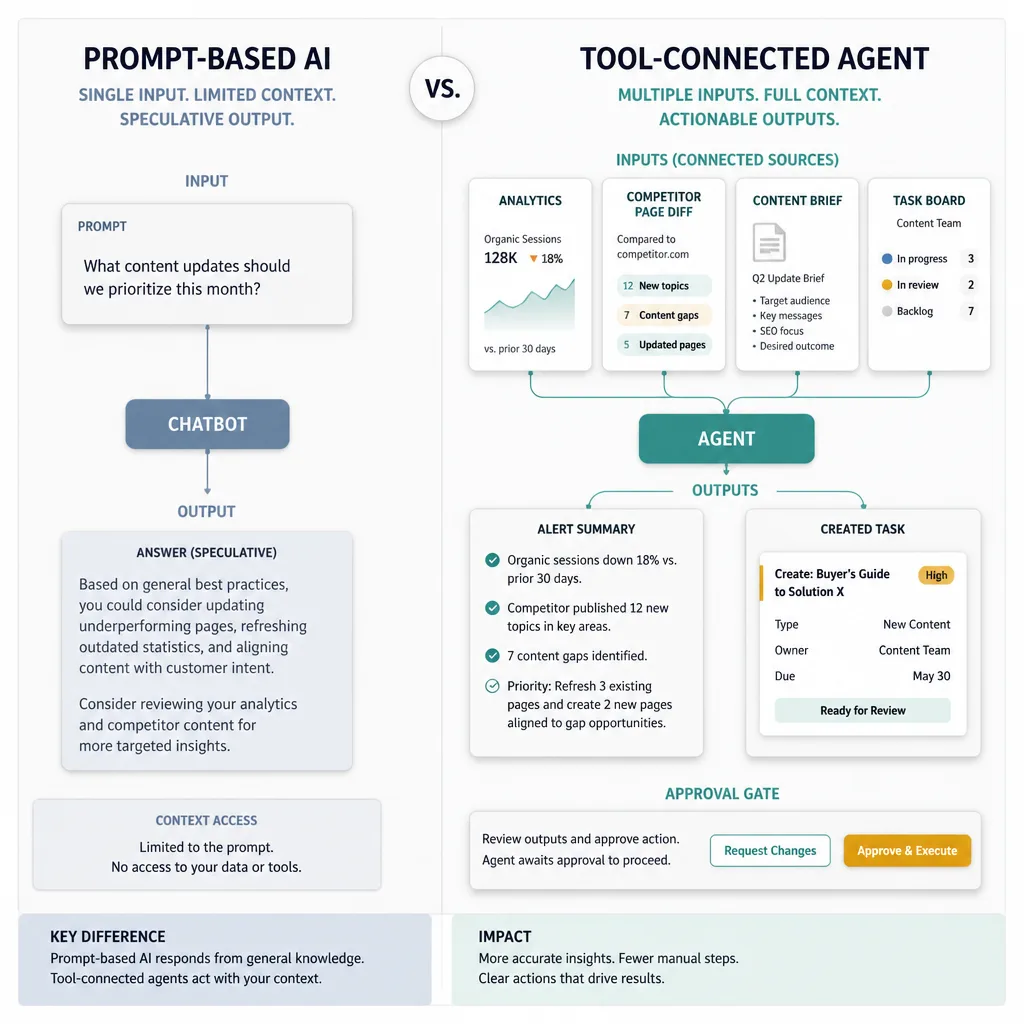
A normal chatbot answers from what it can see
A normal chatbot usually works from a limited set of inputs: your prompt, any uploaded files, and the built-in tools or product features already available in that environment.[^1]
That is why many AI outputs still feel thin in operational work. The model may write well, but it often lacks the live business context needed to make the output genuinely useful.
Ask a normal chatbot why blog traffic dipped last week and it will usually offer plausible theories. Ask a tool-connected agent with access to GA4, landing-page data, campaign notes, and your publishing calendar, and the answer can be grounded in actual evidence.
A connected agent can inspect, compare, summarize, and trigger follow-up work
Once connected to external tools, an agent can do more than generate text. It can retrieve live data, compare sources, summarize changes, and sometimes trigger downstream actions.[^1][^3]
For a marketer, that changes the shape of the work. Instead of asking for ideas in isolation, you can ask the system to:
- pull last week’s paid and organic traffic data
- compare it with the prior period
- flag unusual movement
- check whether a landing page changed
- draft a short explanation
- create a follow-up task for a human reviewer
That is not hypothetical. Official MCP materials describe connected access to business tools, repositories, and other systems, while OpenAI’s Responses API explicitly frames these capabilities as building blocks for agentic applications.[^1][^2][^3]
Why this is an operational system, not just a better prompt
This is the part many teams underestimate.
The hard part is rarely getting the model to say something smart once. The hard part is deciding what it is allowed to touch every day.
Once an agent can read dashboards, inspect documents, or create tasks, you need the same discipline you would apply to any operational system: permissions, monitoring, logging, review paths, and failure handling.[^2][^3]
If an AI assistant drafts a mediocre paragraph, the downside is small. If a connected agent edits a live page, changes a CRM record, or adjusts ad spend without proper controls, the downside is very different.
Tool access increases usefulness. It also increases blast radius.[^2]
What MCP enables in a marketing stack
Connecting analytics, content systems, research sources, and task tools
The appeal of MCP is not protocol elegance. It is that connected AI can work across the messy reality of a marketing stack.
That may include:
- analytics sources like GA4
- ad platform exports
- spreadsheets and content inventories
- docs and briefs in shared drives
- SERP research inputs
- community sources like Reddit
- task systems like Asana, ClickUp, or Trello
- CMS content and metadata
Some of these systems may support MCP directly. Others may be accessed through APIs, middleware, or platforms like Zapier, which now offers Zapier MCP and says it can expose its app ecosystem to AI clients.[^4] The important point is not the exact plumbing. It is that connected access turns AI from a writing assistant into a workflow participant.
Read actions, write actions, and approval steps
This is the simplest control model:
Read actions let an agent inspect and summarize.
Write actions let it change something.
Read actions include:
- pulling a traffic report
- checking whether a competitor page changed
- scanning comments and community threads
- reviewing old articles for decay signals
Write actions include:
- updating a CMS draft
- creating or closing tasks
- modifying CRM records
- changing campaign settings
- publishing content
Most teams should start with read-heavy access and keep writes behind explicit approval. That still unlocks a surprising amount of value while limiting damage if the system gets something wrong.[^2][^3]
Where the limits still are
MCP does not make weak workflows strong.
If the source data is messy, the agent may summarize the wrong thing. If your content inventory is incomplete, refresh recommendations will be incomplete. If the prompt logic is vague, the output may still be vague. And if product support is uneven, some workflows will require connectors or middleware rather than direct access.[^1][^2]
This is why marketers should resist the idea that an agent can replace process. In practice, the best early systems improve process by gathering context, reducing manual scanning, and routing work more intelligently.
4 practical agent recipes for marketers
1. Competitor page monitoring -> change log -> content update tasks
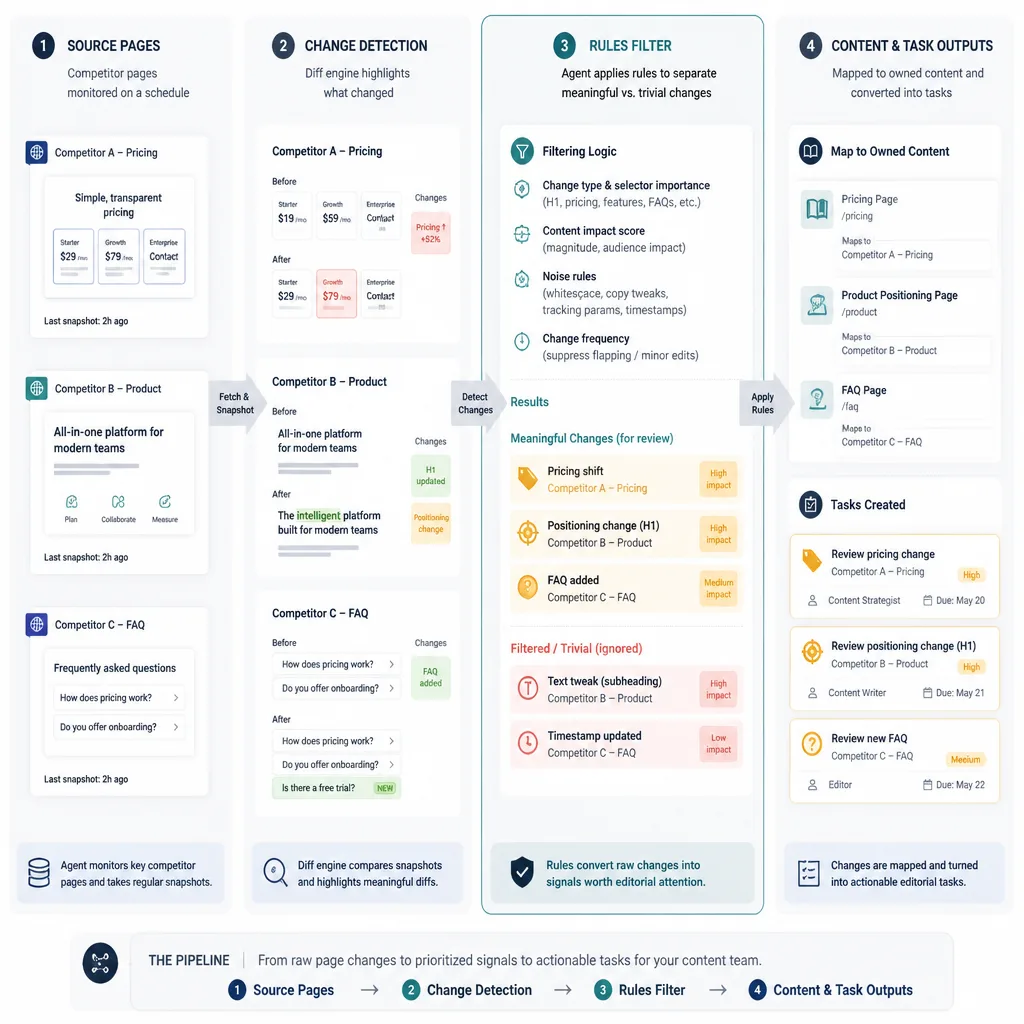
Goal: Track meaningful competitor page changes without manually checking pages every week.
Connected inputs: a saved competitor URL list, browser or page capture access, your own related page inventory, and a task tool.
What the agent does:
It checks selected competitor pages on a schedule, compares the current version with the previous one, and produces a structured change log. Then it maps those changes to your related pages and suggests update tasks.
A realistic output might include:
- Competitor added a pricing comparison table
- Competitor changed the H1 from “best CRM software” to “CRM for small sales teams”
- Competitor added three FAQ blocks around onboarding time
- Suggest reviewing your comparison page and creating two update tasks
Why it helps: The value is not spying on competitors. It is shortening the gap between market changes and editorial response.
Failure case: Not every page change matters. A weak setup creates noisy alerts and busywork. The agent needs clear rules for what counts as meaningful: offer changes, pricing shifts, feature additions, positioning updates, FAQ expansion, or schema additions.
2. SERP + Reddit insight capture -> structured content brief
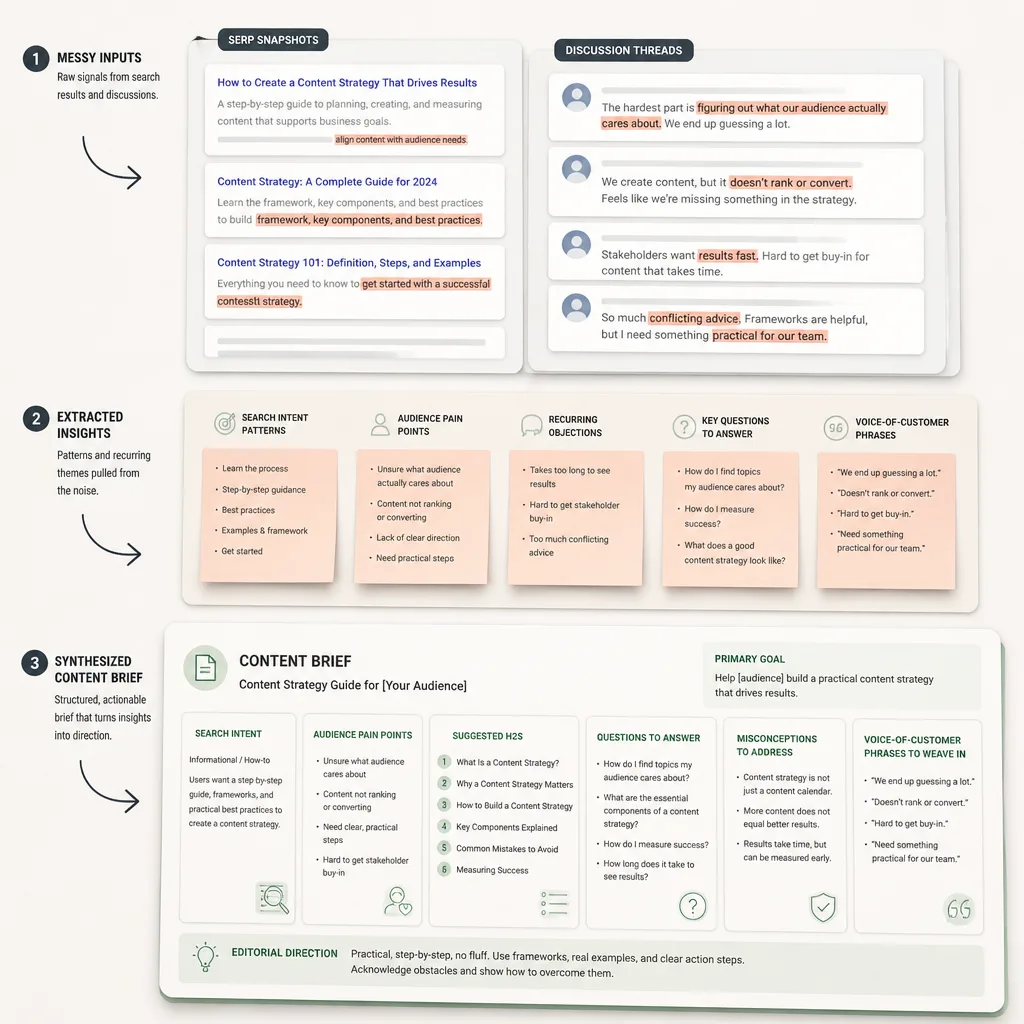
Goal: Turn scattered search and audience research into a usable content brief.
Connected inputs: SERP snapshots, selected Reddit threads, your topic target, and a brief template.
What the agent does:
It gathers recurring questions, objections, frustrations, terminology, and angle patterns from search results and community discussion, then organizes them into a structured brief.
A solid brief might include:
- dominant search intent
- recurring reader pain points
- phrases real users use
- weak spots in existing content
- suggested H2s
- questions to answer directly
- risks or misconceptions to address
Why it helps: This saves time at the messiest stage of content planning. Instead of dumping screenshots and notes into a doc, the agent handles the first pass of synthesis.
Real-world nuance: Reddit can be very useful for voice-of-customer signals, but it is not a neutral sample of the market. The agent should treat it as directional evidence, not universal truth.
Failure case: If you over-trust community sentiment, briefs can get skewed toward loud edge cases instead of representative demand.
3. GA4 + ad platform pull -> anomaly detection summary
Goal: Catch unusual changes in performance faster and explain them clearly.
Connected inputs: GA4 metrics, ad platform exports, landing-page or campaign metadata, and a reporting channel.
What the agent does:
It pulls a defined set of metrics on a schedule, compares them against prior periods or thresholds, flags anomalies, and drafts a short summary.
Example:
- Organic sessions to a blog category down 28% week over week
- Largest decline concentrated in three articles updated more than 12 months ago
- Paid conversions stable, but CPC up 14% on a branded campaign
- Recommend reviewing article freshness and paid search term mix
Why it helps: Most reporting delay comes from collection and interpretation, not the final chart. The agent compresses that early analysis step.
Failure case: Anomaly detection without context can be noisy. Seasonality, tracking issues, publishing gaps, and campaign changes can all look like problems. That is why the output should be a human-reviewed summary, not an autonomous decision engine.
4. Content inventory -> refresh recommendations
Goal: Identify which existing content deserves updating first.
Connected inputs: content inventory export, publish dates, traffic trend data, ranking indicators, conversion data where available, and editorial priority rules.
What the agent does:
It scores or clusters articles based on signs of decay, missed opportunity, or business importance, then recommends refresh actions.
For example:
- High priority refresh: strong historical traffic, recent decline, outdated examples
- Medium priority: still ranking, but weak conversion path
- Low priority: low traffic, low business relevance, no clear update case
It can also suggest the type of refresh needed:
- factual update
- SERP intent realignment
- deeper examples
- stronger internal linking
- conversion path improvement
Why it helps: Many teams know they should refresh old content. Few have a clear way to prioritize it. The agent adds triage.
Failure case: If the system treats every traffic dip as decay, it will over-prioritize content that simply had a temporary fluctuation. The scoring logic needs restraint.
The controls that matter before you give an agent real access
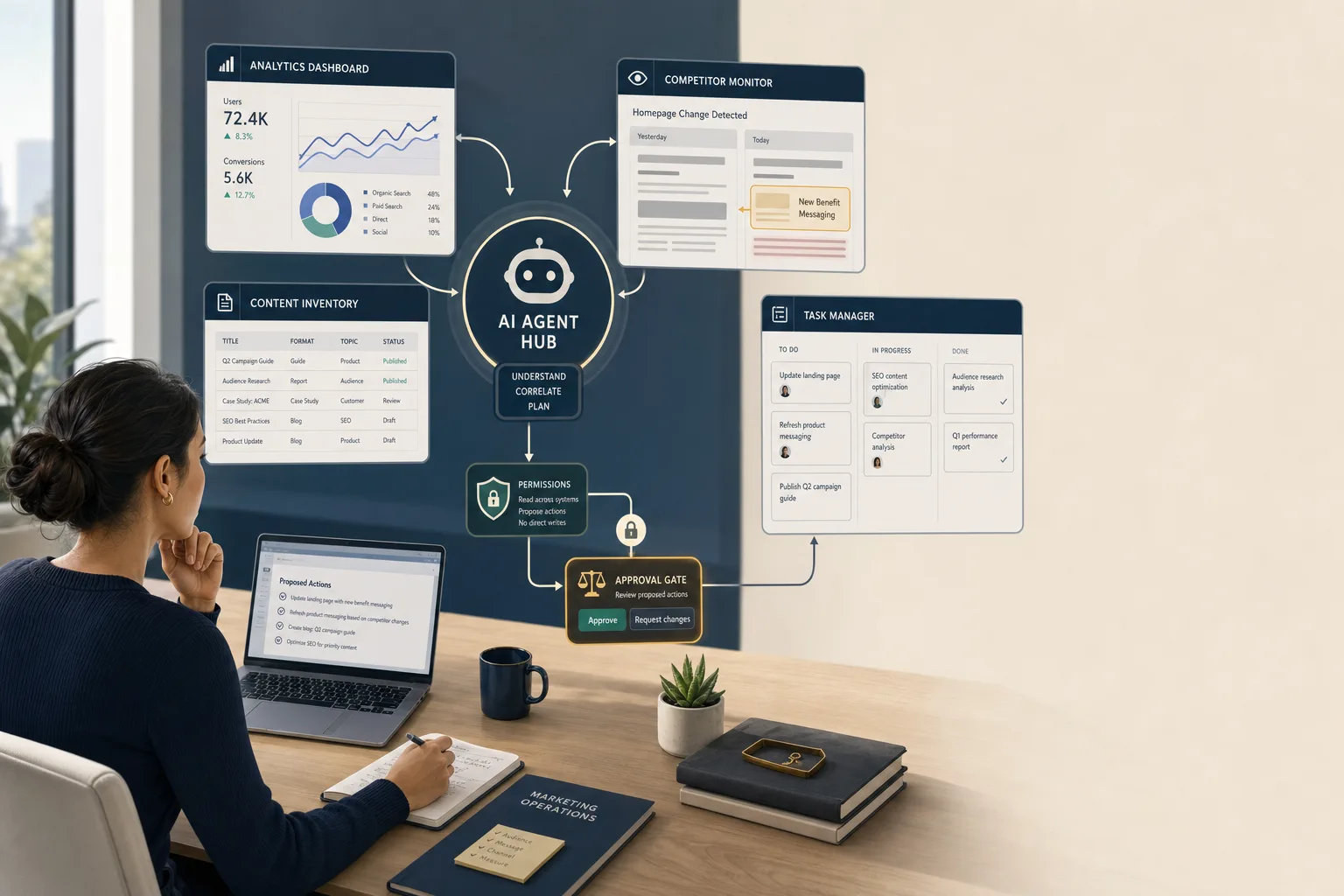
Start with read-only permissions
If you do one thing right, do this first.
Read-only access is where most early marketing value lives: monitoring, summarizing, comparing, and recommending. It reduces the chance of accidental edits, spend changes, deletions, or embarrassing public mistakes.[^2]
Separate secrets from prompts
Never paste credentials, API keys, or tokens into prompts.
Those belong in managed connectors, scoped authentication systems, or platform-level secrets handling. Zapier’s MCP documentation, for example, references connection tokens and managed setup rather than stuffing access into the conversation itself.[^4]
Prompts should describe the job. Access controls should define what the system is allowed to touch.
Use approval gates for writes, publishing, and spend changes
Any workflow that can publish, edit records, update a CMS entry, or change campaign settings should require explicit approval.
That is not bureaucracy. It is basic damage control.
A good rule is simple: if the action is customer-facing, revenue-affecting, or hard to reverse, keep a human in the loop.
Log actions so a human can review what happened
You want an audit trail for three reasons:
- to catch mistakes
- to improve prompts and workflow logic
- to build trust internally
Current agent platforms increasingly emphasize visibility and reliability features for exactly this reason.[^3] If the system flagged the wrong anomaly or created the wrong task, you should be able to see why.
Where marketers should start
Begin with one narrow workflow
Do not start with “build an AI marketing agent.”
Start with one bounded workflow where the inputs are clear, the output is easy to review, and the risk is low. Competitor page monitoring or content refresh triage are better starting points than autonomous publishing.
Choose high-context, low-risk tasks first
The best first use cases are usually:
- reporting summaries
- competitor monitoring
- research clustering
- content inventory analysis
- brief generation from structured inputs
These workflows are read-heavy, repetitive, and expensive in human attention. That is exactly where connected agents tend to help most.
Measure whether the system saves time or improves decisions
Do not judge the workflow by how impressive the demo looks.
Measure whether it actually helps. Useful metrics include:
- analyst hours saved
- time to insight
- false-positive rate
- percentage of outputs humans accept
- number of tasks created that lead to action
- whether decision quality improves
A workflow is only smart if it reduces friction without creating new mess.
Conclusion
MCP matters to marketers for a simple reason: it helps AI systems connect to the tools and context where marketing work actually happens.[^1][^2] That turns AI from a standalone assistant into something closer to an operator inside a workflow.
That does not mean you should hand it the keys.
The most practical path is narrow, read-heavy, and supervised. Start with one workflow where the agent gathers context, summarizes what changed, and routes work to humans. If that saves time and improves decisions, expand carefully.
The future here is not an AI that magically runs marketing. It is a better-connected system that helps marketers see faster, decide sooner, and waste less effort getting there.
FAQ
What is MCP in simple terms?
MCP stands for Model Context Protocol. It is a standard way for AI applications to connect to outside tools, files, and systems. It is not the agent itself. It is the connection layer that helps an AI system access the context it needs.[^1]
Why should marketers care about MCP?
Because the real upgrade in AI is not just better writing. It is better access. When an agent can pull data from analytics tools, research sources, content systems, and task managers, it can help with reporting, competitor monitoring, content briefs, and refresh planning in a far more practical way.[^1][^3]
How is a tool-connected agent different from a normal chatbot?
A normal chatbot mainly responds based on your prompt, uploaded files, and built-in capabilities. A tool-connected agent can retrieve live data, compare sources, summarize findings, and sometimes trigger follow-up actions in connected systems.[^1][^3]
Is MCP the same as Zapier or workflow automation?
No. Traditional automation usually follows fixed trigger-action rules. MCP is a protocol for exposing tools and context to AI clients. They can overlap in practice, especially through platforms like Zapier, but they are not the same thing.[^2][^4]
Do marketers need to set up MCP themselves?
Usually not at first. Most marketers will encounter MCP or MCP-like connectivity inside products, agent platforms, or automation layers they already use. The important thing is understanding what connected access enables and what controls it requires.[^1][^3]
What are the safest first use cases for marketing agents?
Start with read-heavy, low-risk workflows such as competitor page monitoring, SERP and community research capture, anomaly summaries from reporting data, and content refresh recommendations. These use cases create value without giving the agent direct publishing or spending power.
What is the difference between read and write permissions for agents?
Read permissions let an agent inspect data, pull reports, or review documents. Write permissions let it change something, such as editing a CMS entry, updating a CRM record, or changing an ad setting. Read access is much safer. Write access needs stricter review and approval.
What does “separate secrets from prompts” mean?
It means credentials, API keys, and tokens should be managed through secure connectors or authentication systems, not pasted into chat prompts. Prompts should tell the agent what to do, while managed access controls determine what it is allowed to touch.[^4]
Can MCP make agents reliable on its own?
No. MCP improves connectivity, not judgment. It does not guarantee accuracy, safe execution, or good workflow design. Human review, scoped permissions, approval gates, and logging still matter.[^2][^3]
What should a marketing team measure after launching an agent workflow?
Track whether it saves analyst time, speeds up time-to-insight, reduces manual reporting work, produces useful alerts, and leads to better decisions. Also measure false positives, ignored outputs, and how often human reviewers accept or reject the agent’s recommendations.[^3]
[^1]: Anthropic documentation on Model Context Protocol (MCP). [^2]: Anthropic announcement introducing MCP on November 25, 2024. [^3]: OpenAI announcement on new Responses API features, including remote MCP server support on May 21, 2025. [^4]: Zapier documentation for Zapier MCP.