Agentic Marketing Ops for Solopreneurs: A Weekly “Content Maintenance Bot” Workflow (n8n + GSC + GA4)
Most solopreneurs do not lose at content because they cannot publish. They lose because old pages quietly slip, links break, product references drift, and nobody has a maintenance habit strong enough to catch the decay early.
That is where agentic marketing ops becomes useful. Not as a flashy “autonomous SEO agent,” but as a disciplined weekly triage system. The real job is simple: surface what changed, show what matters, and make the next update decision easier.
If you run a small site, affiliate project, niche media brand, or solo SaaS content engine, a weekly content maintenance bot can create more leverage than publishing one more rushed article. With n8n, Google Search Console, and GA4, you can build a workflow that flags slipping pages, checks what changed, drafts refresh briefs, and suggests internal links—without handing editorial control to automation.[^1][^2][^3]
Agentic content ops sounds advanced, but the job is simple
Why solopreneurs usually lose traffic in maintenance, not publishing
Publishing gets attention because it feels productive. Maintenance feels slower, less exciting, and harder to turn into a habit.
But on a one-person site, the pattern is familiar. A page ranks, brings clicks, and then sits untouched for months. Meanwhile, the tool it recommends changes pricing, two outbound sources die, a newer article on your site becomes a better internal link target, and the queries driving traffic start to shift. None of that looks dramatic in isolation. Over time, it compounds.
The result is rarely a crash. It is a slow leak.
That is why a weekly maintenance workflow matters. It helps you catch decline while the page is still worth saving.
What this weekly bot should do—and what it should never do
Your workflow should do four things well:
- collect signals
- score likely maintenance opportunities
- summarize what changed
- queue decisions for you
It should not auto-publish rewrites, remove pages, create redirects, or update pricing and comparison claims without review. n8n supports API-based orchestration and also documents human-in-the-loop patterns, which is the right posture here: use automation for evidence gathering and synthesis, not autonomous publishing.[^4][^5]
The workflow in one view: a weekly content maintenance loop
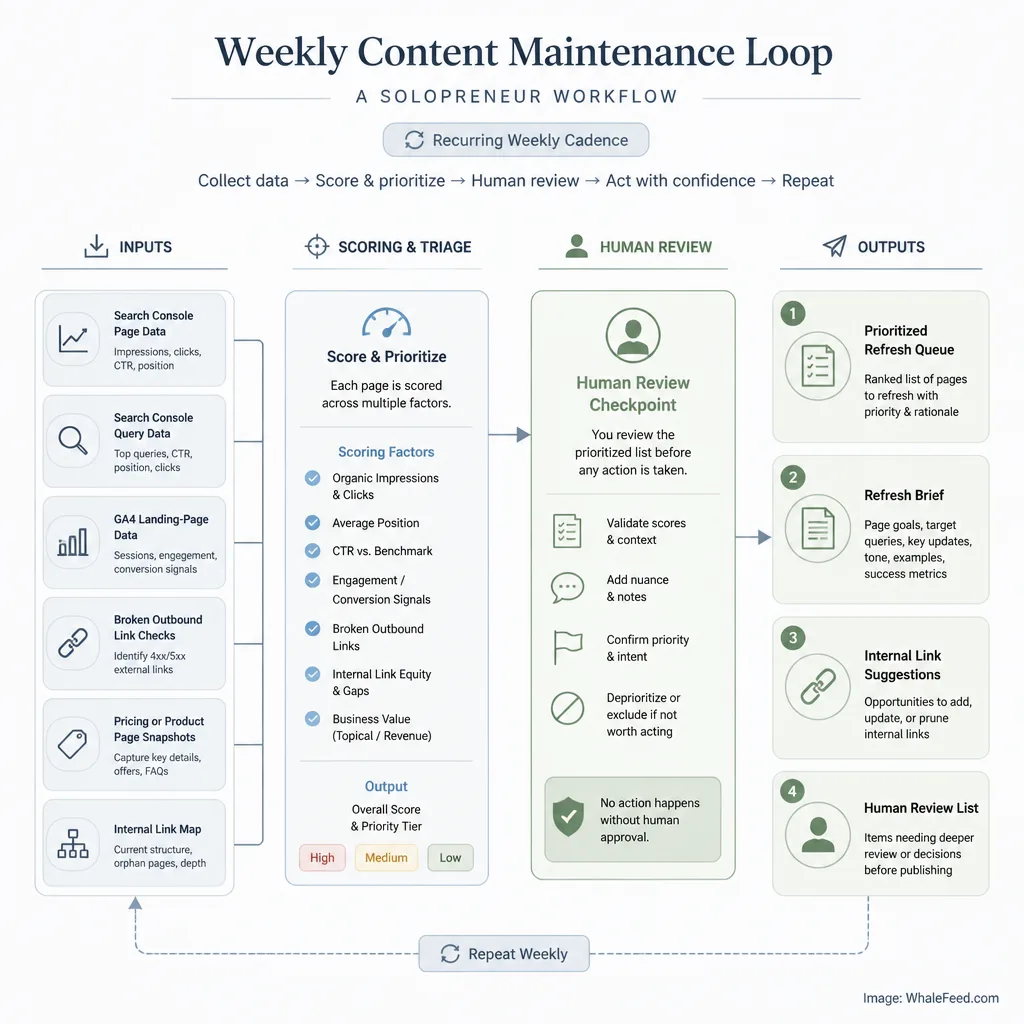
Inputs: GSC, GA4, crawl checks, pricing-page snapshots, internal link map
At a practical level, this workflow runs once a week and pulls from five inputs:
- GSC page-level performance data for click and impression decline
- GSC query-level data for shortlisted pages
- GA4 organic landing-page data to confirm whether search decline is showing up in visits or engagement
- Page checks for broken outbound links and changed reference pages
- A simple internal link map built from topic clusters and money pages
This two-pass GSC approach matters. Google’s Search Console API can return page and query data, but Google also notes that more detail can mean less complete data, and Search Analytics does not guarantee every row because the API returns top rows under internal limits.[^1][^6] For a solo workflow, broad page-level triage first and query diagnosis second is the sensible design.
Outputs: prioritized refresh queue, update brief, link suggestions, human review list
By the end of each run, you want four outputs:
- a ranked list of pages worth reviewing
- one short refresh brief per flagged page
- a few internal link suggestions
- a “do nothing for now” list for suppressed false alarms
That last one matters more than people admit. A good maintenance bot should save you from bad work, not just create more work.
Step 1: Pull pages and queries that are actually slipping
Use GSC for click and query loss, not just rankings
If you build this workflow around rankings alone, you will get noise.
Search Console’s searchanalytics.query method gives you clicks, impressions, CTR, and position across dimensions such as page and query.[^1][^7] For maintenance, clicks and query changes usually matter more than rankings because they reflect real search demand meeting real page performance.
A clean weekly pattern looks like this:
- Compare last 28 days vs. previous 28 days at the page level.
- Shortlist pages with meaningful click loss.
- For those pages, pull query-level data to see which terms dropped.
Example: if a page lost 22% of clicks but impressions stayed flat, the problem may be weaker CTR, title mismatch, or a more competitive SERP. If both clicks and impressions fell, the issue may be topical decay, query drift, or weaker visibility.
Use GA4 to separate SEO decline from broader traffic noise
GA4 is not your first detector. It is your corroboration layer.
The GA4 Data API’s properties.runReport method returns table-based reports and supports the filters, dimensions, and metrics you need for landing-page checks.[^2] Google’s GA4 schema includes dimensions such as landingPage and landingPagePlusQueryString, which makes this workflow workable for small sites.[^8]
In plain English: GSC tells you whether search visibility is weakening. GA4 helps confirm whether that decline is also showing up in organic landing-page performance.
That distinction matters. If GSC drops but GA4 organic sessions are stable, you may be looking at reporting lag, low-volume variation, or a less urgent issue. If both are down, the page deserves a closer look.
How to avoid false alarms from seasonality and low-volume pages
A weekly bot without suppression rules becomes a panic machine.
Use a few simple filters:
- ignore pages below a minimum impression threshold
- ignore pages with trivial click changes
- compare 28-day windows, not just 7-day windows
- add year-over-year checks for seasonal content when possible
For example, a “best tax software” page behaving differently in March versus June is not necessarily decaying. It may just be seasonal. Your workflow should know the difference, or at least prompt you to check.
Step 2: Flag likely content decay candidates
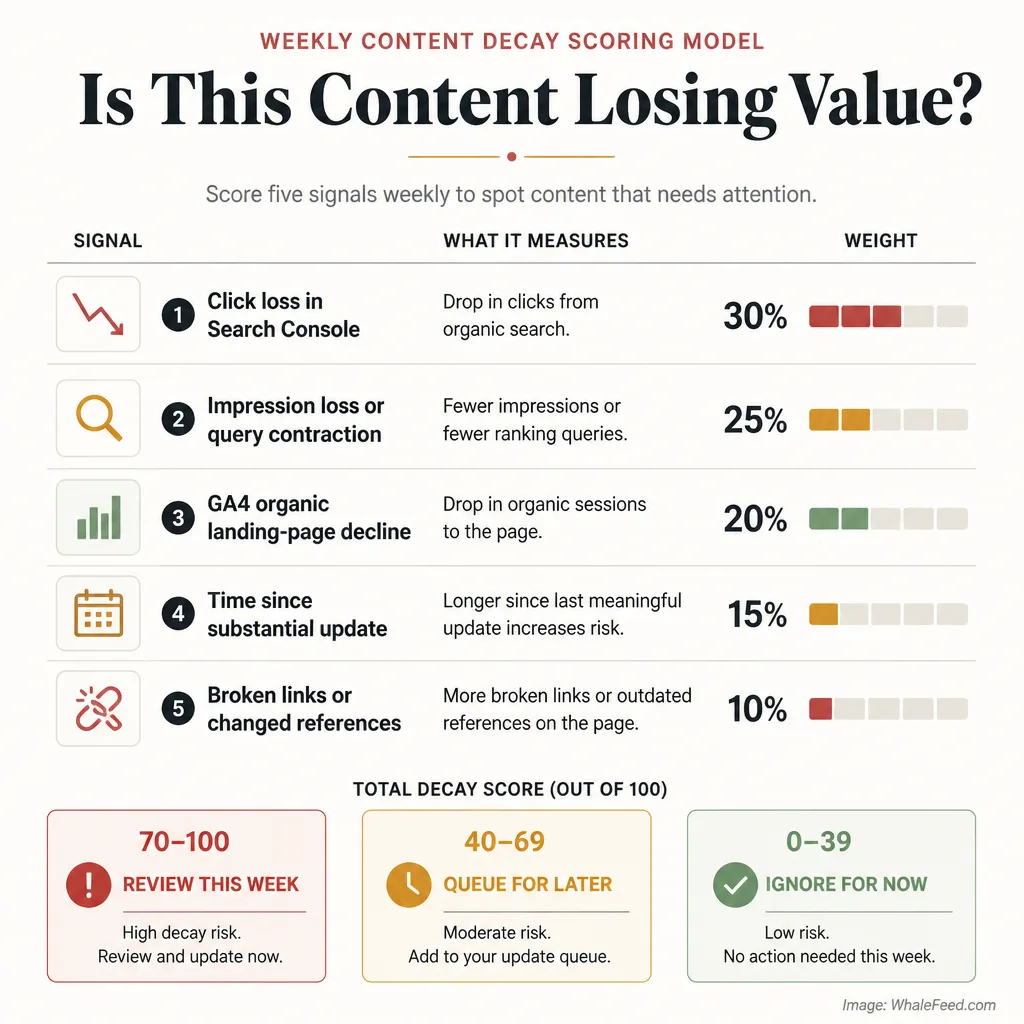
Signals that suggest decay instead of temporary fluctuation
Content decay is usually a pattern, not a single metric.
A page is more likely to be decaying when several signals line up:
- GSC clicks down materially
- impressions down or queries contracting
- GA4 organic landing-page sessions down too
- page has not had a meaningful update in months
- broken outbound links or stale references are present
- product, pricing, or comparison targets changed
One signal alone is weak. Three or four together are useful.
A simple weekly scoring model for prioritization
Do not chase precision here. Use a practical rubric.
A simple decay score out of 100 might look like this:
- Click loss in GSC: up to 35 points
- Impression loss or query contraction: up to 20 points
- GA4 organic landing-page decline: up to 20 points
- Time since substantial update: up to 10 points
- Broken links or changed references: up to 15 points
Then add action bands:
- 70–100: review this week
- 40–69: queue for later review
- 0–39: ignore unless strategically important
A page that lost 30% of clicks, 18% of organic landing sessions, and contains two dead outbound links should outrank a page that slipped from 18 clicks to 13.
That is the point of the score: better weekly triage.
Step 3: Check what changed on the page and around it
Broken outbound links and outdated references
Some refreshes are obvious. A cited study 404s. A recommended tool rebrands. A competitor comparison page disappears.
These are not glamorous wins, but they matter. If your content promises current guidance and sends readers to dead or misleading destinations, trust erodes before rankings do.
A lightweight check can fetch the page HTML, extract outbound links, and test status codes. You do not need an enterprise crawler. For a solo workflow, “is this link dead, redirected strangely, or clearly changed?” is often enough.
Changed pricing pages, product pages, and comparison targets
This is especially useful for affiliate, SaaS, and comparison content.
If you mention pricing tiers, free plans, or competitor differences, your workflow can keep a simple snapshot of those target pages and compare the current version with the last saved one. Even a basic text diff is enough to catch the big stuff: pricing moved, plan names changed, trial terms disappeared.
That is a good example of why maintenance beats blind publishing. One pricing change can make an old comparison article quietly wrong.
When a page should be refreshed, merged, redirected, or left alone
Not every flagged page should be updated.
Use four branches:
- Refresh when the topic still matters and the page has recoverable value
- Merge when two weak pages overlap and split relevance
- Redirect when the page is outdated beyond repair or strategically redundant
- Leave alone when the loss is minor, seasonal, or not worth the effort
This is where judgment enters. The workflow can suggest. You decide.
Step 4: Generate a refresh brief instead of auto-editing the article
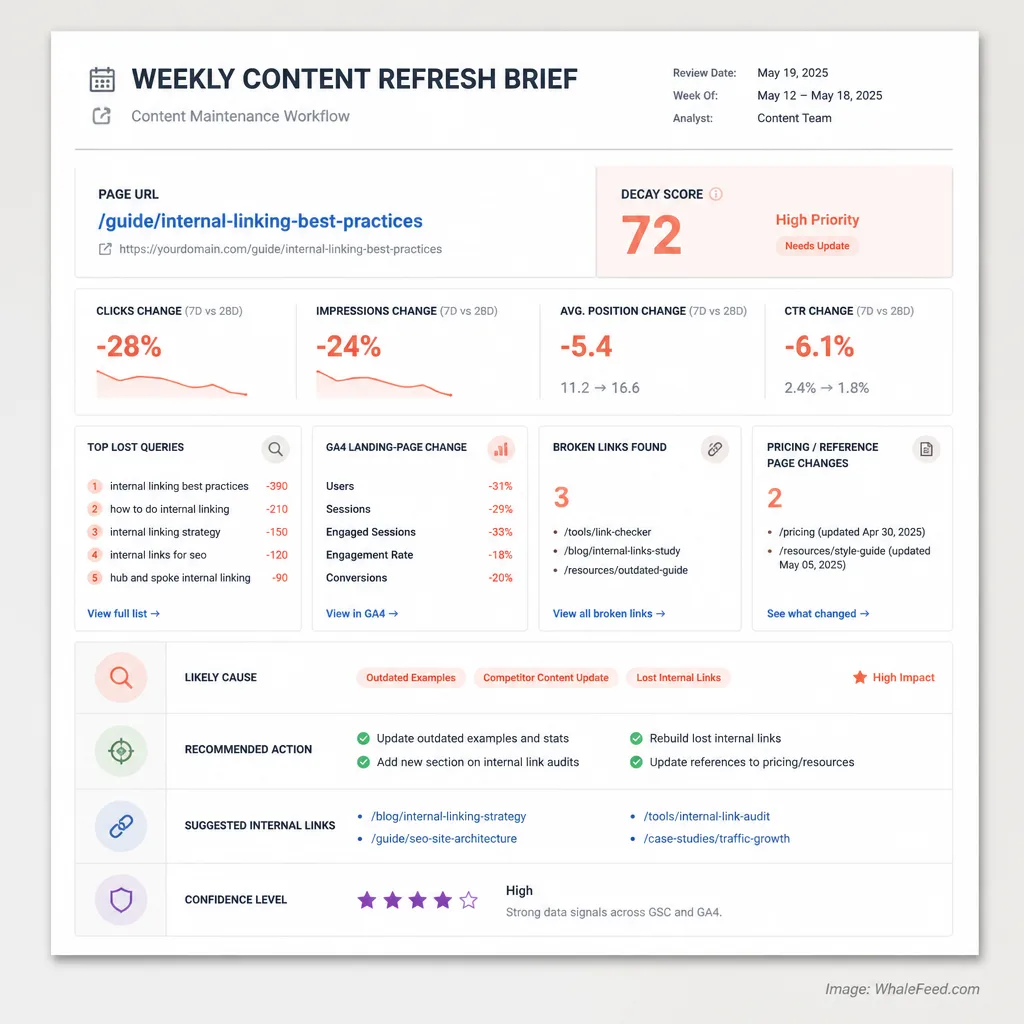
What the brief should include
The output should be a short, operator-friendly brief, not a wall of machine text.
A useful refresh brief includes:
- page URL
- current decay score
- clicks and impressions change
- top lost queries
- GA4 landing-page change
- broken links found
- changed pricing or reference pages
- likely cause
- recommended action
- suggested internal links
- confidence level
Think of it as a maintenance ticket for yourself.
Here is a realistic example:
URL: /best-email-tools-for-creators
Issue: clicks down 27%, organic landing sessions down 19%
Likely cause: pricing references outdated; competitor page now compares “creator plans” differently; two lost queries shifted toward “newsletter platform for paid subscriptions”
Recommended action: refresh intro and comparison table, update pricing notes, add two internal links from newsletter and monetization cluster pages
That is actionable. A generic rewrite is not.
How AI helps with synthesis without becoming the publisher
AI is useful here because it can summarize evidence, not because it should control the page.
Let it do things like:
- cluster lost queries into themes
- summarize what changed on reference pages
- draft update recommendations
- suggest likely internal anchors
Do not let it silently rewrite 2,000 words and publish. That is not leverage. That is outsourced risk.
Step 5: Suggest internal links based on topic clusters and money pages
How to identify likely source pages and target pages
Internal linking suggestions are most useful when they follow a simple map:
- target pages: money pages, strategic landing pages, or underlinked high-value articles
- source pages: relevant supporting articles with contextual overlap
You do not need embeddings on day one. A simple spreadsheet with cluster labels works.
For example:
- Cluster: email marketing
- Money page: /email-automation-consulting
- Supporting pages: /newsletter-monetization, /welcome-sequence-examples, /email-copy-mistakes
If the maintenance bot flags /welcome-sequence-examples, it can also check whether that page should link to the consulting page or another relevant commercial destination.
How to keep internal link suggestions relevant instead of spammy
This is where many internal linking automations go bad.
A good suggestion should answer three questions:
- Is the source page topically relevant?
- Is the target page genuinely useful to the reader at that moment?
- Would the anchor feel natural in the paragraph?
If the answer to any of those is no, skip it. Internal linking is editorial structure, not sitewide confetti.
Build the n8n workflow without making it fragile
Suggested node sequence and logic
A clean workflow in n8n usually looks like this:
- Schedule Trigger runs weekly
- HTTP Request pulls GSC page-level data
- Filter/Code node computes page deltas
- HTTP Request pulls GSC query data for shortlisted URLs
- HTTP Request pulls GA4 landing-page data
- Page check step tests outbound links and key reference pages
- Set/Code node computes decay score
- AI step drafts refresh briefs and link suggestions
- Google Sheets, Notion, Trello, or email step sends the review queue
- Human approval checkpoint decides what happens next
n8n’s docs explicitly support API-based fallback through the HTTP Request node when a built-in integration does not cover the operation you need, which makes this architecture realistic even when connector coverage changes.[^4] Its data mapping system also makes it easier to pass page URLs, deltas, and issue flags between steps.[^9]
Storage, logging, and weekly reporting
Keep your source of truth outside the workflow itself. A spreadsheet, Airtable-style base, or lightweight database is enough.
Log:
- date flagged
- URL
- score
- issue type
- human decision
- action taken
- date updated
n8n execution history helps with traceability, retries, and debugging, which matters more than people think once a workflow has been running for months.[^10]
Where manual checkpoints belong
Put a human checkpoint before:
- any content rewrite
- any pricing or comparison update
- any merge or redirect
- any internal link pushed to a money page for commercial intent
Those are not implementation details. They are trust controls.
Guardrails: the boring rules that make this useful
No auto-publishing
The bot should never publish content changes on its own.
That includes “small” updates. Small factual errors are still errors. And the more commercial the page, the more review matters.
Human review before any content change
Automation should narrow the field. You make the editorial call.
That is especially important because Search Console data has row limits and top-row behavior, and detailed queries can trade completeness for granularity.[^6][^7] Your workflow is seeing useful signals, not perfect reality.
Confidence thresholds and exception handling
Set minimum conditions for action:
- no refresh brief unless score exceeds threshold
- no redirect recommendation without overlap review
- no pricing-change alert unless snapshot diff exceeds a simple threshold
- no internal link suggestion if no natural anchor appears
These rules make the system quieter, which makes it more valuable.
A realistic weekly maintenance checklist for 2026
What to review in 30 to 60 minutes
For most solopreneurs, this should be a short weekly ritual:
- review the top 5 to 10 flagged pages
- dismiss obvious false alarms
- approve 1 to 3 refresh briefs
- fix broken links immediately if the fix is simple
- queue larger updates for the week
- add approved internal links
- log what you changed
That is enough. You are building consistency, not maintenance theater.
What success looks like after a few months
Success is not “the bot recovered all my traffic.”
Success looks more like this:
- fewer neglected pages
- earlier detection of slipping URLs
- faster refresh cycles
- cleaner internal links
- fewer outdated claims
- better judgment about what deserves effort
In other words, less chaos.
Conclusion
The best use of agentic marketing ops for a solopreneur is not autonomous publishing. It is disciplined maintenance.
A weekly bot built with n8n, GSC, and GA4 can help you see which pages are slipping, why they may be slipping, and what deserves attention next. That alone is powerful. Not because it replaces editorial judgment, but because it protects it from getting buried under noise.
More content is not always the answer. Sometimes the real growth move is to stop letting your existing content quietly decay.
FAQ
What is an n8n SEO workflow for content maintenance?
It is a scheduled automation that pulls signals from tools like Google Search Console and GA4, flags pages that may be losing traction, checks for common maintenance issues, and creates a review queue for human action. In this workflow, the goal is weekly upkeep, not auto-publishing.
How do you detect content decay without manually auditing every page?
Start with Google Search Console to compare page-level click and impression changes across time windows. Then inspect query-level losses only for shortlisted pages. Use GA4 as a second signal to confirm whether the landing page is also seeing weaker organic sessions or engagement.[^1][^2]
Why use GSC before GA4 in a content decay workflow?
GSC is closer to search visibility and click loss, so it is usually the better first detector for organic decline. GA4 is more useful as a corroborating layer because it shows whether the drop is translating into weaker landing-page performance.[^1][^2]
What should a weekly content maintenance bot never do?
It should not auto-rewrite and publish articles, remove pages, create redirects, or change pricing and comparison claims without review. The safe role of the bot is to surface evidence, draft a refresh brief, and help you prioritize decisions.[^4][^5]
What signals should be in a content decay score?
A practical score can combine click loss, impression loss, query contraction, GA4 organic landing-page decline, time since last meaningful update, and issue flags such as broken outbound links or changed pricing references. The point is not perfect precision. The point is better triage.
How can AI help with internal linking suggestions?
AI can suggest likely source pages and target pages by using topic clusters, anchor context, and money-page relevance. It works best as a recommendation layer that proposes a few strong options instead of spraying links across the site.
What is a refresh brief in this workflow?
A refresh brief is a short update document for each flagged URL. It can include the page URL, click-loss summary, top lost queries, broken-link findings, changed references, likely causes, update recommendations, and possible internal links to add.
What comparison windows work best for a weekly content maintenance checklist in 2026?
For most small sites, a practical setup is weekly monitoring with broader comparison windows such as last 28 days versus previous 28 days. If seasonality matters, year-over-year checks can reduce false alarms better than short week-over-week swings.
[^1]: Google Search Console’s Search Analytics documentation explains that searchanalytics.query() exposes Performance report data and supports grouping and filtering across dimensions such as page and query. It also notes that detailed data retrieval should be interpreted carefully. (developers.google.com)
[^2]: Google Analytics Data API documentation states that properties.runReport returns tabular reports with requested dimensions and metrics and is the core reporting method for custom GA4 report queries. (developers.google.com)
[^3]: Google’s GA4 Data API schema includes landing-page dimensions useful for page-level content maintenance analysis, including landingPage and landingPagePlusQueryString. (developers.google.com)
[^4]: n8n documentation notes that when a built-in node does not support a required operation, the HTTP Request node can be used to call the service API with configured credentials. (docs.n8n.io)
[^5]: n8n documentation includes human-in-the-loop and approval-oriented workflow patterns, supporting the use of review checkpoints rather than autonomous publishing. (docs.n8n.io)
[^6]: Google’s “Getting your performance data” documentation notes that more detailed Search Console queries can come at the expense of losing some data and that Search Analytics exposes a maximum amount of top-row data per day per search type. (developers.google.com)
[^7]: Google’s Search Analytics API documentation states that results are grouped by chosen dimensions, sorted by clicks, and constrained by internal limitations, meaning not all rows are guaranteed to be returned. (developers.google.com)
[^8]: Google Analytics Data API reporting references and schema documentation support the use of landing-page dimensions and filtered reporting for weekly content checks. (developers.google.com)
[^9]: n8n’s data mapping documentation explains how data from previous nodes can be referenced by name across workflow steps, which is useful when carrying page URLs, scores, and issue flags through a multi-step automation. (docs.n8n.io)
[^10]: n8n execution history documentation explains that workflow executions can be reviewed, filtered, retried, and used for debugging, which makes weekly maintenance workflows easier to audit over time. (docs.n8n.io)