Traffic Loops: How to Build a Referral Engine That Sends Visitors Without SEO
SEO can be a strong acquisition channel, but it is slow, competitive, and unpredictable. Rankings change, content loses momentum, and newer sites often wait months for meaningful traction. If SEO is your only traffic source, your acquisition strategy is more fragile than it looks.
Traffic loops offer a second path. Instead of waiting for search demand, you create something useful enough that people naturally pass it along. That might be a template sent to a teammate, a calculator embedded on a partner site, or a scorecard result shared in a community.
What makes this valuable is simple: distribution becomes a byproduct of usefulness, not a separate campaign. And unlike a one-time promotion, a good loop can keep bringing in qualified visitors as new users repeat the same behavior.
In this guide, you’ll learn how traffic loops work, which type fits your product or content, what metrics matter, and how to launch a minimum viable version in one week.
What a traffic loop actually is
A traffic loop is a repeatable system where one user action creates exposure to a new visitor, some of those visitors reach value, and some of them repeat that same action.
The basic model looks like this:
Visitor → activation → share trigger → referred visit → activation → repeat
The key word is repeat.
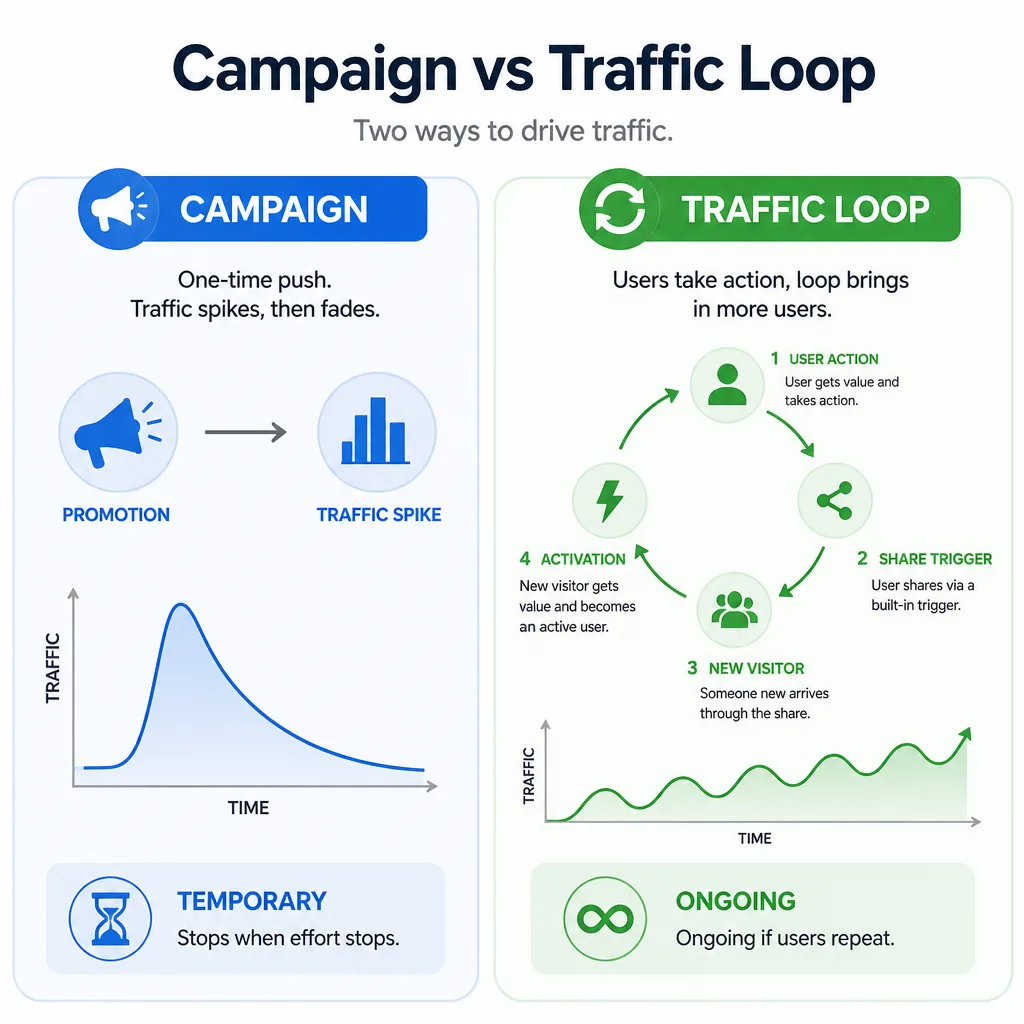
A campaign sends traffic once. A loop keeps sending traffic only if downstream users do the same thing that brought them in.
Why some referrals compound and others stall
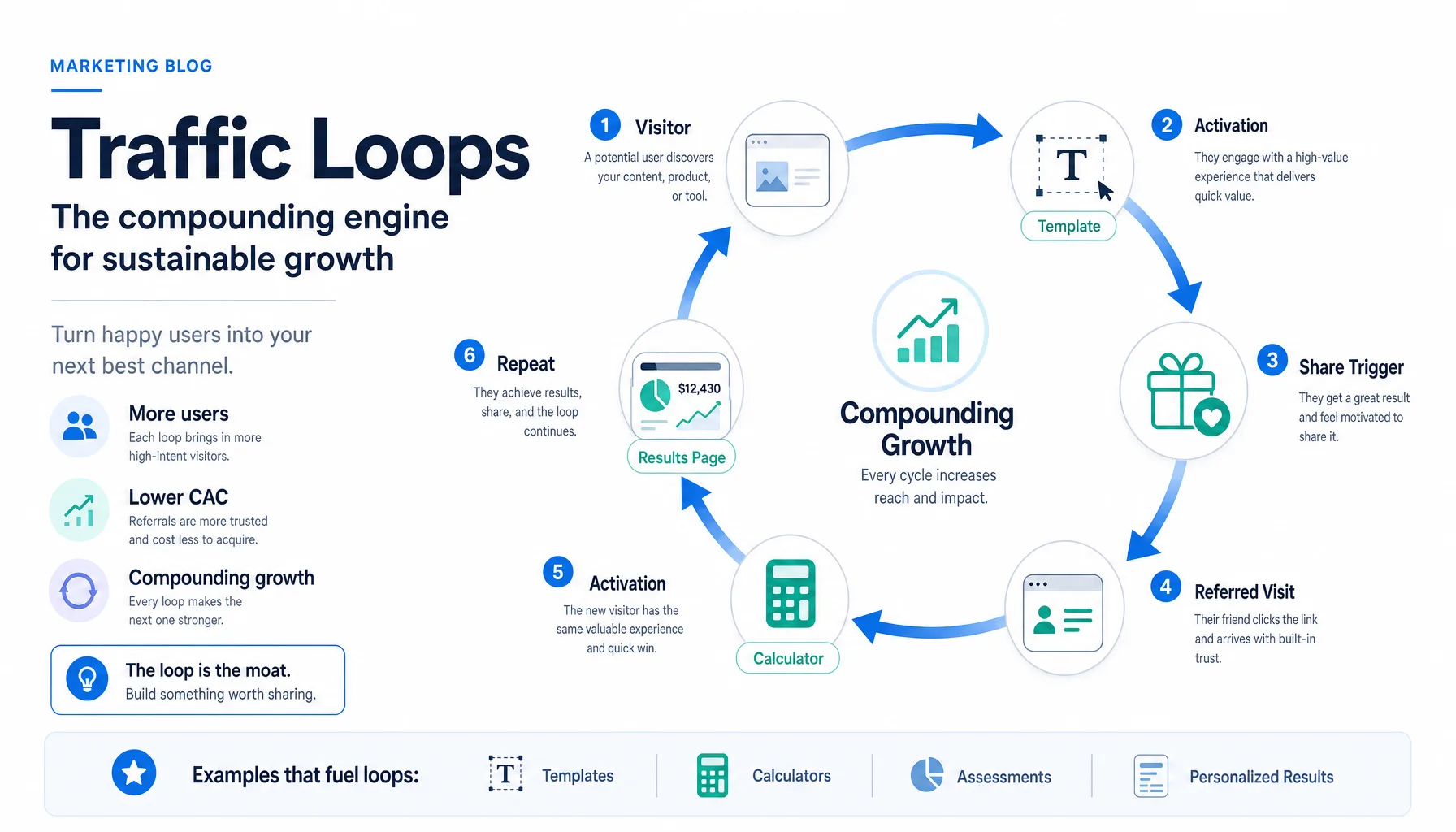
A loop grows when sharing is built into the job the user is already trying to complete.
For example, imagine a founder publishes a team meeting template. One user duplicates it, fills it out, and sends it to a manager for review. The manager clicks, uses the template, and passes it to another teammate. The sharing is not forced. It happens because collaboration is already part of the workflow.
A loop stalls when value stays private.
If someone reads an article, gets the answer, and leaves, there may be no reason to involve anyone else. The content helped, but it did not create a repeatable sharing behavior.
The difference between a campaign and a loop
| Type | How it gets traffic | Duration | Weakness | Strength |
|---|---|---|---|---|
| Campaign | One-time push, promotion, launch, or ad burst | Temporary | Stops when effort stops | Fast spike |
| Traffic loop | Users repeatedly create new exposure | Ongoing, if it works | Harder to design well | Can compound over time |
Bottom Line: A loop is not defined by reach. It is defined by whether new users repeat the same distribution behavior.
The three loop types most teams can ship
Most teams do not need a full referral program first. They need a minimum viable referral engine. In practice, that usually means one of three loop types.
Invite loops
An invite loop works when the asset becomes more useful with another person involved.
That second person might be a teammate, editor, client, reviewer, or manager.
A practical example: a campaign planning checklist includes a send to teammate for approval action after completion. The share is useful because the work needs review.
Best for:
- Shared templates
- Workspaces
- Planning tools
- Approval flows
- Collaborative checklists
Strength: Usually attracts qualified traffic because the inviter knows who should join.
Limitation: Weak when the asset can be used entirely alone.
Embed loops
An embed loop works when someone else can place your asset inside their own distribution channel.
Think calculators, widgets, maps, interactive charts, or lightweight diagnostic tools.
Example: an agency builds a website conversion calculator. A partner newsletter archives it on a resource page, or an industry blog embeds it in an educational article. Readers use the tool and click through for the full experience.
Best for:
- Calculators
- Widgets
- Interactive tools
- Charts
- Benchmarks with lightweight UI
Strength: Can create durable traffic if the embed stays live.
Limitation: Requires a useful standalone asset and a host that benefits from publishing it.
Co-created output loops
A co-created output loop works when the user generates something worth showing.
That output might be:
- A benchmark report
- A scorecard
- A custom checklist
- A summary page
- A draft plan
Example: a newsletter growth scorecard gives users a percentile ranking and three tailored recommendations. A creator shares the result in a private founder group and asks, “Does this benchmark seem right?” Curious peers click to run their own score.
Best for:
- Assessments
- Audits
- Scorecards
- Generators
- Planning tools
Strength: The result becomes the marketing asset.
Limitation: Generic output rarely spreads. Specificity matters.
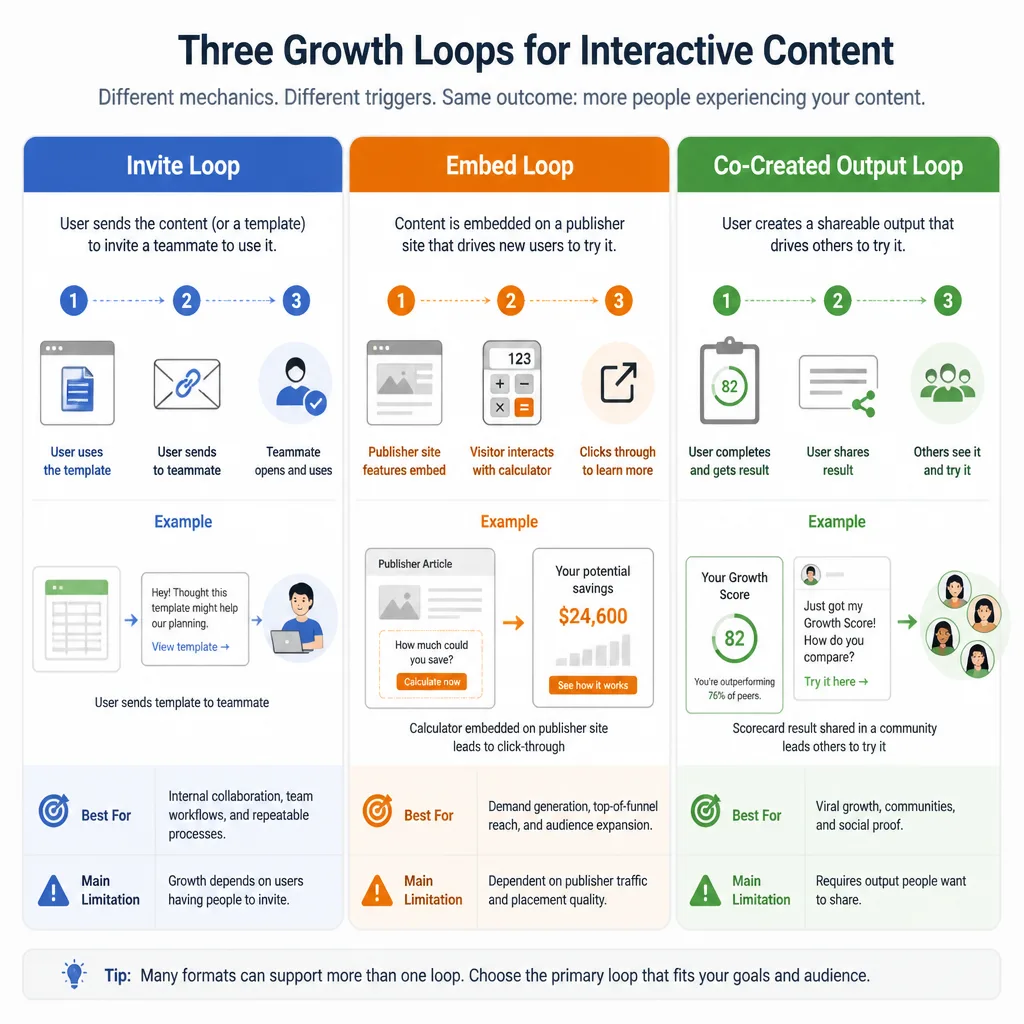
Loop type comparison
| Loop Type | Best For | Natural Trigger | Strength | Limitation | Example |
|---|---|---|---|---|---|
| Invite loop | Collaborative workflows | Need review, input, or approval | High relevance | Weak for solo use cases | Template sent to teammate |
| Embed loop | Utility tools for publishers | Host wants to help their audience | Durable placement | Needs host adoption | Calculator embedded in a resource page |
| Co-created output loop | Personalized tools and assessments | User wants to show, compare, or ask for feedback | Strong reason to click | Fails if output is generic | Shared scorecard result page |
Decision Rule: The best loop usually matches how your users already work, not the one that sounds most viral.
How to choose the right loop for your product or content
Use three variables:
- Utility type — Is the value collaborative, embeddable, or personalized?
- Sharing context — Does the user naturally need another person, another audience, or public visibility?
- Audience structure — Are you serving an individual, a team, or a publisher?
When invite loops work best
Choose an invite loop when value increases with another person’s participation.
Examples:
- A content brief template that needs editor approval
- A checklist a team uses to coordinate a product launch
- A draft campaign plan reviewed by a manager
When embed loops work best
Choose an embed loop when your asset can stand alone and help another publisher serve their audience.
Examples:
- A pricing calculator for SaaS buyers
- A cost estimator in a partner resource hub
- A lightweight benchmark widget in a newsletter archive
When co-created output works best
Choose co-created output when the result is personally relevant, specific, or comparison-driven.
Examples:
- A CAC benchmark score
- A site audit summary
- A channel ROI estimate
- A customized launch checklist
Bottom Line: If your asset improves with teammates, start with invites. If it helps publishers educate their audience, test embeds. If it produces a result people want to show or discuss, build co-created output.
The SHARE framework for natural share triggers
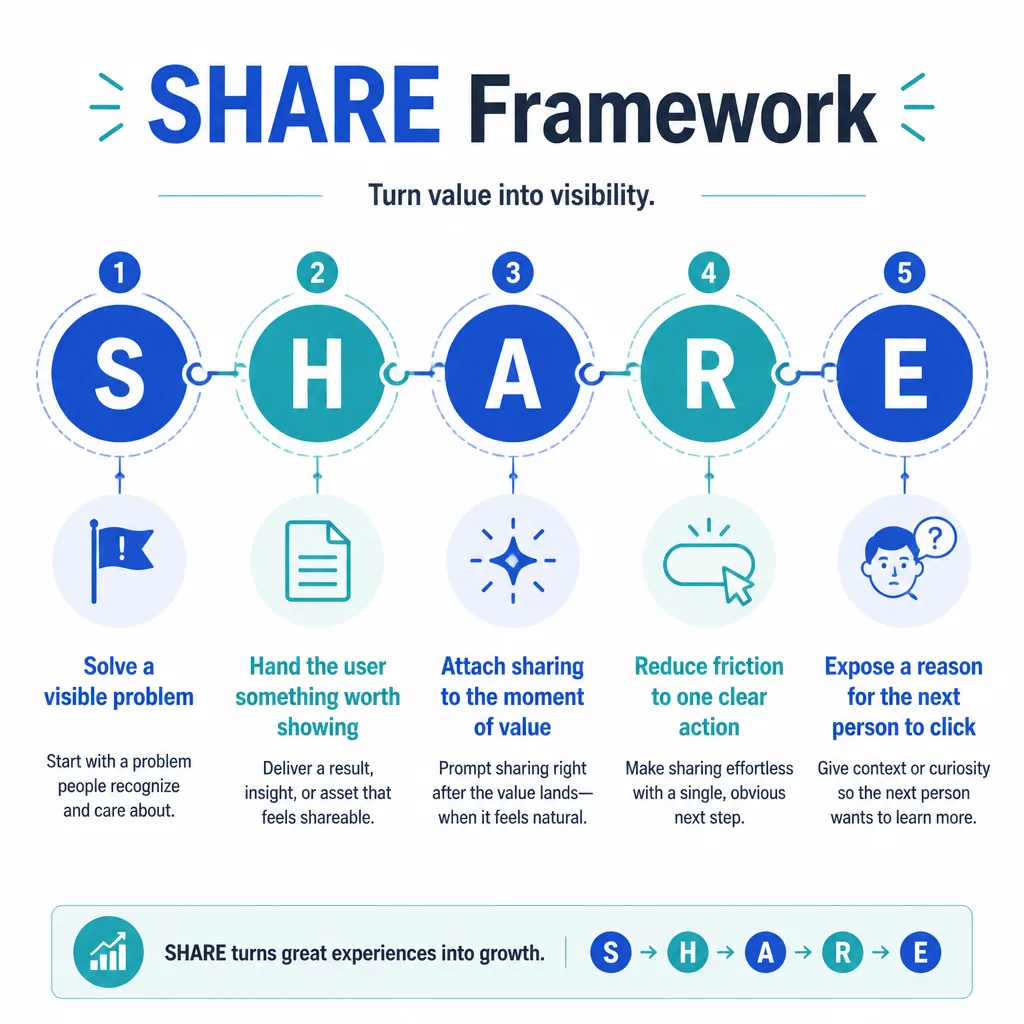
Many weak loops fail because the share ask is disconnected from the value. To avoid that, use the SHARE framework.
The SHARE framework
| Step | Meaning | What it looks like in practice |
|---|---|---|
| S | Solve a visible problem | Address a problem the user can name immediately |
| H | Hand the user something worth showing | Give them an output, asset, or result with concrete value |
| A | Attach sharing to the moment of value | Ask for the share right after usefulness appears |
| R | Reduce friction to one clear action | Use one-click copy, send, invite, or embed actions |
| E | Expose a reason for the next person to click | Make the shared message obviously relevant |
S — Solve a visible problem
Shareable assets usually solve a clear problem, not a vague interest.
A content ROI calculator is easier to share than a broad article about content strategy because the user can explain why it matters right away: “We’re trying to figure out whether this channel is worth the effort.”
H — Hand the user something worth showing
People rarely share empty confirmation screens. They share something concrete.
Good examples:
- A benchmark score
- A filled-in template
- A custom checklist
- A draft plan
- A short audit summary
A — Attach sharing to the moment of value
Ask too early and the loop weakens.
If the user just generated a scorecard, that is the right time to offer:
- Send to teammate
- Copy result link
- Share benchmark
- Embed this tool
R — Reduce friction to one clear action
Do not make users hunt for sharing options.
If people already copy screenshots or links manually, formalize that behavior with a visible button and a tracked share URL.
E — Expose a reason for the next person to click
The share should answer one question: Why should the next person care?
Better:
- “See how your CAC compares to this benchmark.”
Worse:
- “Check out this website.”
Key Insight: Natural share triggers do not feel like promotion. They feel like the next useful step.
Examples of share triggers that feel natural
Templates people send to teammates
A launch checklist or content brief often needs review. That makes the share behavior private, practical, and high intent.
Example: “Use this checklist to review our launch plan.”
Why it works:
- Clear job to be done
- Immediate relevance to the recipient
- Collaboration is built into the workflow
Calculators that generate benchmarked results
Calculators can create curiosity and comparison.
Example: A CAC calculator shows that your paid acquisition cost is 28% above an industry benchmark. The user forwards it to a manager with, “Can we review this?”
Why it works:
- Personalized result
- Easy to explain
- Strong reason for the next click
Checklists that help groups coordinate work
Checklists spread when teams use them to align on process.
Example: An agency shares a client onboarding checklist with internal team members and then adapts it for clients.
Why it works:
- Reusable across teams
- Useful as a shared document
- Often triggers multiple private invites
Personalized output pages that create curiosity
Result pages work best when they are specific enough to prompt discussion.
Example: A site audit tool produces a score, a few priority fixes, and a short summary link. The user posts it in a Slack group asking for feedback.
Why it works:
- The output creates context
- The recipient knows what they are clicking into
- The result invites comparison or advice
The metrics that prove a loop works
A loop is not working because it gets clicks. It is working when it creates qualified, repeatable activation.
Activation rate
Activation rate is the percentage of visitors who reach the first meaningful value moment.
That might mean:
- Completing a calculator
- Duplicating a template
- Generating a report
- Viewing a personalized result
- Creating the first workspace
If activation is weak, nothing else matters yet.
Invite rate or share rate
This is the percentage of activated users who trigger the distribution event.
That event might be:
- Sending an invite
- Copying a share link
- Embedding the tool
- Sharing a result page
Conversion from shared visit to activated user
This shows whether referred visitors are actually good traffic.
If people click but do not reach value, your share context or landing experience is probably mismatched.
K-factor, in simple terms
K-factor is a directional measure of how many additional users each activated user creates through referral behavior over a given period.
A simple way to think about it:
K-factor ≈ share rate × referred visit-to-activation conversion
Do not treat it like a magic number. It is useful only as part of a bigger picture.
Why retention still matters
Retention matters because some loops depend on repeated behavior. If users never come back, they may never create more outputs, invite more people, or maintain live embeds.
A loop with decent sharing but poor retention can still fade over time.
Bottom Line: Track activation first, then sharing, then referred activation, then retention. If activation is weak, improve value delivery before trying to increase shares.
A minimum viable traffic loop you can ship in one week
Do not start with a full referral program. Start with one small, measurable loop.
Day-by-day launch plan
Day 1: Pick one audience problem and one loop type
Choose one painful problem for one audience.
Example: “Content leads need a faster way to review campaign briefs.”
Day 2: Define the asset and the share trigger
Pick the asset and the exact moment of value.
Example:
- Asset: campaign brief template
- Value moment: duplicated and ready to edit
- Share trigger: send to teammate for review
Day 3: Create the landing flow and value moment
Reduce time to first value.
If it is a calculator, ask for only the minimum inputs. If it is a template, let users preview or duplicate it quickly.
Day 4: Build the share surface and tracking
Add:
- Unique share links
- UTM parameters
- Event tracking for activation
- Event tracking for share actions
Some private sharing will fall into dark social, so attribution may be incomplete.
Day 5: Launch to a small segment
Launch to a narrow, relevant group first. That makes feedback easier to interpret.
Day 6: Review metrics and friction points
Look for stalls:
- Before activation
- Before sharing
- After the referred click
Day 7: Improve the biggest bottleneck
Usually this is one of three things:
- Weak messaging
- Generic output
- Poor share CTA placement
Implementation checklist
- Define one audience and one painful problem
- Choose one loop type
- Build one useful asset
- Identify the first value event
- Add one natural share action
- Track activation and share events
- Launch to a small segment
- Review referred activation
- Improve the biggest point of friction
Decision Rule: Launch the smallest loop you can measure, then improve the thing people share.
Common mistakes that break loops
Asking for shares before value is delivered
This is the fastest way to make the ask feel promotional.
Making the output too generic
If the result says what the user already knows, it will not spread.
A vague “Your marketing needs improvement” score is weak. A benchmark like “Your CAC is 28% above the peer median” is much stronger.
Creating extra steps between result and share
If users must sign up after seeing the result, dig through menus, or recreate the output, you are adding friction at the worst possible moment.
Tracking clicks but not activation
A noisy loop can look healthy if you only measure visits.
You need to know whether referred visitors actually reach first value.
Confusing virality with quality traffic
High share volume does not always mean useful traffic. Private teammate invites often outperform broad public shares in conversion quality.
Common Mistake: Teams often optimize the CTA first. In many cases, the bigger problem is that the shared object is not compelling enough.
How to scale a loop after the first signal
Once you see signs of life, scale carefully.
Improve the output, not just the CTA
Make the thing being shared more specific, more personalized, or more collaborative.
A better result page often beats a louder share prompt.
Test audience-specific variants
Different audiences share for different reasons.
A founder may share a benchmark score for comparison. A manager may share a checklist for coordination. Build versions that reflect that behavior.
Add distribution surfaces inside product and content
Place the trigger where users already experience value:
- Result pages
- Onboarding flows
- Templates
- Emails
- Embedded tools
- Resource content
Use paid traffic carefully to seed a proven loop
Paid traffic can help once the loop already shows qualified activation. It is useful for seeding, not rescuing, a weak loop.
For teams that want to amplify a validated asset with paid acquisition, a service like Traffics.io can be relevant for bringing more initial users into a working funnel. The sequence matters: prove the loop first, then add spend.
Bottom Line: Scale by improving usefulness and fit before increasing distribution pressure.
Conclusion
Traffic loops are not magic, and they do not need to go viral to matter.
A useful loop simply turns some users into distributors because sharing helps them do something practical: get feedback, coordinate work, compare results, or publish something useful. That is enough to reduce dependence on SEO and create a second acquisition path.
If you are starting from scratch, do three things first:
- Pick one audience problem
- Choose one loop type
- Define one clear first value moment
Then ship the smallest version you can measure.
A good referral engine usually starts as a modest, useful loop. Build that first. Compounding comes later.
FAQ
What is a traffic loop in plain language?
A traffic loop is a repeatable system where one user action exposes the next visitor, some of those visitors get value, and some repeat the same action. In simple terms, one user gets value, shares something useful, and brings in the next user.
How is a traffic loop different from a one-time campaign?
A campaign produces traffic once and then fades unless you keep pushing it. A traffic loop can keep generating visitors because new users repeat the same behavior that brought them in. The difference is repeatability, not just reach.
Can you build a referral engine without a formal referral program?
Yes. Many referral engines work without discounts, credits, or incentives. If your template, calculator, checklist, or result page is genuinely useful, people may naturally send it to teammates, embed it on their sites, or share the output.
What are the main types of traffic loops?
The three most practical types are invite loops, embed loops, and co-created output loops. Invite loops work when collaboration improves the experience. Embed loops work when a third party can place your tool or asset in their own content. Co-created output loops work when users generate a result worth sharing, such as a scorecard, report, or checklist.
When should I use an invite loop instead of an embed loop?
Use an invite loop when your product or asset becomes more useful with another person involved, such as a teammate, reviewer, client, or manager. Use an embed loop when your tool has standalone utility and publishers, partners, or communities would benefit from placing it in front of their audiences.
What makes a share trigger feel natural instead of forced?
A natural share trigger happens right after the user gets value and helps them take the next logical step. For example, sending a completed checklist to a teammate for approval feels natural. A generic “share this” prompt before the user gets a result usually feels forced.
What is activation rate in a traffic loop?
Activation rate is the percentage of visitors who reach the first meaningful value moment. That might be generating a report, duplicating a template, completing a calculator, or viewing a personalized result. It matters because a loop cannot grow if new visitors do not reach value.
What is K-factor in simple terms?
K-factor is a directional measure of how many additional users each activated user creates through referral behavior over a given period. A simple way to think about it is share rate multiplied by the conversion rate from referred visit to activated user. It is useful, but it should be paired with activation quality and retention.
Why is K-factor not enough on its own?
A strong K-factor can still hide weak quality if referred visitors do not retain, convert, or get real value. It tells you whether the loop is creating more users, but not whether those users are useful or likely to continue the loop.
How do I know if my referral traffic loop is working?
Track four things first: activation rate, share or invite rate, referred-visit-to-activation conversion, and retention. If activation is weak, fix value delivery. If users activate but do not share, improve the output or trigger. If referred visitors click but do not activate, the share context or landing experience may be mismatched.
What is a realistic minimum viable traffic loop?
A minimum viable traffic loop is a small, testable referral mechanism built around one audience problem, one asset, and one share action. For example, a calculator that produces a benchmark result and gives the user a simple link to send to a teammate is enough to test the loop.
How long does it take to launch a basic referral loop?
A basic version can often be launched in a week if the scope stays narrow. The practical path is to choose one audience and one loop type, define the value moment, build a simple landing flow, add the share surface and tracking, launch to a small segment, and then improve the biggest point of friction.
What are the most common mistakes that break traffic loops?
The most common mistakes are asking for shares before value is delivered, making the output too generic, adding friction between the result and the share action, tracking clicks but not activation, and assuming high share volume means high-quality traffic.
Can paid traffic help a referral loop?
Yes, but usually after the loop has shown an initial signal. Paid traffic is most useful for seeding or amplifying a validated loop, not for forcing a weak one to work. Once activation and referred activation are solid, paid distribution can help you test scale more efficiently.