Outbound Automation Without Destroying Deliverability: A Deliverability-First System for 2027
Most outbound teams think their bottleneck is volume. It usually isn’t. The real constraint is inbox placement.
You can have solid sequences, decent personalization, and a polished automation stack, but if mailbox providers stop trusting your sending patterns, none of that matters. Messages land in spam, get rate-limited, or sink into low-visibility inbox tabs. From the outside, it looks like the copy stopped working. In reality, reputation usually failed first.
That’s the right way to think about outbound in 2027. Cold outreach should be built around sender trust: authentication, alignment, list quality, throttling, suppression, and monitoring. Automation should sit on top of that system, not replace it.
The goal is simple: create pipeline without burning domains, muddying ownership, or scaling faster than reputation can support.
Outbound automation in 2027 starts with a deliverability-first mindset
Why inbox placement, not send volume, is the real bottleneck
Cold outbound only works if people actually see the message. Obvious, but teams still optimize the wrong layer. They test subject lines, add more variants, or buy more inboxes before answering the harder question: are messages consistently reaching the primary inbox?
Mailbox providers increasingly judge sender behavior at the policy and reputation level before copy quality has any chance to help. Gmail’s sender rules emphasize authentication, low spam rates, infrastructure hygiene, and easy unsubscribe handling for relevant traffic.[^1][^2] Microsoft applies similar authentication expectations to high-volume senders targeting Outlook.com, Hotmail, Live, and MSN consumer mailboxes.[^3]
What changed
The environment is less forgiving than many outbound playbooks imply. Gmail’s enforcement is ongoing, and Google said in its FAQ that starting in November 2025 it increased enforcement on non-compliant traffic, including temporary and permanent rejections.[^2] Gmail also treats bulk-sender status at roughly 5,000 messages per day to personal Gmail accounts at the primary-domain level, and once assigned, that status is effectively permanent.[^2]
The takeaway is straightforward: you can’t brute-force scale and fix deliverability later.
Core thesis
Automation only helps when reputation is protected. If your system can’t maintain stable authentication, low complaint risk, and controlled sending behavior, more automation just helps you fail faster.
Build the technical floor before you automate anything
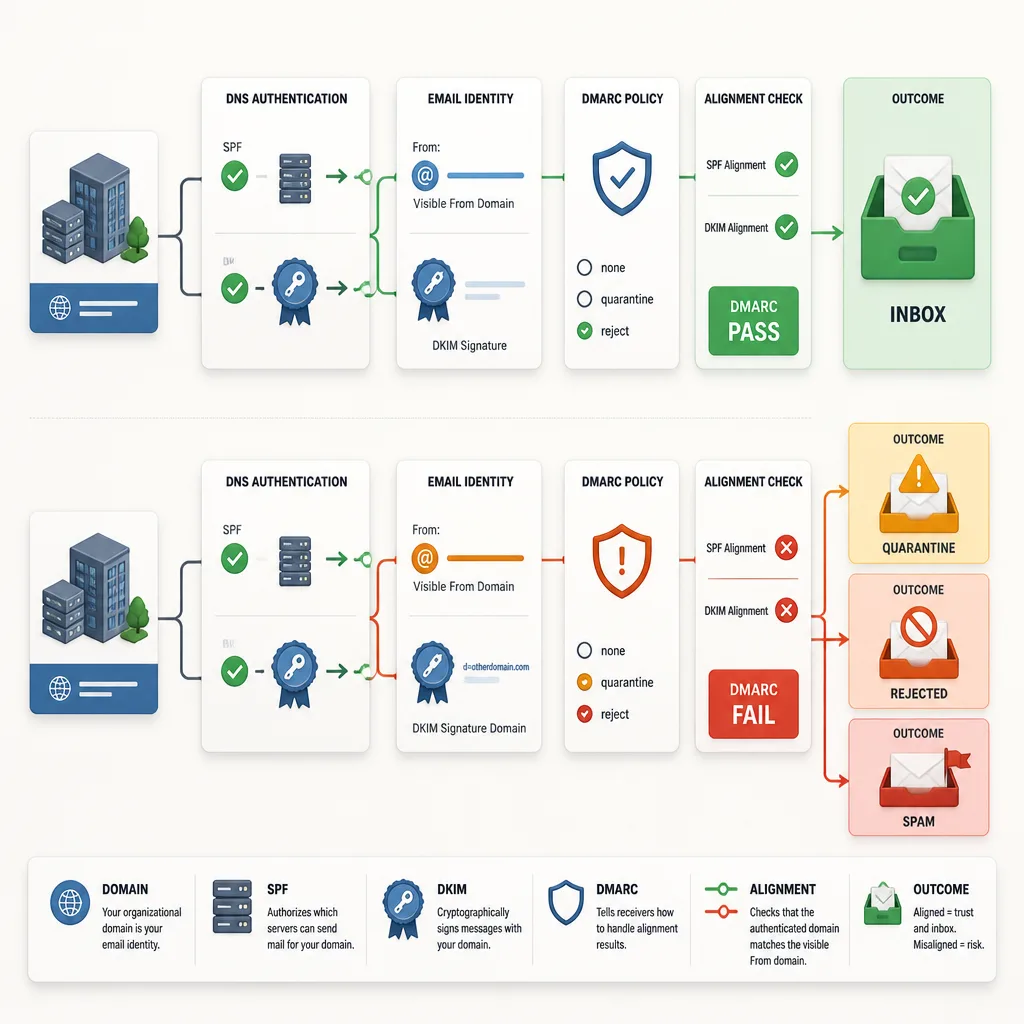
The minimum viable authentication stack: SPF, DKIM, DMARC
At minimum, outbound sending needs SPF, DKIM, and DMARC. Gmail explicitly requires authentication for senders and requires SPF, DKIM, and DMARC for bulk senders to personal Gmail accounts.[^1][^2] Microsoft’s guidance for high-volume consumer-mail senders also expects SPF, DKIM, and DMARC, with messages passing DMARC validation.[^3]
In plain English:
- SPF defines which servers can send on behalf of your domain.
- DKIM adds a signature that proves the message was authorized.
- DMARC ties that identity to the visible From address and tells receivers how to handle failures.
Why alignment matters more than simply publishing records
This is where many setups look compliant but still perform poorly.
Publishing SPF, DKIM, and DMARC records isn’t enough if the domain people see in the From header doesn’t align with the domain authenticated by SPF or DKIM. Gmail says direct mail must align the From domain with either SPF or DKIM to satisfy DMARC alignment, and recommends full DMARC alignment.[^1] Microsoft’s Outlook.com guidance says high-volume senders must pass DMARC validation with SPF or DKIM alignment to the 5322.From domain.[^3]
So a technically working setup can still be operationally broken.
Reverse DNS, host consistency, and infrastructure hygiene
Google also requires valid forward and reverse DNS for sending hosts. The public sending IP needs a PTR record that resolves to a hostname, and that hostname must resolve back to the same IP.[^1] It’s boring infrastructure work, but it matters. Deliverability problems often start with small inconsistencies no one owns.
Why unsubscribe handling increasingly matters
Strictly speaking, Gmail’s one-click unsubscribe requirement applies to marketing and promotional messages, implemented through List-Unsubscribe headers as described in RFC 8058.[^1][^2] Cold outbound teams sometimes dismiss that because they see themselves as sending sales email, not marketing.
In practice, that distinction matters less than people think. If recipients see your message as unwanted promotion, complaint risk rises either way. Even when one-click unsubscribe is not clearly mandatory for your exact use case, unsubscribe handling is still smart deliverability design.
Choose a domain strategy that limits blast radius
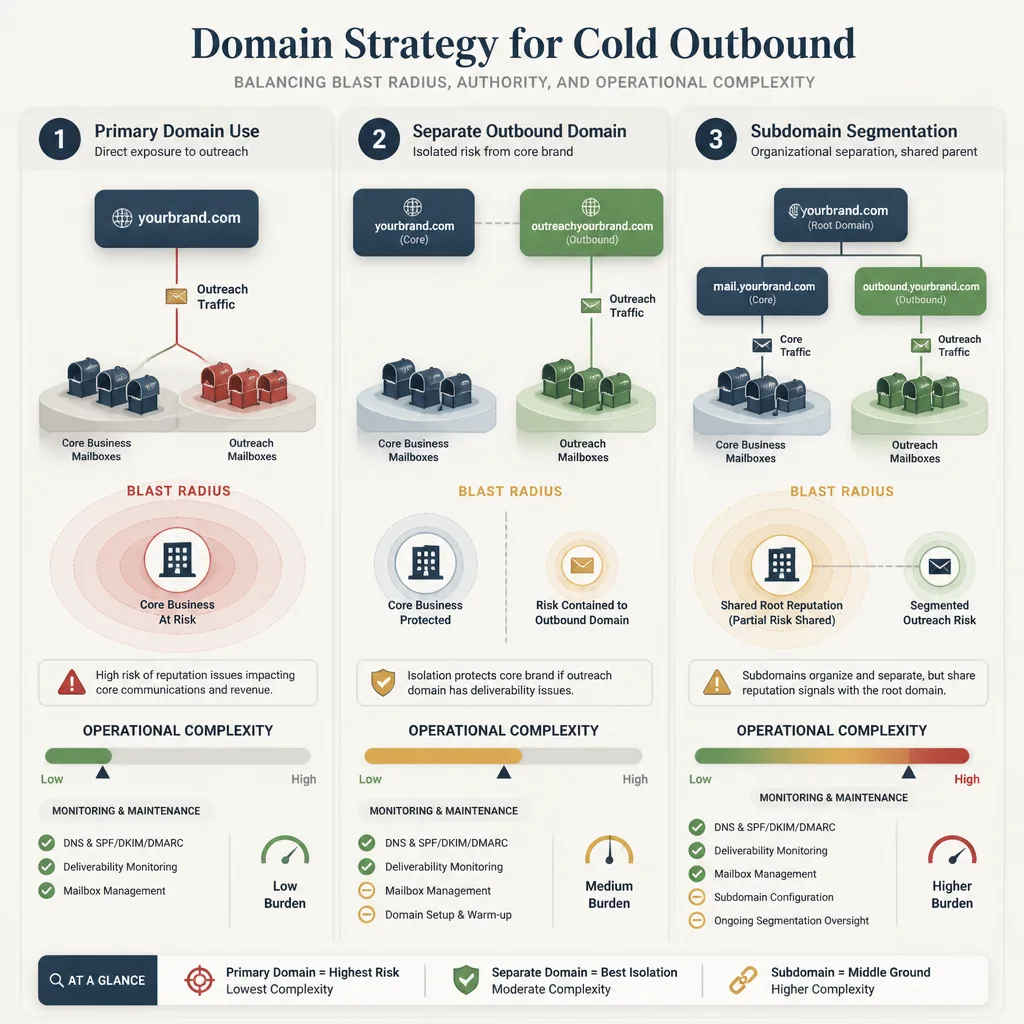
A sensible setup usually separates three roles:
- Primary domain: your core brand and business email
- Outbound domain or tightly controlled subdomain: where cold outreach happens
- Operational mailboxes: the individual sender identities tied to that sending environment
Separate outbound domains often make sense when brand protection matters. If a campaign goes badly, the blast radius is smaller. But the tradeoff is real: more domains and more mailboxes mean more DNS work, more monitoring, and more room for mistakes.
A common failure pattern looks like this: a team buys several lookalike domains, spreads volume across many mailboxes, and assumes that solves the problem. It doesn’t. Now they have fragmented reputation, uneven setup quality, and no consistent monitoring discipline.
One nuance matters. Gmail’s bulk-sender threshold applies at the primary-domain level, including subdomains under that same primary domain.[^2] Subdomains can help with organization, but they are not a loophole.
A practical rule: use segmentation to protect the brand, not to hide bad sending behavior.
Warm-up and throttling should be policy-driven, not tool-driven
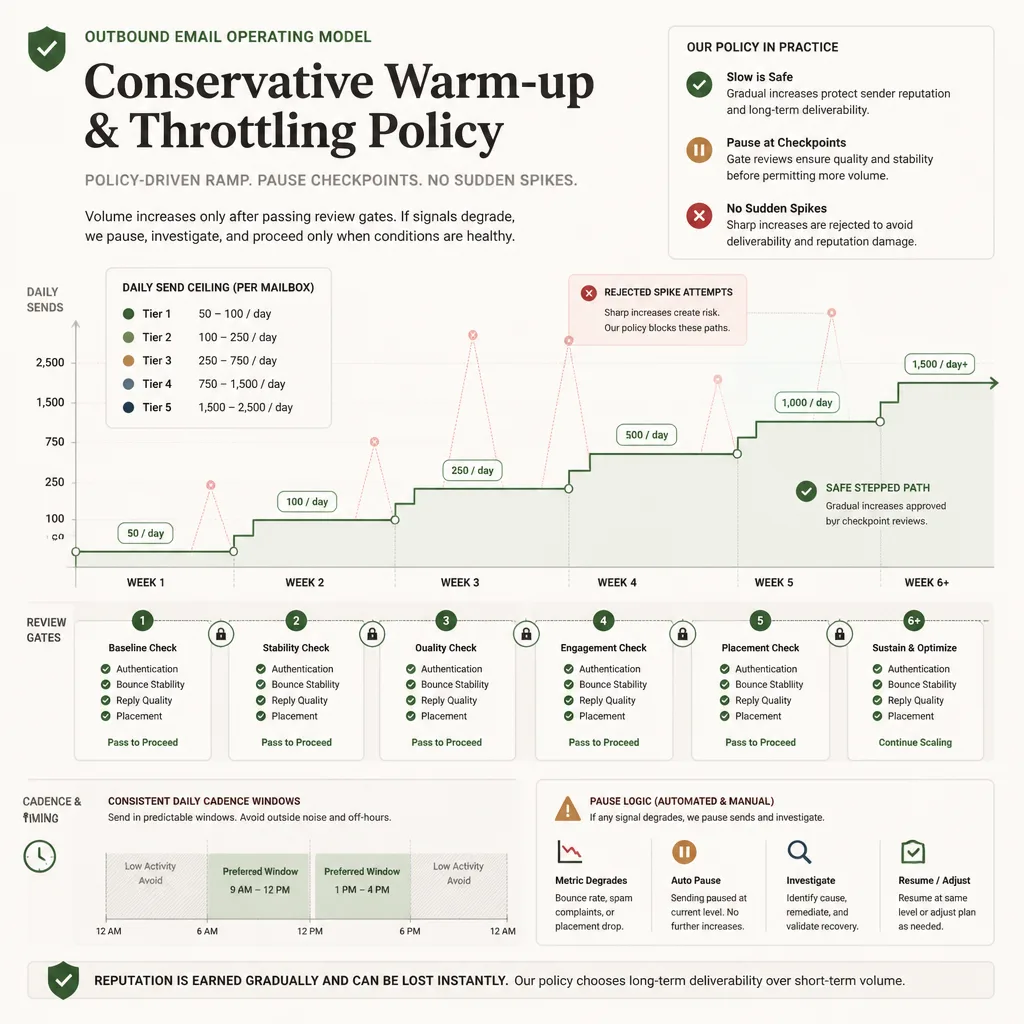
Warm-up is best understood as reputation consistency, not fake engagement.
Official guidance supports gradual ramping and warns against suspiciously high sending rates, but providers don’t publish universal safe schedules for cold outbound.[^1][^2] So any volume plan should be treated as a conservative operating policy, not a guaranteed formula.
A defensible model for new domains and mailboxes is:
- start with low daily volume
- keep behavior consistent for at least a couple of weeks
- increase only when authentication, bounce patterns, reply quality, and placement remain stable
- avoid sudden jumps after campaign changes, list imports, or mailbox additions
For many small teams, that means resisting the urge to scale a mailbox just because the tool says you can. A mailbox that handled 15 quality sends per day last week should not suddenly handle 80 tomorrow because a sequence looked promising.
Cadence should vary enough to feel normal, but not so much that sending becomes chaotic. Randomness is not the goal. Stable, believable behavior is.
List hygiene does more for deliverability than clever copy
The most useful distinction here is valid versus safe to contact.
An address can be valid and still be a poor outbound target. Think of:
- a stale contact who left six months ago
- a catch-all domain that accepts mail broadly but tells you nothing about recipient quality
- a role account like
info@,support@, oradmin@ - a broad scraped list that only loosely matches your offer
That’s why list hygiene usually beats copy optimization over time. Gmail’s documentation strongly emphasizes avoiding unwanted mail and controlling spam rates. It even notes that low visible complaint rates can coexist with poor reputation because many messages may already be routed to spam.[^2]
Practically, your workflow should include:
- verification before first send
- suppression of role accounts unless there is a strong reason to contact them
- caution with catch-alls and stale records
- re-verification if data has been sitting for weeks
- immediate suppression after negative replies or opt-out requests
A narrow list often outperforms a broad one not just on reply rate, but on sender health. Better targeting reduces complaints, negative replies, and hidden reputation damage.
Design reply handling like an operations system
Reply handling is not admin work. It’s a deliverability control surface.
You need clear rules for four categories:
- positive replies: route quickly to a human owner
- neutral replies: clarify, qualify, or park
- negative replies: suppress immediately
- unsubscribe or “not interested” replies: suppress without debate
One of the fastest ways to increase complaint risk is to keep emailing someone after they’ve already signaled disinterest.
Non-response should not trigger endless follow-ups either. If a contact doesn’t engage after a short, controlled sequence, stop. A six-email sequence spread across multiple mailboxes over three weeks can easily feel like persistent unwanted mail, even if each individual touch seems reasonable.
For agencies and SDR teams, ownership matters. Someone should explicitly own:
- suppression rules
- mailbox pausing
- bounce review
- escalation when one domain or mailbox starts drifting
If nobody owns replies, deliverability gets managed by accident.
Where automation and AI agents help safely
This is where AI is genuinely useful.
Lead enrichment and research
AI can speed up firmographic research, account summaries, technology lookups, and persona context. That improves targeting before you send, which is a much safer use of automation than simply raising volume.
Personalization drafts with constraints
AI can draft first lines, relevance angles, and follow-up variants. It works best with constraints: approved claims, tone limits, forbidden topics, and human review for edge cases.
A good use case is: “Draft a 40-word opener using these three verified account facts.”
A bad use case is: “Invent something personalized for every lead.”
Scheduling and routing
Automation is also useful for business-rule tasks:
- schedule follow-ups only within defined send windows
- stop sequences when a reply is detected
- classify incoming replies
- push qualified responses into the CRM
- assign ownership by territory or account segment
These are bounded tasks. That’s where automation works best.
Where automation hurts deliverability
The risky uses are predictable.
Unbounded sending is the biggest one. If an agent can raise daily volume without human review, you’ve removed the main safety brake.
Over-spun copy is another. Too much variation can make patterns look unstable while also producing awkward messages that trigger complaints. More variation is not automatically more human.
Autonomous suppression mistakes are especially dangerous. If an agent misclassifies a negative reply, misses an opt-out, or routes the wrong segment into a campaign, the downstream damage is much larger than the time saved.
One mistake deserves extra emphasis: teams often treat deliverability problems as copy problems. If placement is collapsing, rewriting the sequence is rarely the first fix. Reputation, targeting, authentication, and sending behavior usually deserve inspection first.
The monitoring stack: what to watch before things break
Monitoring is imperfect, but you still need it.
At minimum, watch:
- hard bounces: usually signal invalid or unsafe data; spikes are worth pausing for
- soft bounces: can indicate temporary issues, throttling, or early reputation friction
- provider rejection patterns: especially recurring
5.7.xstyle errors - spam-rate and reputation data in Google Postmaster Tools, including authentication, delivery errors, and the Compliance status dashboard where available[^2]
- placement tests and seed testing: imperfect, but useful for spotting trends
- negative replies and unsubscribes: operational early-warning signals even when formal complaint visibility is limited
The most important distinction is leading versus lagging indicators.
A hard-bounce spike is often a leading indicator. So is a rising share of negative replies on one domain. A spam-folder collapse in placement tests is a lagging indicator: by then, the problem is already expensive.
A stoplight policy for scaling volume responsibly
This is the simplest framework I know for keeping outbound sane.
Green
Scale gradually when:
- authentication is passing consistently[^1][^3]
- hard-bounce trends are stable
- placement tests are steady
- negative replies are not rising
- reply quality still looks normal
Yellow
Hold volume and investigate when:
- soft bounces increase
- one provider starts drifting
- unsubscribes or suppressions jump
- one mailbox or domain behaves differently from peers
- a new list segment underperforms sharply
Red
Pause sending when:
- SPF, DKIM, or DMARC breaks[^1][^3]
- hard bounces spike
- repeated provider rejections appear
- placement tests show broad spam-foldering
- complaint or abuse signals suggest reputation damage
The key is governance. Red conditions should override pipeline pressure.
A practical operating model for 2027
The weekly rhythm matters more than most teams realize.
Once a week, review:
- authentication status
- domain and mailbox performance
- bounce breakdowns
- suppression growth
- negative-reply trends
- placement drift by provider
- whether any campaign is trying to scale faster than reputation can support
Then make ownership explicit. DNS belongs to someone. List quality belongs to someone. Copy approval belongs to someone. Reply operations and suppressions belong to someone. When those responsibilities blur, deliverability degrades in slow motion.
The central idea is simple: scale only when placement stays stable. Not when the sequence dashboard looks exciting. Not when a tool says capacity is available. Only when the reputation system remains healthy.
Conclusion
Cold outbound in 2027 is still viable, but it is less forgiving.
The teams that keep winning are not the ones with the most aggressive automation. They’re the ones that treat deliverability as the governing system. They authenticate correctly, align domains properly, keep lists tight, suppress quickly, and scale only when inbox placement holds.
That changes how automation should be used. Use it to improve judgment, speed up research, route replies, and enforce process. Don’t use it to override constraints, inflate volume, or fake humanity through endless variation.
If you remember one thing, make it this: outbound doesn’t break when you send too little. It breaks when you send more than your reputation can carry.
FAQ
Can cold outbound still work at scale in 2027?
Yes, but only if deliverability is treated as the limiting factor. Teams that scale safely focus on authentication, domain reputation, list quality, complaint prevention, and measured volume ramping rather than brute-force sending.
What is the minimum authentication setup for cold outbound?
At minimum, outbound sending should have SPF, DKIM, and DMARC properly configured.[^1][^3] In practice, alignment matters as much as record presence, because mailbox providers increasingly evaluate whether the visible From domain matches authenticated sending.[^1][^3]
Do I need a separate domain for outbound email?
Not always, but many teams use a separate outbound domain or tightly controlled subdomain to reduce blast radius if performance drops. The tradeoff is added operational complexity and more chances for monitoring gaps.
How fast should I ramp sending on a new mailbox?
There is no universal provider-approved number. A safer approach is to ramp conservatively, watch bounce and placement signals closely, and increase volume only when authentication, reply quality, and inbox placement remain stable.[^1][^2]
What matters more for deliverability: copy or list quality?
List quality usually matters more over time. Strong copy can improve response rates, but it can’t offset poor targeting, stale data, spam complaints, or repeated emailing of uninterested recipients.[^2]
Are warm-up tools enough to build sender reputation?
No. Warm-up tools may help establish early sending patterns, but they are not a substitute for real recipient engagement, strong authentication, careful throttling, and disciplined suppression. That conclusion is mostly practitioner judgment rather than a provider-certified tactic.
Where does AI help outbound without increasing deliverability risk?
AI is most useful in bounded support tasks such as lead enrichment, account research, personalization drafts, reply classification, and follow-up scheduling. It is safest when humans set the rules and review outputs.
Where does automation hurt deliverability?
Automation becomes risky when it controls volume, targeting, suppression, or message variation without constraints. Unbounded sending, aggressive ramping, and over-spun copy can make sender behavior look unstable or low quality.
What metrics should trigger a pause in outbound sending?
Pause conditions usually include authentication failures, hard-bounce spikes, repeated provider rejections, noticeable inbox-placement decline, or rising complaint and negative-reply signals.[^1][^2][^3] These are stronger warning signs than send volume alone.
What is a deliverability stoplight policy?
It is a simple framework for scaling volume responsibly. Green means sender signals and placement are stable enough to scale gradually. Yellow means hold or investigate. Red means pause sending and fix the underlying issue before resuming.