The Essential Crawl Files Every Modern Website Should Have: A Practical Guide to robots.txt, ai.txt, and llms.txt
Most developers already understand robots.txt: it is the standard file for telling compliant crawlers where they should and should not go. What is less settled is how to handle AI crawlers, retrieval agents, and LLM-oriented systems that are not just indexing pages for search, but also trying to interpret, summarize, cite, or train on them.
That is where the confusion starts. Many teams assume robots.txt still covers the whole problem. It does not. It handles broad crawl access well, but it does not express AI-specific preferences or tell machine consumers which resources on your site are the canonical ones.
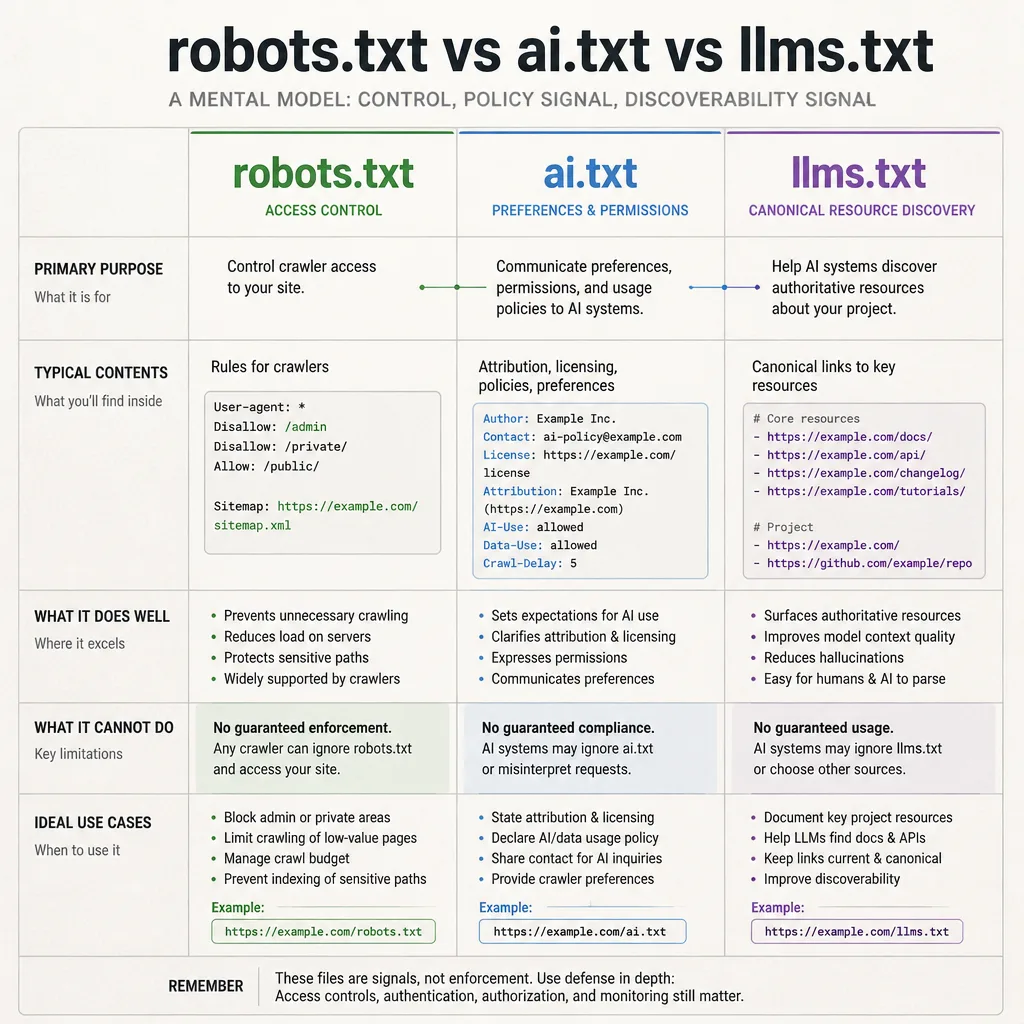
A practical way to think about it:
robots.txtis the baseline control file.ai.txtis an emerging preference layer.llms.txtis an emerging discoverability layer.
None of them are magic, and only one of them—robots.txt—has mature standardization behind it.[^1] Still, for content-rich sites, docs portals, API platforms, and SaaS properties, the newer files can be useful, low-cost signals.
Why modern websites need more than robots.txt
The old crawl model was built for search engines
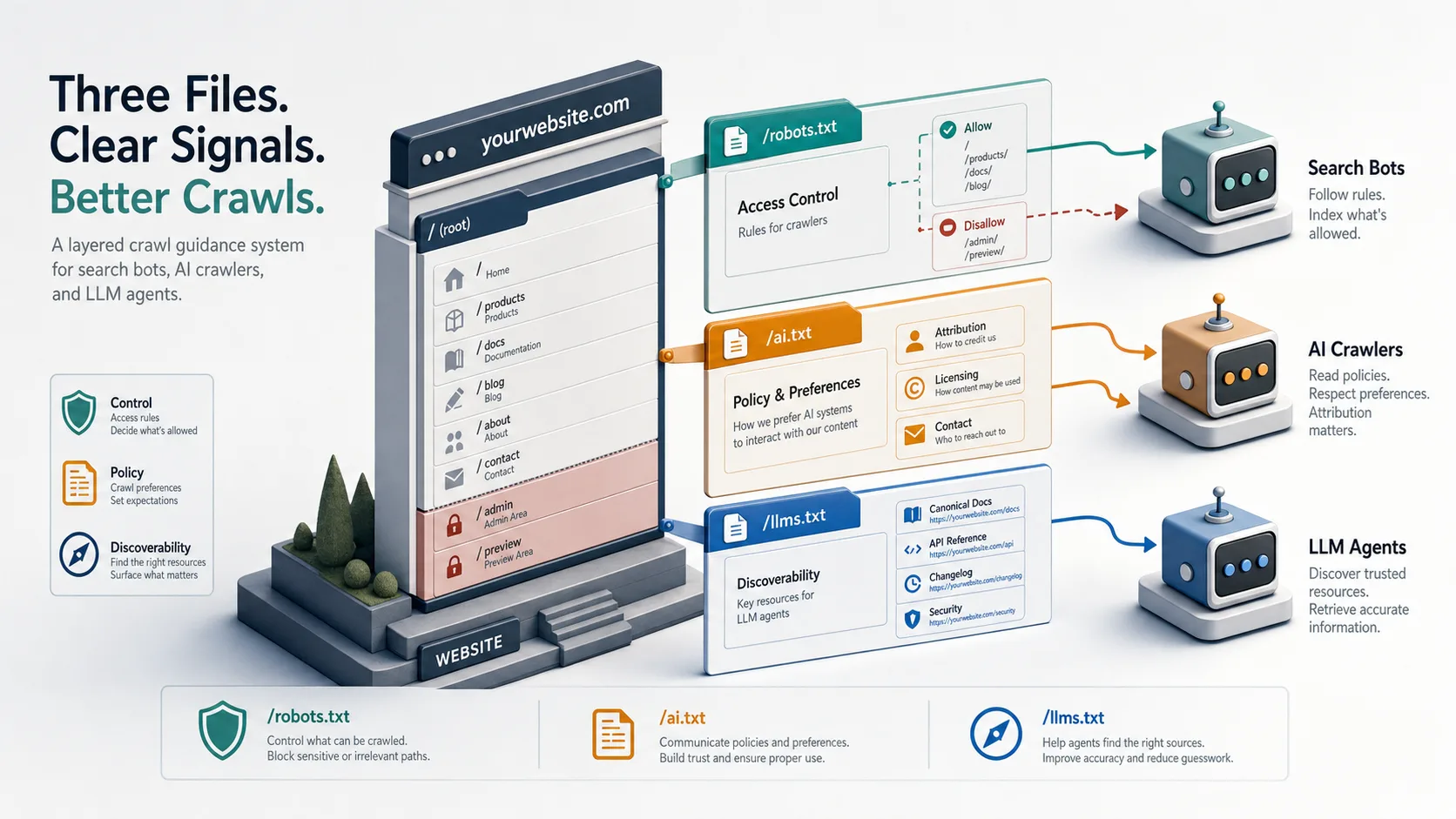
The web’s crawl conventions were designed around a simple model: a bot fetches pages, indexes them, and maybe shows them in search. robots.txt fits that model well. It lets site owners give path-level guidance to compliant crawlers, and its behavior is standardized in RFC 9309.[^1]
That is still useful. It is just no longer the whole picture.
AI crawlers and LLM agents create a different discovery problem
AI systems do not all behave the same way. Some act like search crawlers. Some are retrieval agents looking for authoritative pages to ground answers. Some may gather content for training or evaluation. Others behave more like browser agents, following links to complete tasks.
Those systems often need more than “allowed” or “disallowed.” They need hints such as:
- Which docs page is canonical?
- Which API reference should be preferred?
- Where is the getting-started guide?
- What are your attribution or licensing expectations?
That is a discoverability and policy problem, not just a crawl-access problem.
A useful mental model
A simple framing helps:
robots.txt= controlai.txt= policy signalllms.txt= discoverability signal
That is more useful than treating all three files as interchangeable. They are not.
Start with the baseline: what robots.txt does well, and where it stops
A brief refresher on robots.txt
robots.txt lives at /robots.txt and gives instructions to compliant crawlers using user-agent blocks and path rules. Google’s documentation still treats it as the primary crawler access mechanism for public sites.[^2]
It does three things well:
- path-based allow/disallow rules
- bot-specific instructions by user-agent
- sitemap discovery hints
A minimal example:
User-agent: *
Disallow: /admin/
Disallow: /preview/
Allow: /

Sitemap: https://example.com/sitemap.xml
Why robots.txt still matters for AI crawlers
Some AI-related crawlers publicly identify themselves and may respect robots.txt if configured correctly. That makes it the first place to govern known bots. If you want to limit crawling of staging paths, account areas, internal search results, or thin utility pages, start here.
Its limits
This is the key constraint: robots.txt is access guidance, not rich instruction.
It cannot clearly express:
- preferred content for LLM grounding
- attribution expectations
- licensing context
- training-related preferences
- contact information for permissions
It is also not enforcement. It is not authentication, not a contract, and not a reliable anti-scraping mechanism.[^2]
What ai.txt is trying to solve
The basic idea behind ai.txt
ai.txt is best understood as an emerging convention for AI-related preferences. It gives site owners a simple place to state, in machine-readable form, how they want AI systems to treat their content.
That might include:
- whether certain uses are discouraged
- whether attribution is expected
- where licensing terms live
- who to contact for permissions
- whether protected content requires explicit approval
Common use cases
For publishers, ai.txt can point to licensing and attribution rules.
For SaaS companies, it can clarify that public docs are available for reference while gated customer content is not.
For content platforms, it can reduce ambiguity by separating public crawlable resources from content that requires separate permission.
A practical ai.txt is usually short. That matters because support is uneven and conventions are still immature. Simplicity is more likely to survive parser differences.
Current status
This part needs to be said plainly: ai.txt is not an official web standard in the same sense as robots.txt.
There is no equivalent of RFC 9309 behind it. Adoption exists, but it is fragmented. Confidence here is low to medium. Publishing ai.txt is reasonable as a signal. Assuming broad support or enforcement is not.
What llms.txt is, and why it is gaining traction
The idea behind llms.txt
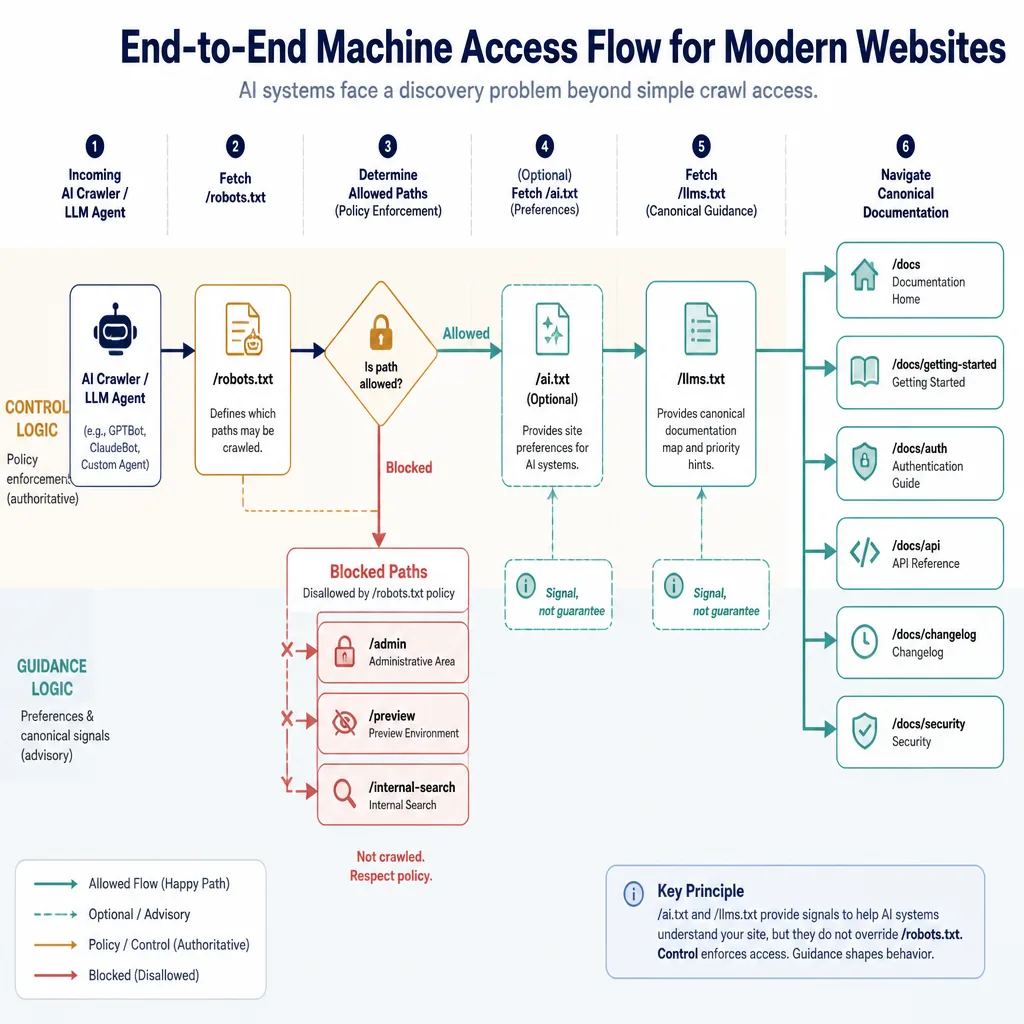
llms.txt is getting attention because it solves a more concrete problem: helping LLM-oriented systems find the best pages on a site without guessing from navigation, sitemaps, or noisy archives.
The commonly cited reference point is llmstxt.org, which describes it as a lightweight way to guide language models toward canonical resources.[^3]
Typical uses
A good llms.txt often points to:
- docs home
- getting started guide
- API reference
- SDK docs
- product overview
- changelog
- glossary
- security or policy pages
For developer sites, that is immediately useful. A model trying to answer “How does this API authenticate?” is far more likely to benefit from a direct link to the auth guide than from wandering through a marketing navigation tree.
How llms.txt differs from ai.txt in practice
This is the distinction that matters most:
ai.txtsays how you want AI systems to behavellms.txtsays where AI systems should look first
That is why llms.txt often feels more actionable. It does not rely as heavily on policy enforcement. It simply improves the odds that compliant systems discover the right material.
Current adoption: useful, but uneven
Adoption appears strongest on:
- docs-heavy SaaS sites
- developer tools
- API platforms
- AI-native products
- open-source documentation hubs
That pattern makes sense. These sites have structured content and clear canonical pages, so machine-readable guidance creates immediate value.
Adoption remains uneven for three reasons:
- there is no universal standard
- support by AI systems is not transparent or consistent
- the ROI is hard to measure directly
So the evidence here is mostly observational, not census-grade. Confidence is high for robots.txt, medium for llms.txt as a discoverability signal, and low to medium for broad ai.txt adoption.
Real-world examples of ai.txt and llms.txt
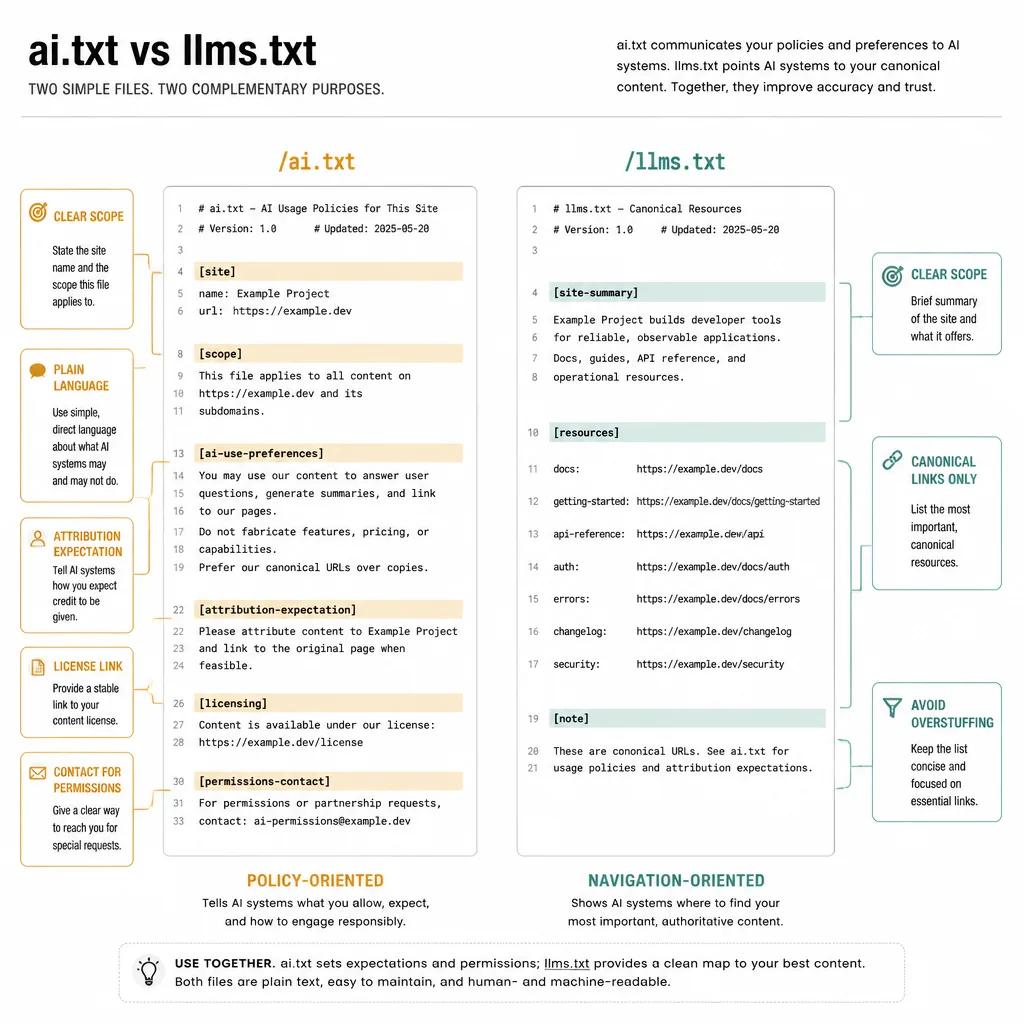
Because these conventions change quickly, teams should verify live examples before treating them as durable references. A safer approach is to use examples that show the pattern clearly and then adapt them to your site.
Example ai.txt file
A concise ai.txt might look like this:
Site: Example Docs
URL: https://example.com

Public content: documentation, API reference, changelog
Restricted content: customer dashboards, private workspaces, staged previews

AI-use preferences:
- Public documentation may be accessed for retrieval and reference.
- Attribution to the canonical source is requested where feasible.
- Licensing and usage terms: https://example.com/terms
- Permissions contact: mailto:[email protected]

Protected or gated content requires explicit authorization.
What makes this effective:
- clear scope
- plain language
- links to real terms
- no false promise of enforcement
- realistic distinction between public and protected content
Example llms.txt file
A useful llms.txt might look like this:
Site: Example Platform
Summary: Developer platform for payments infrastructure and API automation.

Canonical resources:
https://example.com/docs
https://example.com/docs/getting-started
https://example.com/docs/api
https://example.com/docs/authentication
https://example.com/docs/rate-limits
https://example.com/changelog
https://example.com/security
What makes this effective:
- brief site summary
- canonical URLs only
- focuses on high-value pages
- easy for both humans and parsers to interpret
The common failure mode is overstuffing. If you dump 200 links into llms.txt, you recreate the problem it was meant to solve.
How to decide what belongs in each file
A simple framework helps here: Control, Guidance, Discoverability.
What belongs in robots.txt
Use robots.txt for:
- path-level crawl restrictions
- user-agent-specific blocking or allowances
- sitemap declarations
- keeping known bots out of admin, preview, or utility paths
What belongs in ai.txt
Use ai.txt for:
- AI-use preferences
- attribution expectations
- licensing links
- permissions contacts
- high-level policy context
What belongs in llms.txt
Use llms.txt for:
- canonical docs
- API references
- getting-started material
- product explainers
- changelogs
- glossaries
- security and policy pages
When not to use these files
Do not use any of these files as a substitute for:
- authentication
- authorization
- signed URLs
- paywalls
- rate limiting
- contractual licensing controls
If content is genuinely sensitive, a text file is not enough. Use access control.
Implementation best practices for developers
File placement, naming, and content type
Use root-level placement:
/robots.txt/ai.txt/llms.txt
Serve them as text/plain where possible. Keep them public and fetchable.
Keep directives plain, stable, and easy to parse
Avoid elaborate syntax unless a live spec clearly supports it. These formats are still emerging. Plain text is the safest choice.
Link to canonical sources
For llms.txt, prefer stable URLs you expect to maintain. Docs hubs, API references, auth guides, and changelogs are strong candidates.
For ai.txt, link directly to terms, licensing, and contact pages.
Versioning and ownership
These files go stale quickly when:
- docs URLs change
- API versions shift
- product naming changes
- legal pages move
Assign ownership. Usually that means technical SEO or docs/platform owners, with engineering review.
How to test and monitor
At minimum:
- Fetch the files directly in a browser or with
curl. - Confirm status
200. - Check headers and content type.
- Review server or CDN logs for requests to these paths.
- Compare file fetches with later crawl behavior.
Just be careful with interpretation. A bot requesting /llms.txt does not prove it used the file meaningfully.
Templates you can adapt
Minimal robots.txt snippet for AI crawler governance
User-agent: *
Disallow: /admin/
Disallow: /preview/
Disallow: /internal-search/

Sitemap: https://example.com/sitemap.xml
If you manage named AI bots, add explicit user-agent sections only when you have current, documented tokens. Those can change over time.
Practical ai.txt template
Site: [Site Name]
URL: https://www.example.com

Scope:
- Public docs, blog, changelog
- Excludes private dashboards, user data, preview content

AI-use preferences:
- Public content may be accessed for indexing and retrieval unless otherwise restricted.
- Attribution to canonical URLs is requested where feasible.
- Training, licensing, or permissions questions: https://www.example.com/ai-policy
- Contact: mailto:[email protected]

Protected content requires explicit authorization.
Developer-friendly llms.txt template
Site: [Site Name]
Summary: [One-sentence description of the product or documentation set.]

Canonical resources:
https://www.example.com/docs
https://www.example.com/docs/getting-started
https://www.example.com/docs/api-reference
https://www.example.com/docs/authentication
https://www.example.com/docs/errors
https://www.example.com/changelog
https://www.example.com/security
Variations by site type
For docs sites, prioritize setup guides, API references, and version policy.
For SaaS marketing sites, include product overview, docs home, pricing explainer, security, and API overview.
For publishers, ai.txt often matters more than llms.txt, especially if licensing and attribution are central concerns.
What these files can’t do
They cannot guarantee compliance.
They cannot stop bad actors from scraping content.
They cannot replace authentication or licensing.
They cannot guarantee model inclusion, exclusion, citation, or attribution.
This is the main misconception worth correcting. These files are signals—sometimes useful ones—but still just signals.
A pragmatic recommendation
If your site is small and simple, robots.txt may still do most of the work.
If your site has serious documentation, APIs, a large knowledge base, or a lot of evergreen product content, the low-risk approach is straightforward: keep robots.txt clean, publish a focused llms.txt, and treat ai.txt as an optional policy layer.
That recommendation holds up because the implementation cost is low, the downside is limited, and the upside is practical. llms.txt can help compliant systems find the right pages faster. ai.txt can reduce ambiguity around attribution, licensing, and permissions. Neither replaces real controls, but both can make your site easier for machine consumers to interpret.
The important part is not publishing these files for the sake of trend-chasing. It is publishing them with realistic expectations, clear ownership, and a solid understanding of what problem each one actually solves.
FAQ
What is the difference between robots.txt, ai.txt, and llms.txt?
robots.txt is the established crawl-control file used to guide compliant bots on where they may crawl. ai.txt is an emerging convention for expressing AI-related preferences such as licensing, attribution, or training guidance. llms.txt is an emerging discoverability file meant to help LLM-oriented systems find a site’s most useful canonical resources, such as documentation, API references, and product pages.
Is ai.txt an official web standard?
Not in the same sense as robots.txt. robots.txt is standardized in RFC 9309, while ai.txt is better described as an emerging convention or proposal.[^1] That means it can be useful as a signal, but it should not be treated as a universally supported or enforceable control.
Is llms.txt worth adding to a website?
For documentation-heavy, API-first, SaaS, and developer-focused sites, llms.txt can be worth adding because it helps machine consumers find high-value canonical pages faster. Its value is strongest as a low-cost guidance layer, not as a guarantee of better AI visibility or citations.
Can ai.txt or llms.txt block AI crawlers from using my content?
No. Neither file should be treated as hard access control. They can communicate preferences and guidance, but they do not replace authentication, authorization, rate limiting, legal terms, or licensing controls.
Do AI crawlers still use robots.txt?
Some do, especially those that publicly identify themselves with user-agent tokens and choose to respect standard crawler controls. But behavior is uneven across AI systems, so robots.txt remains necessary without being sufficient for broader AI crawler governance.
Where should robots.txt, ai.txt, and llms.txt be placed?
The conventional location is the site root: /robots.txt, /ai.txt, and /llms.txt. They should generally be publicly accessible and served as plain text unless a current spec for a given convention recommends otherwise.
What should go in llms.txt?
A useful llms.txt usually contains a short description of the site and a concise set of canonical links to the most valuable machine-readable resources, such as docs home, getting-started guides, API references, changelogs, glossary pages, and policy or security pages.
What should go in ai.txt?
A practical ai.txt may include the site name, scope, AI-use preferences, attribution expectations, links to licensing or terms pages, and a contact method for permissions questions. It works best as a simple policy signal rather than a complex rule system.
Should blogs, docs, and gated content be treated differently?
Yes. Public docs, API references, changelogs, and product explainers are often good candidates for llms.txt inclusion. Gated content, internal tools, preview environments, and private assets should be protected with auth or other real access controls, not just crawl files.
How can I tell whether bots respect these files?
Check server or CDN logs to see whether named bots request /robots.txt, /ai.txt, or /llms.txt and compare that to later crawl behavior. Even then, a file fetch does not prove full compliance or reveal downstream training or model-use decisions.
[^1]: RFC 9309: Robots Exclusion Protocol
[^2]: Google Search Central: Introduction to robots.txt
[^3]: llmstxt.org