YouTube-to-Email Flywheel in 2026: How to Turn One Video a Week Into Compounding Leads
A lot of entrepreneurs are not failing at content. They are failing at capture.
They publish useful YouTube videos, get some views, maybe a few comments, and then wonder why the business barely moves. The issue is often not the video itself. It is that the value stops at the platform.
A better model is simpler, but more demanding: treat each weekly video as the start of a system. One video should attract the right viewer, move them into an email relationship you own, continue the lesson off-platform, and give qualified people a clear path to a buying decision.
That is the flywheel. Not “post everywhere.” Not “clip it into Shorts and hope.” A tighter loop: attract, capture, continue, distribute, decide.
YouTube Views Do Not Compound Until You Own the Relationship
Why attention alone is a weak business asset
YouTube is a powerful discovery engine, but it is still rented land. YouTube’s own documentation says search ranking is shaped by relevance, engagement, and quality, with watch behavior playing a meaningful role in discoverability.[^1][^2] That makes the platform excellent for finding demand, but limited for owning it.
This matters even more in 2026. YouTube says more than 500 hours of video are uploaded every minute.[^1] In that environment, “publish and hope” is not a strategy. It is a lottery ticket with editing software.
Email changes the equation because it creates a direct relationship you control. An email list is not magic. It still depends on topic fit, message quality, and offer alignment. But unlike a view, a subscriber gives you repeated chances to teach, segment, and convert over time.
The core thesis: one video can feed a lead system
The real value of one weekly video is not the upload itself. It is what the upload becomes.
A useful video can feed:
- a companion page on your site
- an email opt-in tied to the same problem
- a short nurture sequence
- a few repurposed assets
- a decision page for qualified prospects
That is how content starts to compound. Not through views alone, but through the system attached to those views.
What a YouTube-to-email flywheel actually is
A YouTube-to-email flywheel is a content system where each video does more than attract attention. It brings in the right viewer, moves them to an email signup through a relevant next step, continues the lesson by email, and routes the best-fit people to a focused conversion page.
Think of it like this:
Attract -> Capture -> Continue -> Distribute -> Decide
Most YouTube strategies stop at attract. That is why they feel busy without becoming cumulative.
Start With Problem-First Topics, Not Broad Ideas
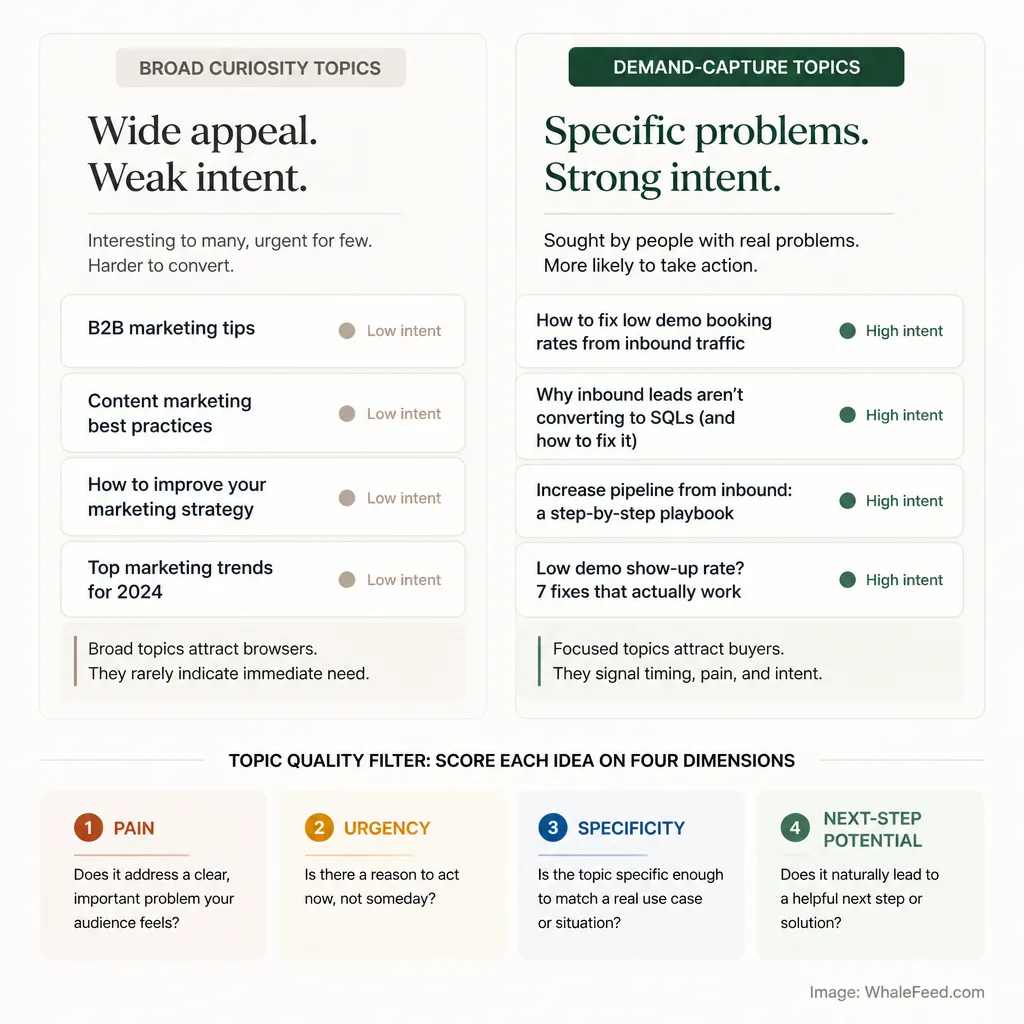
How to find topics tied to real buyer problems
Lead generation starts before you hit record.
If the topic is broad, the audience will usually be broad too. That can create reach, but weak intent. You want topics that sound like someone is trying to solve something now.
A small shift makes a big difference.
Broad topic:
B2B marketing tips
Demand-capture topic:
How to fix low demo booking rates from inbound traffic
The first attracts curiosity. The second attracts people with a live problem and a reason to act.
YouTube search rewards relevance, engagement, and quality, so topic fit matters before CTA tactics even enter the picture.[^1][^2] A weak topic cannot be rescued by a clever lead magnet.
The difference between curiosity topics and demand-capture topics
Curiosity topics answer, “That sounds interesting.”
Demand-capture topics answer, “I need help with this.”
That does not mean every video needs to be bottom-of-funnel. It does mean your weekly anchor video should stay close to a real business problem. If you sell email marketing services, a video on “Why newsletters matter” is too soft. A video on “Why your welcome sequence gets opens but no replies” is much closer to commercial intent.
A simple topic filter: pain, urgency, specificity, and next-step potential
Before choosing a topic, score it against four questions:
- Pain: Is there a real cost if this problem stays unsolved?
- Urgency: Does the viewer want an answer soon?
- Specificity: Is the problem narrow enough to attract the right person?
- Next-step potential: Can this topic logically lead to an opt-in, sequence, or offer?
If a topic scores low on three of the four, it may still be worth publishing. It is just probably not your best lead-generation video for the week.
Script for Retention and Lead Capture at the Same Time
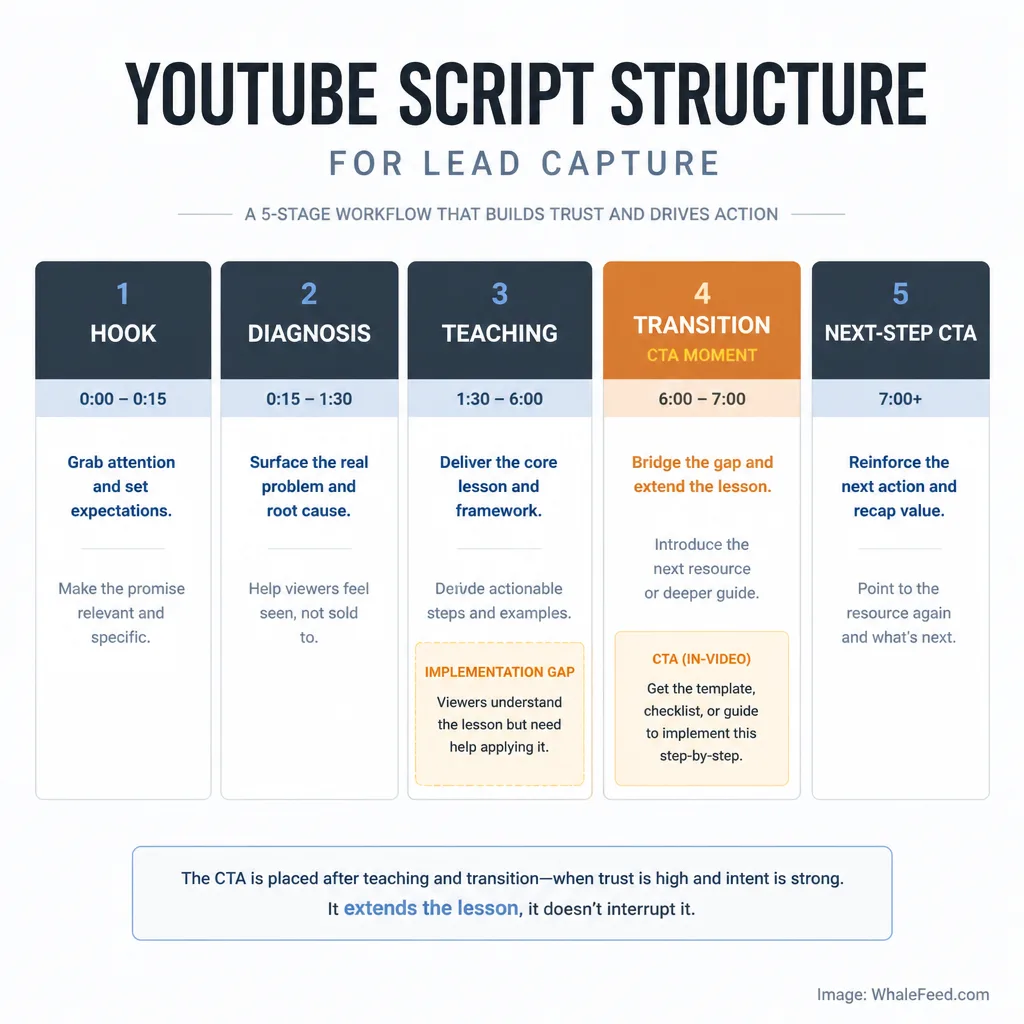
Why most CTAs fail inside useful videos
Most YouTube CTAs fail because they feel stapled on.
The creator teaches for eight minutes, then suddenly says, “Download my free guide below.” The viewer feels the gear shift. Trust drops.
A CTA works better when it appears at the moment the viewer naturally feels the gap between understanding the problem and implementing the fix.
How to place a lead capture moment without breaking trust
The best place for a CTA is usually after a meaningful insight, diagnostic moment, or framework.
For example:
“If you’re realizing your video topics are too broad, I put together a one-page topic scoring sheet linked below. It uses the same filter I used here—pain, urgency, specificity, and next-step potential—so you can score your next five ideas in ten minutes.”
That works because it extends the lesson. It does not interrupt it.
Do not rely only on end screens. YouTube end screens appear only in the last 5 to 20 seconds, require videos of at least 25 seconds, can be hidden by viewers, are unavailable in some contexts like mobile web, and external website links require YouTube Partner Program eligibility.[^3] Layer the CTA instead: verbal mention, description link, pinned comment where relevant, and end screen when available.[^3][^4]
A simple script structure: hook, diagnosis, teaching, transition, next-step CTA
A practical weekly structure:
- Hook: name the problem quickly
- Diagnosis: explain why it happens
- Teaching: give the fix or framework
- Transition: show what still needs to be done
- Next-step CTA: offer the companion asset
That structure respects the viewer. It also tends to convert better than saving every CTA for the last few seconds.
Build a Companion Page That Continues the Lesson
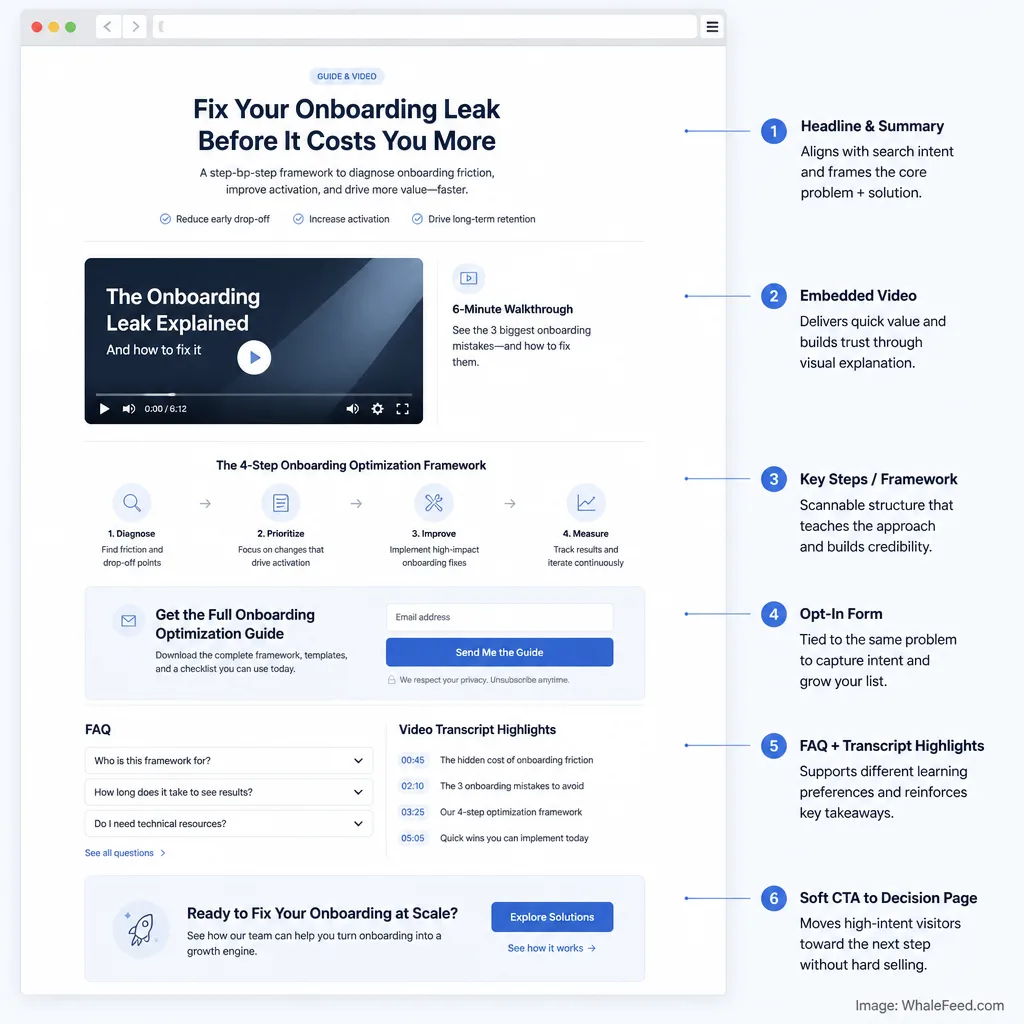
Why the companion page matters more in an answer-engine environment
A YouTube description helps. It is not enough.
In 2026, Google published guidance for optimizing content for generative AI features in Search and launched Search Console reporting for generative AI visibility for a subset of sites.[^5][^6] Google’s position is not that there is some secret “AEO trick,” but that strong SEO fundamentals and useful, original content still matter in AI-shaped search experiences.[^5]
That is the strategic case for a companion page. It gives you a structured, crawlable asset on your own domain. Not a guarantee of AI visibility. Just a better chance to be discovered beyond the video platform.[^5][^6]
What to include: summary, key steps, embedded video, opt-in, FAQ, transcript highlights
A good companion page is not a transcript dump. It should include:
- a clear summary of the lesson
- the embedded YouTube video
- the key steps or framework from the video
- a relevant opt-in
- short FAQ answers
- selected transcript highlights
- a soft path to the decision page
If your video is about fixing low demo booking rates, the companion page might offer a demo page teardown checklist, summarize the three biggest causes of low conversion, and answer objections like, “What if traffic is the real issue?”
How the page bridges search intent, email capture, and conversion intent
The companion page does three jobs at once.
It helps search and AI systems understand the topic on your domain.[^5][^6] It captures the visitor into email. And it gives you a place to introduce the next decision without forcing it on cold viewers.
That is much stronger than sending everyone to a homepage.
Use Email to Continue the Lesson, Not Replace It With a Pitch
What subscribers are actually saying yes to
When someone opts in from a video, they are not saying, “Please sell to me immediately.”
They are saying, “Help me go further on this problem.”
That sounds obvious, but many nurture sequences ignore it. They switch topics, over-brand the message, or pitch in the first email before trust is earned.
A 4- to 6-email nurture sequence that deepens the topic
A solid starting sequence looks like this:
- Email 1: deliver the asset and restate the core lesson
- Email 2: show a common mistake or false fix
- Email 3: give a practical example or mini case
- Email 4: explain the implementation gap
- Email 5: introduce the offer as a logical next step
- Email 6: answer objections or show fit
Example progression for a video about demo conversion:
- Email 1: checklist + recap
- Email 2: why “better traffic” is often the wrong diagnosis
- Email 3: example of a decision page rewrite
- Email 4: what usually breaks during implementation
- Email 5: invitation to an audit or product demo
- Email 6: who the offer is and is not for
When and how to introduce the offer without collapsing trust
Introduce the offer when the reader can clearly see the boundary between learning and doing.
That is the moment when the offer feels like help, not an ambush.
Email still matters strategically because it gives you direct access to an audience you control, though results vary widely based on list quality, segmentation, and offer fit.[^7] Keep the promise narrow. Continue the lesson first.
Repurpose the Same Weekly Video Into a Small Distribution System
How Shorts, LinkedIn posts, and email each play a different role
Repurposing is not copying. It is translation.
One weekly video can become:
- Shorts: a sharp insight or diagnostic clip for reach
- LinkedIn post: a text-first argument or story fragment
- Email: a lesson continuation for subscribers
- Companion page: the searchable source asset
- Decision-page path: the conversion route for qualified prospects
YouTube’s current link rules make this even more important. URLs in long-form video comments and descriptions can be clickable, but URLs in Shorts comments and Shorts descriptions are non-clickable.[^4] So Shorts are useful for discovery, but weak as a direct capture mechanism.
What to repurpose from the original video versus what to rewrite
Reuse the core idea. Rewrite the packaging.
Take a 10-minute video on why demo requests stall:
- Clip one 45-second diagnostic for Shorts
- Turn the strongest contrarian point into a LinkedIn post
- Expand the implementation lesson in email
- Organize the full logic on the companion page
- Send high-intent readers to a decision page about your product or service
Why repurposing should move people toward the companion page or decision page
Repurposing only creates business value when it moves people somewhere intentional.
If every asset creates just one more impression, you are building noise. If each asset points back to the companion page or, for warmer prospects, the decision page, you are building a system.
Close the Loop With a Decision Page
What a decision page is and why it converts better than a generic homepage
A decision page is a focused bottom-of-funnel page for people evaluating whether your offer fits their problem.
It often converts better than a homepage because it removes wandering. A homepage is built for broad navigation. A decision page is built for one audience, one problem, and one next step.
Who it is for, what problem it solves, and what objections it answers
A strong decision page should answer:
- who this is for
- what problem it solves
- what outcome it helps create
- how the process or product works
- what objections usually come up
- what the next step is
If your video and emails target founders with low demo conversion, your decision page should not talk vaguely about “growth solutions.” It should speak directly to that use case.
How to route the most qualified subscribers from email and repurposed content
Do not send every viewer there.
Send the most qualified people there from:
- later nurture emails
- companion page CTA sections
- LinkedIn posts aimed at problem-aware readers
- comments or replies when someone asks implementation questions
This is where the flywheel becomes commercial without becoming pushy.
A Weekly Workflow: One Video, Multiple Assets, One Compounding System
A practical Monday-to-Friday workflow for a small team or solo operator
A lean workflow can look like this:
Monday: choose the topic using the four-part filter
Tuesday: script and record the video
Wednesday: publish the video and companion page
Thursday: send email 1 and publish one LinkedIn post plus one Short
Friday: review metrics and queue follow-up assets
That is manageable for a solo operator or small team. The point is not volume. It is continuity.
What to publish first, what to automate, and what to measure
Publish the long-form video and companion page first. Those are the spine of the system.
Automate what is repetitive but not strategic: email delivery, page templates, basic analytics dashboards, and some clipping workflows. Do not automate topic judgment or message-to-offer alignment. That is where most of the leverage sits.
The metrics that show whether the flywheel is actually working
Track by stage:
- Attract: views, click-through rate, average view duration, average percentage viewed[^2]
- Capture: companion page visits, opt-in rate
- Continue: email opens, clicks, replies
- Decide: decision-page visits, booked calls, trials, sales
In the first 30 to 60 days, leading indicators matter more than immediate revenue. Look for better topic fit, stronger opt-in rates, and warmer email engagement before expecting steady bottom-funnel volume.
Where This System Usually Breaks
Publishing useful videos with no clear next step
Helpful content with no next action produces goodwill, not pipeline.
Offering a disconnected lead magnet
If the video is about fixing demo conversion and the opt-in is “my weekly marketing newsletter,” the thread breaks.
Sending sales emails too early
The subscriber asked for help with a problem. If the first thing they get is a pitch deck in disguise, trust collapses.
Repurposing for reach without building owned demand
This is the quiet failure mode: more clips, more posts, more impressions, but no owned audience growth and no clear path to conversion.
Conclusion
One video a week is enough to build momentum, but only if the video is not the end product.
The leverage comes from the system around it: problem-first topics, retention-aware scripting, a companion page on your site, an email sequence that continues the lesson, repurposing that serves intent, and a decision page that helps qualified people move.
That is what makes the flywheel work. Not more content. Better continuity.
FAQ
What is a YouTube-to-email flywheel?
A YouTube-to-email flywheel is a content system where each video does more than attract views. It brings in problem-aware viewers, moves them to an email signup through a relevant next step, continues the lesson by email, and routes qualified prospects to a decision page or offer.
Why is email the center of this system instead of YouTube subscribers?
YouTube helps with discovery, but email gives you a direct relationship you control. Platform views and subscribers are useful, but they do not create the same ownership, follow-up flexibility, or conversion path as an email list tied to your site and offer.
How do I choose YouTube topics that generate leads instead of just views?
Start with buyer problems, not broad content ideas. Strong topics usually score well on pain, urgency, specificity, and next-step potential. A topic like how to fix low demo booking rates will usually produce better lead quality than a general topic like B2B marketing tips.
What is a companion page and why does it matter?
A companion page is a page on your site built around the video. It should extend the lesson with a clear summary, embedded video, key steps, FAQ, transcript highlights, and an email opt-in. It matters because it gives you a searchable, crawlable asset on your own domain instead of leaving all the value on YouTube.[^5][^6]
Should the email sequence sell right away?
Usually no. The subscriber opted in because they wanted help with the topic, not an immediate pitch. A better sequence deepens the lesson first, adds examples or implementation help, and introduces the offer only after trust and relevance are established.
How many emails should a nurture sequence include?
A practical starting point is four to six emails, but there is no universal number. What matters more is sequencing: continue the lesson, address likely obstacles, show what success looks like, and then present the offer as the logical next step for readers who want help implementing it.
What should I repurpose from each weekly video?
At minimum, repurpose the core video into a companion page, one or more Shorts, a LinkedIn post, and a nurture email. The key is not copying the same asset everywhere. Each format should be rewritten to match its job, with clear paths back to the companion page or decision page.
What is a decision page?
A decision page is a focused bottom-of-funnel page for people evaluating whether your offer fits their problem. Unlike a homepage, it is built to answer fit, objections, outcomes, and next steps for a specific audience already warmed up by your content and email sequence.
How long does this system take to show results?
It usually takes time because the system compounds through consistency, topic quality, and alignment. In the first 30 to 60 days, leading indicators like companion-page visits, opt-in rate, watch behavior, and email clicks matter more than immediate sales volume.
What usually breaks a YouTube-to-email lead system?
The most common failures are publishing useful videos with no clear next step, using a lead magnet unrelated to the video topic, pitching too early in email, repurposing only for reach, and sending qualified traffic to a generic homepage instead of a decision page.