Sudden Traffic Spike Support Playbook: Triage, Templates, and Staffing for the Next 72 Hours
A traffic spike looks like good news at first. A campaign lands, an affiliate push works, a product mention spreads, or a paid burst sends far more people to your site than usual. Then the second-order effects appear: checkout confusion, shipping questions, duplicate billing concerns, login failures, onboarding friction, and a support queue that starts moving faster than the team can process it.
That is the point where a growth event becomes an operational incident.
The next 72 hours are rarely about perfect service. They are about controlled degradation: protecting revenue-critical workflows, reducing customer uncertainty, and preventing the team from drowning in a queue that should no longer be handled first-in, first-out. The teams that recover fastest usually do not work harder first. They decide better first.
A traffic spike can become a support incident very quickly
Traffic, orders, and tickets do not rise in neat proportion.
You might see a 2x increase in visits with only a modest bump in support volume. Or a 40% traffic jump can create a 3x support problem because the traffic is confused, the offer is unclear, checkout breaks under load, or fulfillment expectations are muddy. This is common during flash sales, viral mentions, partner campaigns, or mass traffic pushes from services like Traffics.io, where acquisition can outpace support planning.
The hidden risk is that support often breaks before revenue dashboards show the damage. Customers usually signal friction in tickets before the business feels the full effect in refunds, abandoned carts, chargebacks, or churn. That is not a universal law, but it is a familiar pattern in ecommerce and SaaS.
This playbook is for the first 72 hours of that situation: contain the damage, classify the queue, communicate clearly, and add capacity only where the data shows real strain.
Start with triage, not heroics
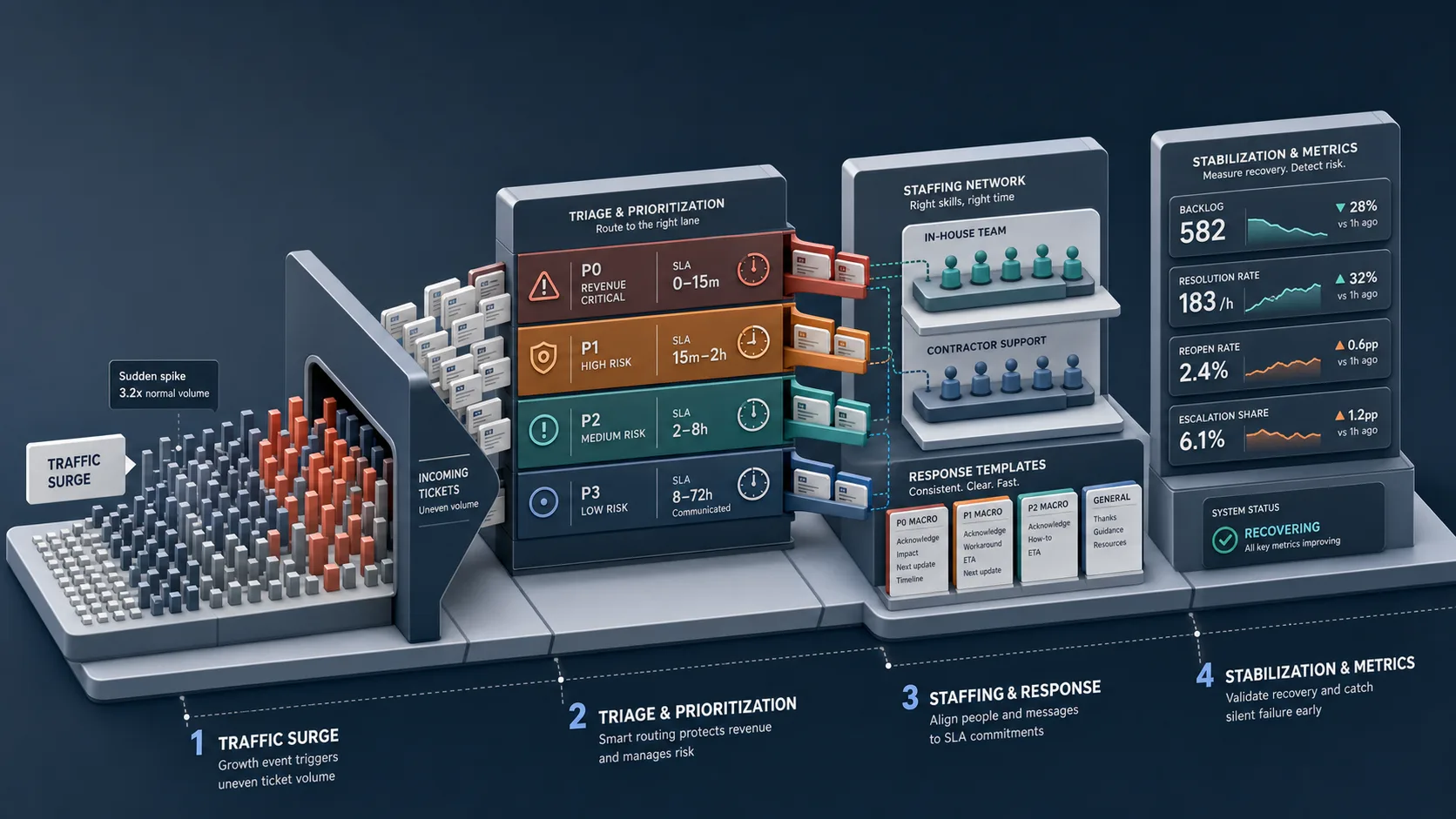
When teams get overloaded, the instinct is predictable: answer faster, pull everyone in, and keep things “fair” by working strictly in order.
During a surge, that often makes things worse.
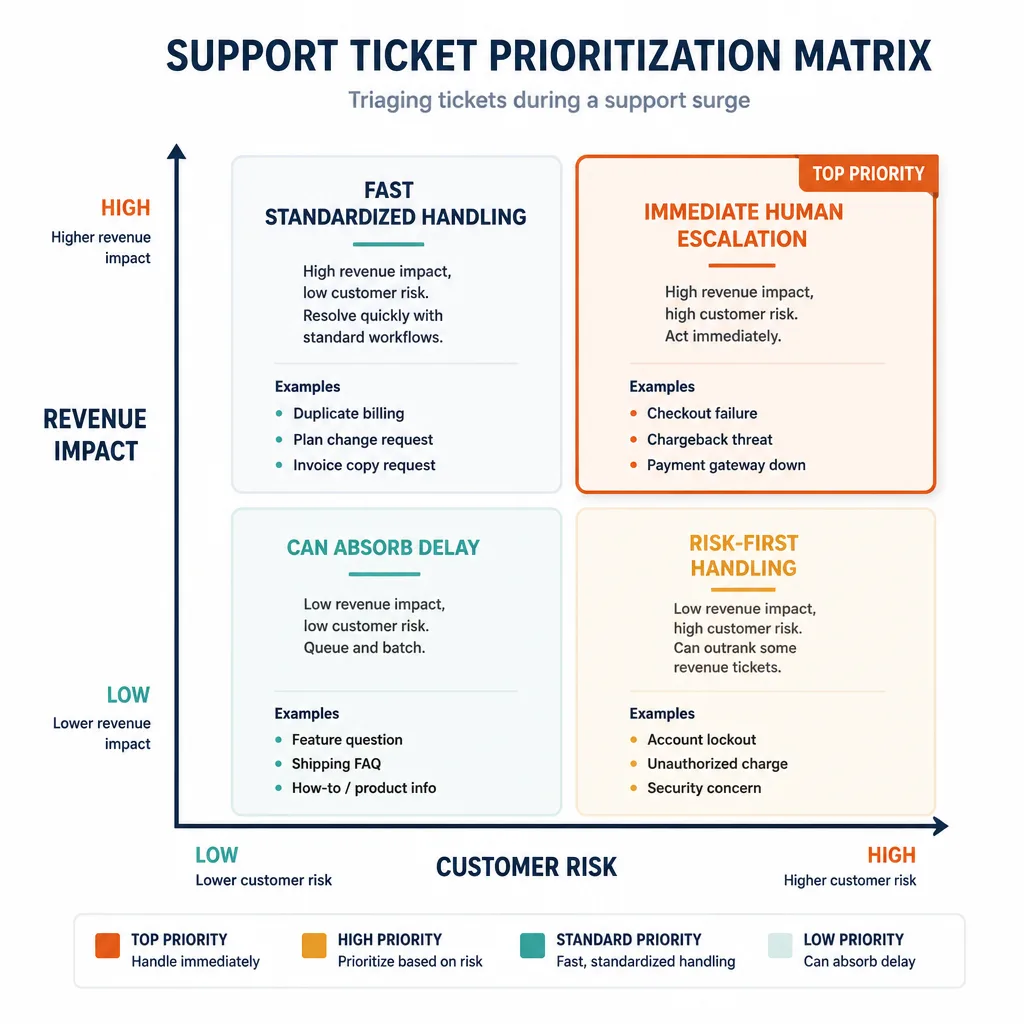
The two-axis prioritization model: revenue impact and customer risk
Use a simple 2x2 matrix:
| Low customer risk | High customer risk | |
|---|---|---|
| High revenue impact | Discount code not applying, invoice requests blocking purchase, premium shipping ETA | Paid account access failure, duplicate billing, checkout bug, enterprise onboarding blocker |
| Low revenue impact | Basic feature questions, low-value shipping FAQs, how-to requests covered in docs | Privacy concerns, fraud suspicion, chargeback threats, public complaints from visible customers |
This works because not all tickets cause equal harm if delayed.
- High revenue + high risk goes first.
- High revenue + low risk should move quickly, often with standardized handling.
- Low revenue + high risk can outrank some revenue tickets because trust, compliance, or public escalation risk compounds fast.
- Low revenue + low risk can wait if expectations are clear.
Which tickets should move to the front immediately
In most online businesses, these belong at the front of the queue:
- paying customers locked out of accounts
- failed or duplicate charges
- checkout failures affecting active buyers
- orders tied to deadlines or events
- security or privacy concerns
- high-value renewals or onboarding blockers
- public escalations from VIPs or visible customers
A useful distinction: a backlog full of low-risk questions is survivable. A smaller backlog full of payment, access, or trust issues is not.
Which tickets can absorb delay
General education requests, low-value order status checks, policy clarifications, or trial-user questions can usually wait longer if you say so clearly.
Some teams argue that FIFO is fairer. In one narrow sense, it is. But surge conditions are about reducing total harm, not preserving queue purity. If one unanswered billing issue turns into a charge dispute while ten feature questions wait another day, strict FIFO has protected process at the expense of both the business and the customer.
The first 12 hours: contain the surge
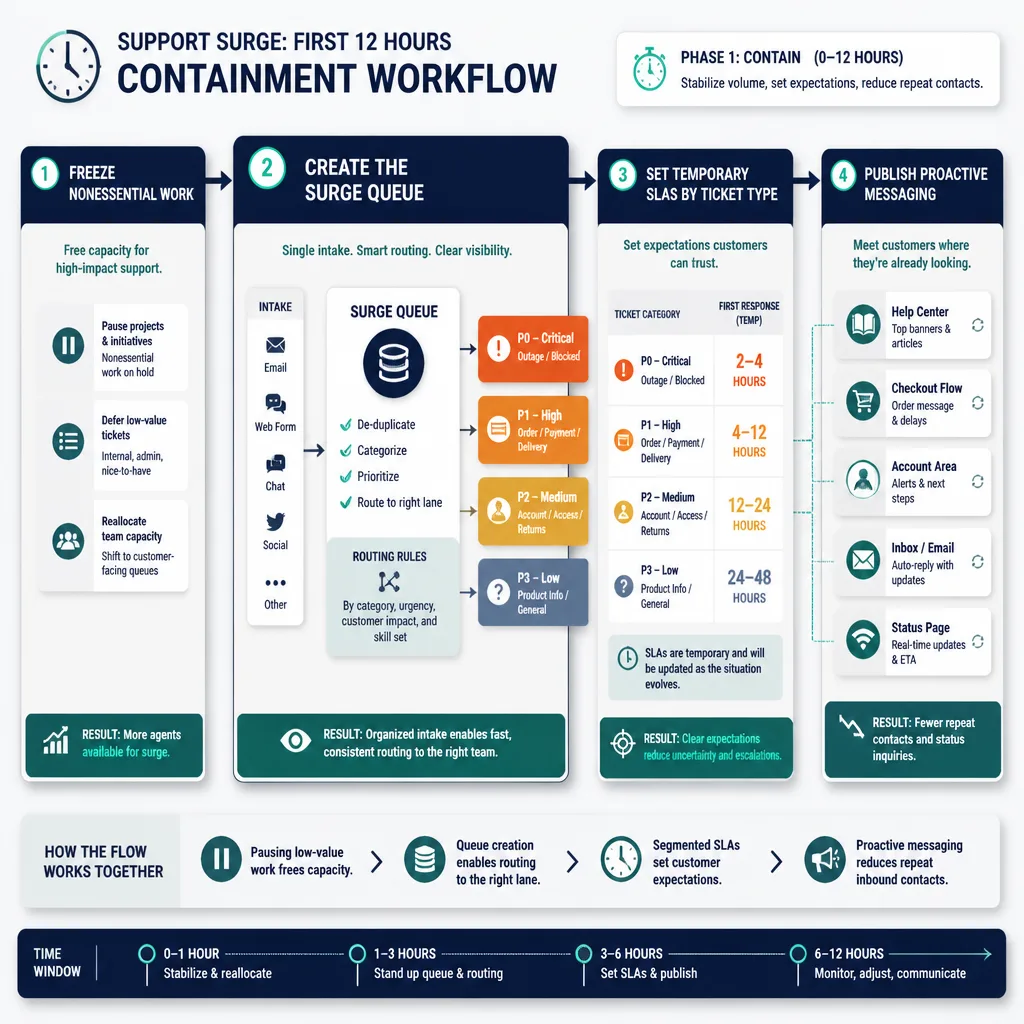
The first phase is not about elegance. It is about control.
Freeze nonessential work and create a surge queue
Pause anything that consumes response capacity without helping the incident: low-priority meetings, nonurgent QA reviews, documentation cleanup, and side projects.
Then create a temporary queue structure. In tools like Zendesk, Intercom, or Freshdesk, that might mean tags, views, or inbox rules for:
- checkout/payment issues
- login/access
- billing
- active orders/shipping
- outage/bug
- VIP
- public escalation
- refund risk
Assign explicit ownership too:
- incident lead: sets priorities
- queue owner: monitors flow and rerouting
- cross-functional liaison: coordinates with marketing, ops, engineering, or finance
Even very small teams benefit from naming these roles.
Set temporary SLAs by ticket type, not one blanket promise
A generic “responses are delayed” message is too vague. It often increases repeat contacts because customers with urgent problems do not know whether they should wait.
Instead, segment temporary SLAs by issue type. For example:
- critical access, billing, or security: 2–4 hours
- active order or payment blockers: same business day
- general product questions: 24–48 hours
- low-priority requests: 48–72 hours
These are directional, not universal. Your hours, staffing, and usual service level matter.
Example customer-facing language:
We’re experiencing higher-than-normal support volume. Urgent account access, billing, and order-blocking issues are being reviewed first and should receive a response within 4 hours. General questions may take up to 48 hours. If your issue affects an active order or paid account access, please reply with your order number or account email so we can route it correctly.
What this does well is simple: it does not promise the same speed to everyone, and it does not pretend everything is normal.
Publish proactive messaging where customers are already looking
If the same question appears twenty times, the better move is usually not answering it twenty times.
Put short, visible updates in places customers already check:
- help center banner
- checkout FAQ
- account dashboard
- order tracking page
- chat greeting
- auto-reply
- pinned social update, if relevant
- status page, if there is a system issue, using a tool like Atlassian Statuspage
A practical rule: repetitive questions are often a product, messaging, or operations defect until proven otherwise.
How to use templates without sounding robotic
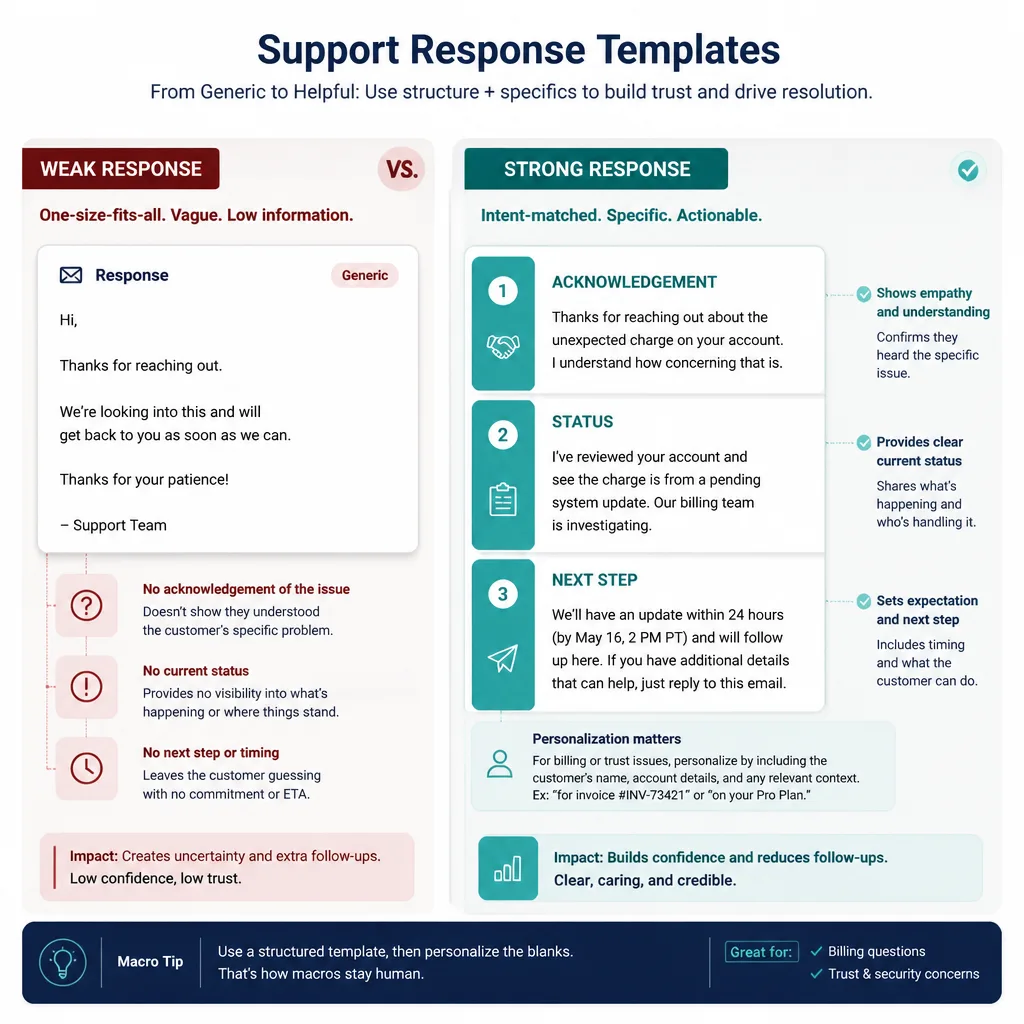
Macros are not the problem. Bad macros are.
Build response macros around intent
A weak canned reply sounds like this:
Thanks for reaching out. We appreciate your patience. We’ll get back to you soon.
It saves almost no work and gives the customer almost no clarity.
A useful macro is built around the actual concern: “I can’t log in after paying,” “my order deadline is tomorrow,” or “the coupon in your ad isn’t working.”
The three-part structure of a good surge reply
Most surge replies should include three elements:
- Acknowledgement of the actual issue
- Current status or known facts
- Next step with a time expectation
Example:
I can see you were charged but still can’t access your paid account. We’re investigating a sync issue affecting some new purchases today. You do not need to repurchase. We’ll update you within 3 hours, and if access is not restored by then, we’ll manually activate the account.
That is short, specific, and useful.
Where personalization matters and where it doesn't
Personalize heavily when the ticket involves money, trust, urgency, or emotion:
- billing disputes
- cancellations
- access failures
- missed delivery windows
- executive or enterprise accounts
- public complaints
Personalize lightly on repetitive, low-risk requests. Most customers care less about warmth theater than whether you understood the problem and gave them a credible next step.
A lightweight staffing model for the next 72 hours
More people can help. More people can also make the system worse.
When to pull in-house cross-functional help
Bring in adjacent internal staff when ticket types are narrow and teachable within hours.
Good examples include:
- sales or success staff helping with standardized account or invoice questions
- operations staff handling order-status lookups
- product specialists tagging known-issue tickets
- marketers updating campaign FAQs and landing page copy to reduce inbound volume
If 60% of new tickets are the same shipping question, one strong macro and one FAQ fix may outperform three extra responders.
When contractors help and when they add risk
Contractors help when:
- volume will likely stay elevated beyond 48–72 hours
- issue categories are stable
- documentation is decent
- permissions and QA are ready
They are riskier when:
- the incident is ambiguous
- tickets require product judgment
- billing or security issues dominate
- escalation paths are undocumented
A simple warning sign: if new helpers ask more questions than tickets they resolve in their first few hours, the bottleneck is probably process design, not headcount.
A simple coverage model by queue volume, complexity, and escalation rate
Use three inputs:
| Queue condition | Best response |
|---|---|
| Backlog growing, low complexity, low escalation rate | Add adjacent internal help |
| Backlog growing, moderate complexity, repeatable categories | Consider contractors |
| High escalation share, inconsistent handling, unclear categories | Fix routing, macros, and knowledge gaps before adding people |
This is practitioner judgment, not a universal staffing formula. But it helps avoid a common mistake: scaling chaos.
The metrics that show whether support is stabilizing or silently failing
Why first response time can mislead
First response time is easy to improve with placeholder replies.
That does not mean customers are getting helped.
A team can cut first response time in half while making the situation worse if those early replies do not resolve anything and drive reopen rates or duplicate contacts higher. Many help desk platforms track both response and resolution metrics, but interpretation matters as much as the dashboard itself.[^1]
A better concept is first meaningful response: the first reply that gives status, direction, or action.
The core metrics to watch
During the first day, check these every 2–4 hours:
- backlog growth rate
- age of oldest high-priority tickets
- time to resolution
- reopen rate
- SLA misses by priority
- escalation share
If you can track them, also watch duplicate contact rate and refunds or cancellations tied to unresolved issues.
What healthy and dangerous patterns look like
Healthy by 24 hours
- queue growth slows
- oldest P1/P2 tickets stop aging upward
- repeat questions begin dropping after proactive messaging
- reopen rate stays stable
Dangerous by 24 hours
- first response time improves, but resolution time gets worse
- queue shrinks mainly because placeholders were sent
- escalations rise sharply
- VIP issues are still being found manually
Healthy by 48 hours
- categories are predictable
- temporary SLAs are mostly met for top priorities
- one or two upstream fixes reduce recurring volume
Dangerous by 48 hours
- low-priority tickets are aging without communication
- team fatigue is obvious
- marketing is still driving traffic into unresolved confusion
Healthy by 72 hours
- priority backlog is under control
- queue taxonomy is clear
- self-service and onsite messaging are absorbing repeat demand
- staffing can be normalized or deliberately extended
Failure modes to watch for
The most common one is fake recovery.
Queue shrinkage caused by low-quality replies
If agents are sending acknowledgements instead of answers, the queue may look healthier while customer frustration quietly gets worse. Reopen rate is the warning light here.
VIP and revenue-critical issues buried in general volume
Without tags, routing rules, or alerts, high-value accounts and urgent revenue blockers can disappear into the crowd.
Staffing added too quickly without routing discipline
Extra hands without permissions, macros, escalation rules, and QA often create duplicate work and inconsistent answers.
Marketing keeps driving traffic while support is underwater
Growth and support cannot operate independently during a spike. If a campaign is creating confusion or the service model is straining, marketing needs that feedback immediately. Sometimes the highest-ROI support action is changing the ad, landing page, or offer copy rather than answering another hundred tickets.
What to keep after the spike ends
Do not throw away the parts that worked.
Playbook elements worth standardizing
Keep:
- the triage matrix
- surge tags and queue views
- temporary SLA templates
- incident roles
- proactive message placements
- dashboard views for priority backlog
Which macros, tags, and escalation rules should become permanent
Any macro that consistently reduced handling time without driving reopen rates should stay. The same goes for routing rules that surface VIP, billing, security, or active-order issues faster.
The goal is not to preserve the emergency state. It is to preserve the control it created.
How to run a short post-incident review
Keep the review short and operational:
- what caused the spike?
- which ticket types surged?
- which messages reduced demand?
- which macros worked?
- where did routing fail?
- which escalations were too slow?
- what should be automated or documented before the next launch?
If you run campaigns regularly, build a pre-spike checklist so growth teams share offer details, expected volume, promo mechanics, and likely support risks before launch.
Conclusion
A sudden traffic spike is not just a customer acquisition event. It is a stress test of your support system.
The first 72 hours go better when you stop chasing perfect service and start managing harm. Triage by revenue impact and customer risk. Set temporary expectations by ticket type. Use macros that reduce uncertainty instead of performing empathy. Add staffing only after the queue tells you what kind of problem you actually have.
The core idea is simple: support stabilizes during a surge because the team becomes more disciplined, not more heroic.
If you remember one thing, make it this: a shrinking queue is not recovery unless the right problems are disappearing first.
FAQ
How should a small business triage support tickets during a sudden traffic spike?
Sort tickets by two factors: revenue impact and customer risk. Issues that block purchases, paid account access, billing, or active orders should move ahead of low-risk informational questions. During a surge, strict FIFO often creates more damage than temporary risk-based prioritization.
Is FIFO or risk-based triage better during a support surge?
Risk-based triage is usually better for the first 72 hours. FIFO feels fair, but it can bury urgent issues like failed payments, account lockouts, or charge disputes under lower-stakes requests. The goal is to reduce total business and customer harm, not preserve queue order at all costs.
What temporary SLAs make sense during high support volume?
Use segmented temporary SLAs by ticket type instead of one blanket promise. For example, critical access, billing, or security issues may need a response within 2 to 4 hours, while general questions may take 24 to 48 hours. Exact targets depend on your business model, hours, and backlog.
How can support teams use canned responses without sounding robotic?
Write macros around customer intent, not generic politeness. A strong surge reply usually includes three parts: acknowledgement of the issue, current status or known facts, and a clear next step with a time expectation. Personalize more heavily when the ticket involves revenue, emotion, or trust risk.
When should a team pull in internal staff versus contractors?
Use internal cross-functional help when ticket types are narrow, repetitive, and teachable quickly. Consider contractors when volume is likely to last beyond 48 to 72 hours and the work is standardized. If escalation rates are high or the issue is ambiguous, fix routing and knowledge gaps before adding more people.
Which support metrics matter most in the first 72 hours?
Watch backlog growth, age of oldest priority tickets, time to resolution, reopen rate, SLA misses by priority, and escalation share. First response time alone can be misleading if agents send placeholder replies that do not solve the issue.
How often should support leaders review metrics during a traffic spike?
In the first day, review queue health every 2 to 4 hours rather than once daily. Surge conditions change quickly, and short review intervals help teams catch rising backlog, stale high-priority tickets, or poor-quality responses before they spread.
What are the most common failure modes during a support surge?
The biggest risks are low-quality replies that shrink the queue without solving problems, VIP or revenue-critical tickets buried in general volume, staffing added too quickly without routing discipline, and marketing continuing to drive traffic while support is already overloaded.
What should teams keep after the spike ends?
Keep the parts that improved control: surge tags, triage rules, temporary SLA templates, macro libraries, escalation paths, dashboard views, and a simple post-incident review. Those assets make the next spike easier to manage and reduce the need to improvise under pressure.