Google Ads Setup for a New Account: Tracking, Goals, and a Campaign Structure You Won’t Need to Rebuild
Many new Google Ads accounts go off track before the first click. The usual mistake is launching campaigns first and sorting out conversion tracking later. That leads to weak optimization, messy reporting, and a structure that has to be rebuilt once spend grows.
This matters because Google Ads does not just display your data. It uses that data to decide who sees your ads and how bids are adjusted. If the signals are noisy or low-value, Smart Bidding can learn the wrong patterns.[^1]
This guide walks through a practical setup sequence for a new account: define conversions, connect GA4 properly, configure goals, create a naming system, choose between Search and Performance Max, and build a simple structure that can scale.
Start with measurement, not campaigns
If you remember one rule, make it this: set up measurement before you add campaign complexity.
Why accounts break when tracking is added too late
When tracking comes after launch, three things tend to happen:
- Early data is unreliable
- Bidding learns from incomplete signals
- Reporting becomes harder to trust
For example, imagine a B2B service company launches Search campaigns and only tracks button clicks for the first three weeks. Google Ads may optimize for people who click “Contact Us,” not people who actually submit a qualified form.
The account can look busy while still learning from a weak signal.
What this guide will help you set up
It helps to separate three things that often get mixed together:
- Business outcome: the result you actually care about, such as a purchase or qualified lead
- GA4 event: a tracked action in Google Analytics 4, such as
form_startorpurchase - Google Ads conversion action: the signal used inside Google Ads for reporting and bidding
Bottom Line: A tracked event is not automatically a good optimization target.
Step 1: Define the conversion actions that should guide optimization
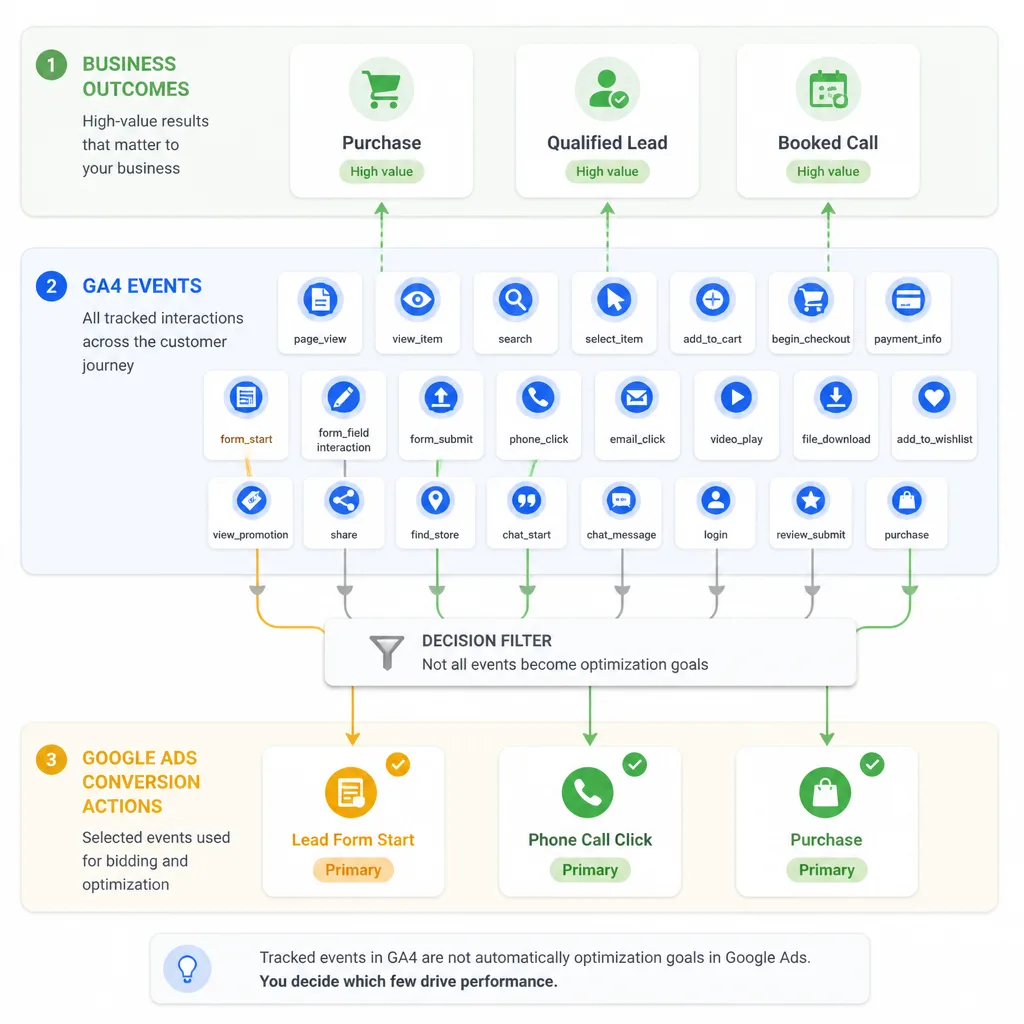
Business outcomes, GA4 events, and Google Ads conversions are not the same
Many setup mistakes come from treating every tracked action as equally valuable.
A purchase is a business outcome. An add_to_cart event is useful behavior, but it is not revenue. A Google Ads conversion action is the event you choose to tell Google Ads, “optimize toward this.”
If you import everything, you create noise.
How to choose primary and secondary conversions
In Google Ads, primary conversions are usually included in the Conversions column and can influence bidding. Secondary conversions are there mainly for observation and analysis.[^2]
| Action | Best use | Usually primary or secondary? | Why |
|---|---|---|---|
| Purchase | Ecommerce optimization | Primary | Closest revenue signal |
| Qualified lead form submit | Lead gen optimization | Primary | Strong commercial intent |
| Booked sales call | Lead gen optimization | Primary | Often higher quality than a casual inquiry |
| Add to cart | Ecommerce observation | Secondary | Useful, but not final value |
| Form start | Funnel observation | Secondary | Usually too soft for bidding |
| CTA click | UX insight | Secondary | Shows interest, not outcome |
| Newsletter signup | Separate objective only | Usually secondary | Often low commercial value |
| Pricing page view | Behavior analysis | Secondary | Useful insight, weak bidding signal |
What usually should not be primary in a new account
In most new accounts, avoid setting these as primary conversions:
- Page views
- Scroll depth
- Button clicks
- Form starts
- Video views
- Add to cart in most cases
- Unqualified lead actions
Decision Rule: If the action does not clearly reflect meaningful buying intent, do not make it primary unless you have no stronger signal yet.
There are exceptions. If sales happen offline months later and volume is low, you may need to optimize toward a softer action for a while. Treat that as a temporary bridge, not the long-term plan.
A simple framework for choosing the right primary conversion
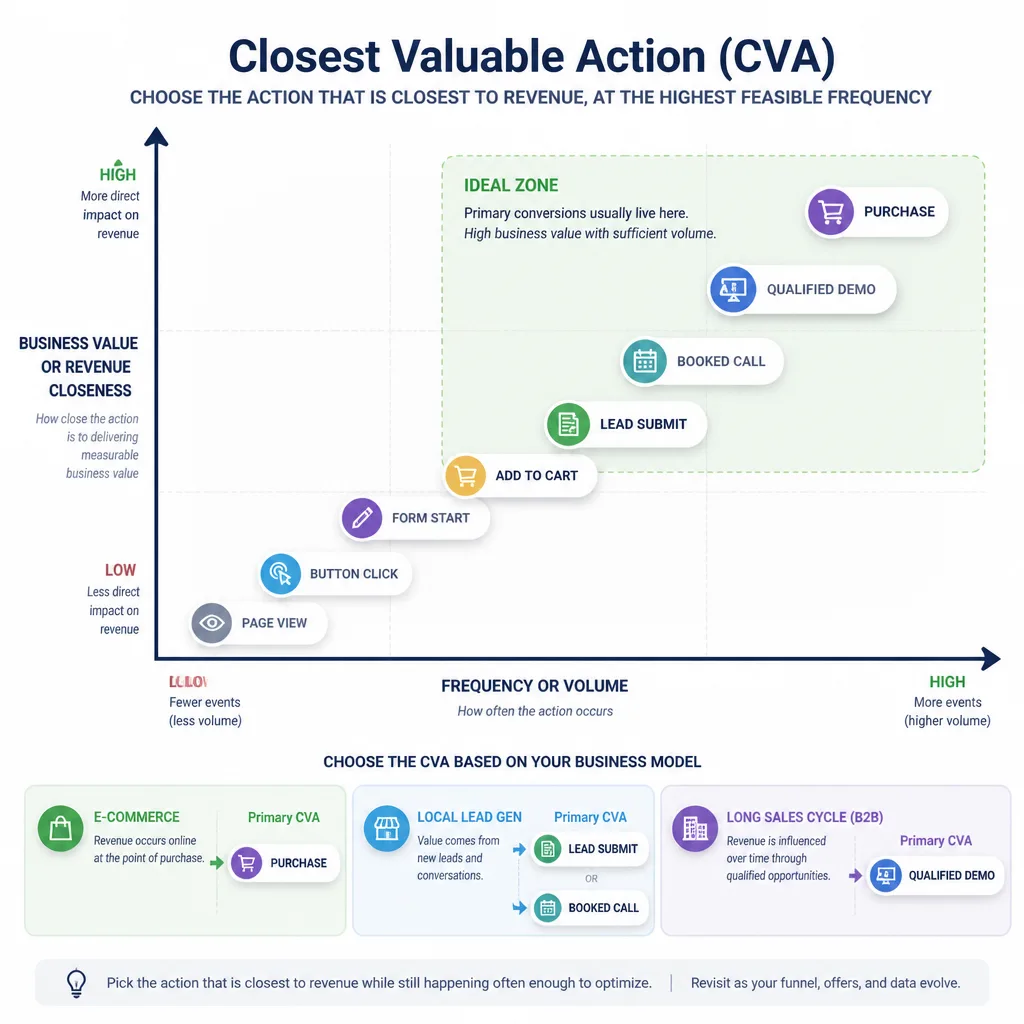
The Closest Valuable Action framework
The best primary conversion is usually the closest valuable action: the highest-value action that happens often enough and sits close enough to revenue for bidding to learn from.
| Scenario | Best primary conversion | Why it works | Limitation |
|---|---|---|---|
| Ecommerce store | Purchase | Direct revenue signal | Can learn slowly if volume is very low |
| Local lead gen | Lead form submit or booked call | Clear intent with enough volume | Lead quality may vary |
| Long sales cycle B2B | Qualified lead | Better than raw inquiries | Requires a qualification process |
How this looks in practice
An ecommerce store should usually optimize toward purchase, while add_to_cart and begin_checkout stay secondary.
A local plumbing company should usually optimize toward submitted lead forms or phone calls, not page visits or click-to-call taps by themselves.
A B2B software company with a 60-day sales cycle may be better off optimizing toward qualified demo requests, not every contact form start. That brings the signal closer to actual pipeline quality.
Bottom Line: Choose the strongest signal that is both meaningful and frequent enough to be useful.
Step 2: Connect Google Ads and GA4 without creating reporting confusion
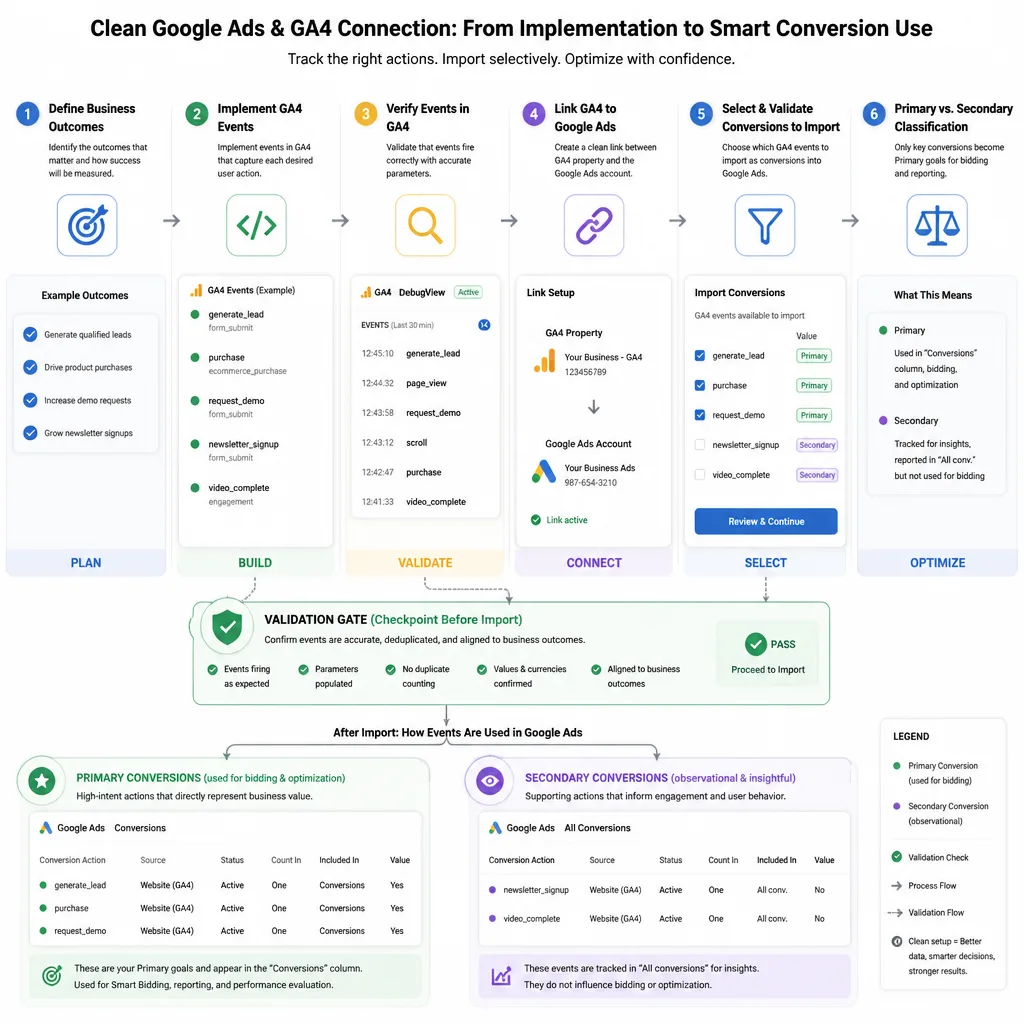
What linking GA4 to Google Ads actually does
Linking the two platforms makes several things possible:
- Importing GA4 key events into Google Ads
- Using audiences for remarketing where available
- Viewing paid traffic behavior in GA4
- Comparing performance across channels more clearly[^3]
But the link does not fix poor tracking design.
A clean setup sequence
Use this order:
- Define the business outcome
- Implement GA4 events cleanly
- Verify that events fire correctly
- Link GA4 and Google Ads
- Import only the conversion actions you want in Ads
- Set each one as primary or secondary on purpose
For example, if GA4 tracks form_start, form_submit, and phone_click, do not import all three as bidding goals by default. In many lead gen accounts, only form_submit should be primary.
When imported GA4 conversions make sense, and when native Google Ads tracking is better
GA4 imported conversions are often a good fit when:
- Your GA4 event setup is clean
- You want measurement consistency across channels
- You are importing a small, intentional set of events
Native Google Ads conversion tracking is often better when:
- You want tighter Ads-side attribution
- You need enhanced conversions
- You want call conversion tracking
- You want simpler purchase or lead signals directly in Google Ads[^1]
Some reporting differences between GA4 and Google Ads are normal. Attribution models and reporting logic are not identical.
Common Mistake: Importing every GA4 key event into Google Ads and assuming all of them should affect bidding.
Step 3: Configure goals so campaigns optimize for the right outcomes
How account-default goals affect bidding
Google Ads account-default goals can shape what campaigns optimize toward by default.[^2] If your default goals include both purchases and low-value lead actions, campaigns may lean toward the easier action instead of the more valuable one.
That becomes a real problem in mixed accounts.
When to use campaign-specific goals
Use campaign-specific goals when different campaigns have different business outcomes.
For example:
- A Search campaign for ecommerce products should optimize to purchases
- A lead gen campaign for consultations should optimize to qualified lead submissions
Those should not always share the same goal setup.
Common mistakes that send weak signals to Smart Bidding
The most common ones are:
- Making micro-conversions primary
- Mixing low-value and high-value goals together
- Leaving imported conversions unreviewed
- Assuming more tracked actions automatically improve optimization
Decision Rule: If two campaigns are trying to produce different business outcomes, they probably need different goal settings.
Step 4: Create a naming convention that still works as the account grows
What a naming system should tell you
A useful naming system should quickly show:
- Platform
- Campaign type
- Market or geography
- Offer or theme
- Objective
It should also be simple enough that you still use it six months later.
A practical format for campaigns, ad groups, and conversions
Try this structure:
- Campaign:
Platform | Type | Market | Offer | Objective - Ad group:
Intent or Theme - Conversion:
Action | Qualification | Source
Example naming conventions
| Item type | Naming pattern | Example |
|---|---|---|
| Campaign | Platform | Type | Market | Offer | Objective | GAds | Search | US | Emergency Plumbing | Leads |
| Campaign | Platform | Type | Market | Category | Objective | GAds | Search | US | Running Shoes | Sales |
| Ad group | Intent cluster | Emergency Plumber |
| Ad group | Intent cluster | Water Heater Repair |
| Conversion | Action | Qualification | Source | Lead Form Submit | Primary | GA4 Import |
| Conversion | Action | Qualification | Source | Purchase | Primary | Google Ads Tag |
Bottom Line: Good naming prevents reporting mistakes and saves time later.
Step 5: Choose your first campaign type: Search or Performance Max
When Search is the better starting point
Search is usually the better place to start when:
- Demand already exists
- You want query-level intent control
- You need cleaner early feedback
- Your offer has a considered buying process
- You want tighter landing page alignment
For many new accounts, Search gives faster and clearer learning.
When Performance Max makes sense early
Performance Max can work early if you already have:
- Strong conversion tracking
- Good creative assets
- Enough budget
- A straightforward offer
- Reliable lead or purchase signals
That is often more realistic for ecommerce than for messy lead gen funnels.
Let the offer and sales cycle guide the choice
A short buying journey with a clear offer is usually a better fit for automation. A long sales cycle with inconsistent lead quality often benefits from more control first.
If you are unsure, start where signal quality is easiest to trust.
Search vs. Performance Max for a new account
| Criteria | Search | Performance Max |
|---|---|---|
| Intent capture | High; captures active search demand | Broader; spans multiple Google inventories |
| Control | Strong | Lower |
| Search term visibility | Better | More limited |
| Asset requirements | Moderate | Higher |
| Conversion signal quality needed | Moderate | High |
| Best for long sales cycles | Usually better | Riskier unless lead qualification is strong |
| Best for ecommerce | Strong | Often strong with clean feed and tracking |
| Best for fresh accounts | Usually safer | Better only with clean signals and enough budget |
Bottom Line: Search is usually the safer first campaign type. Performance Max works best when automation has strong inputs.
Step 6: Build a campaign structure you will not need to rebuild right away
How many campaigns to start with
Start with the fewest campaigns needed to reflect real differences in:
- Budget
- Offer
- Geography
- Business objective
Too many campaigns split spend and slow learning.
Group by intent or offer, not by every variation
Segment based on meaningful differences, not every keyword variation.
Good early segmentation might include:
- Emergency services vs. general services
- High-margin category vs. everything else
- Brand vs. non-brand, if brand demand exists
Poor early segmentation usually means splitting a small budget across too many narrow campaigns just to look organized.
Lean starter structures
Lead gen example
- 1 non-brand Search campaign for core service intent
- 1 additional Search campaign only if a service category has a different budget or landing page
- Ad groups organized by intent themes
Ecommerce example
- 1 Search campaign for core high-intent categories
- or 1 Performance Max campaign if feed quality, purchase tracking, and budget are all strong
If you need help scaling once the basics are working, outside support can make sense at that stage. For some businesses, services like Traffics.io are more useful during growth than during initial setup.
Decision Rule: Add campaigns only when there is a clear business reason.
Common mistakes in new Google Ads accounts
Tracking micro-conversions as primary
This is one of the fastest ways to teach bidding the wrong lesson.
Launching too many campaigns too early
More campaigns do not mean more strategy. They usually mean weaker data in each campaign.
Using unclear names
If you cannot understand a campaign name in two seconds, reporting will get harder later.
Choosing Performance Max before the signals are ready
Performance Max depends heavily on reliable inputs. Weak conversion signals make automation less effective.
Pre-launch checklist
Measurement
- Defined the real business outcome
- Chosen one main primary conversion
- Kept micro-conversions as secondary unless there is a strong reason not to
- Verified that events and tags fire correctly
- Linked GA4 and Google Ads intentionally
- Imported only the conversions needed in Ads
Structure
- Created a simple naming convention
- Limited campaign count to real business differences
- Grouped ad groups by intent or theme
- Matched landing pages to campaign intent
Campaign type decision
- Chosen Search if control and intent visibility matter most
- Chosen Performance Max only if tracking, assets, and budget are ready
- Confirmed goals match the campaign’s real business outcome
Conclusion
A strong Google Ads setup starts with measurement quality, not campaign volume.
Early on, the important decisions are straightforward: choose the right primary conversion, keep secondary signals separate, connect GA4 and Google Ads cleanly, set goals carefully, use a simple naming system, and launch with a lean structure.
Get those right and scaling becomes much easier. Get them wrong and every future optimization decision rests on unstable data.
Bottom Line: Build for signal quality first. Scale second.
FAQ
What should I set up first in a new Google Ads account?
Start with measurement. Define the business outcome you want to optimize for, implement and verify tracking, then configure goals, naming, and campaign structure.
What is the difference between a GA4 event and a Google Ads conversion?
A GA4 event is a tracked user action in Google Analytics 4, such as form_start or purchase. A Google Ads conversion is the action you choose to track or import into Google Ads for reporting and bidding.
Which conversion actions should be primary in a new Google Ads account?
Primary conversions should usually be the closest meaningful business outcome, such as purchases, qualified lead submissions, or booked calls. Low-value actions like button clicks, page views, and form starts are usually better as secondary conversions.
What are primary and secondary conversions in Google Ads?
Primary conversions can be included in the Conversions column and used by Smart Bidding. Secondary conversions are useful for analysis but usually should not guide bidding directly.
Should I use GA4 imported conversions or native Google Ads conversion tracking?
GA4 imported conversions can work well if your event setup is clean and you want consistency across channels. Native Google Ads tracking is often better when you want tighter Ads attribution, enhanced conversions, call tracking, or simpler bidding signals.
Why do account-default goals matter in Google Ads?
Account-default goals influence what many campaigns optimize toward by default. If low-value actions are included as primary goals, Smart Bidding may chase the wrong signals and reduce lead or sales quality.
When should I use campaign-specific goals instead of account-default goals?
Use campaign-specific goals when different campaigns are trying to produce different outcomes. For example, one campaign may optimize for purchases while another should optimize for qualified lead submissions.
Should a new account start with Search or Performance Max?
Search is usually the better starting point when you want stronger intent control, better query visibility, and a simpler setup. Performance Max can make sense earlier if you have solid conversion data, strong assets, enough budget, and a straightforward offer.
How many campaigns should I launch in a new Google Ads account?
Start with the minimum number of campaigns needed to reflect real differences in budget, offer, geography, or objective. Too many campaigns early on fragment spend, slow learning, and complicate reporting.
What naming convention should I use in Google Ads?
Use a simple format that shows platform, campaign type, market, offer or theme, and objective. For example: GAds | Search | US | Emergency Plumbing | Leads.