How to Fix a Facebook Ads Conversion Rate Drop: A 60-Minute Diagnostic Checklist (2026)
A drop in Facebook Ads conversion rate triggers the same reaction almost every time: conversions fall, spend keeps going out, and someone wants an explanation immediately.
That pressure is exactly when teams make the problem worse. They swap creatives, tighten audiences, change budgets, adjust bidding, and edit the landing page all at once. Then they can’t tell what actually caused the decline.
A better approach is simpler. A conversion-rate drop is a symptom, not a diagnosis. The job is to isolate where the break happened: tracking, delivery, creative, audience, or landing page. Once you know that, the next move becomes much clearer: stop, fix in place, or relaunch.
This checklist is for that moment. If you’re already in Ads Manager and need a disciplined way to work through the problem in under an hour, this is the process.
How to approach a conversion-rate drop without making it worse
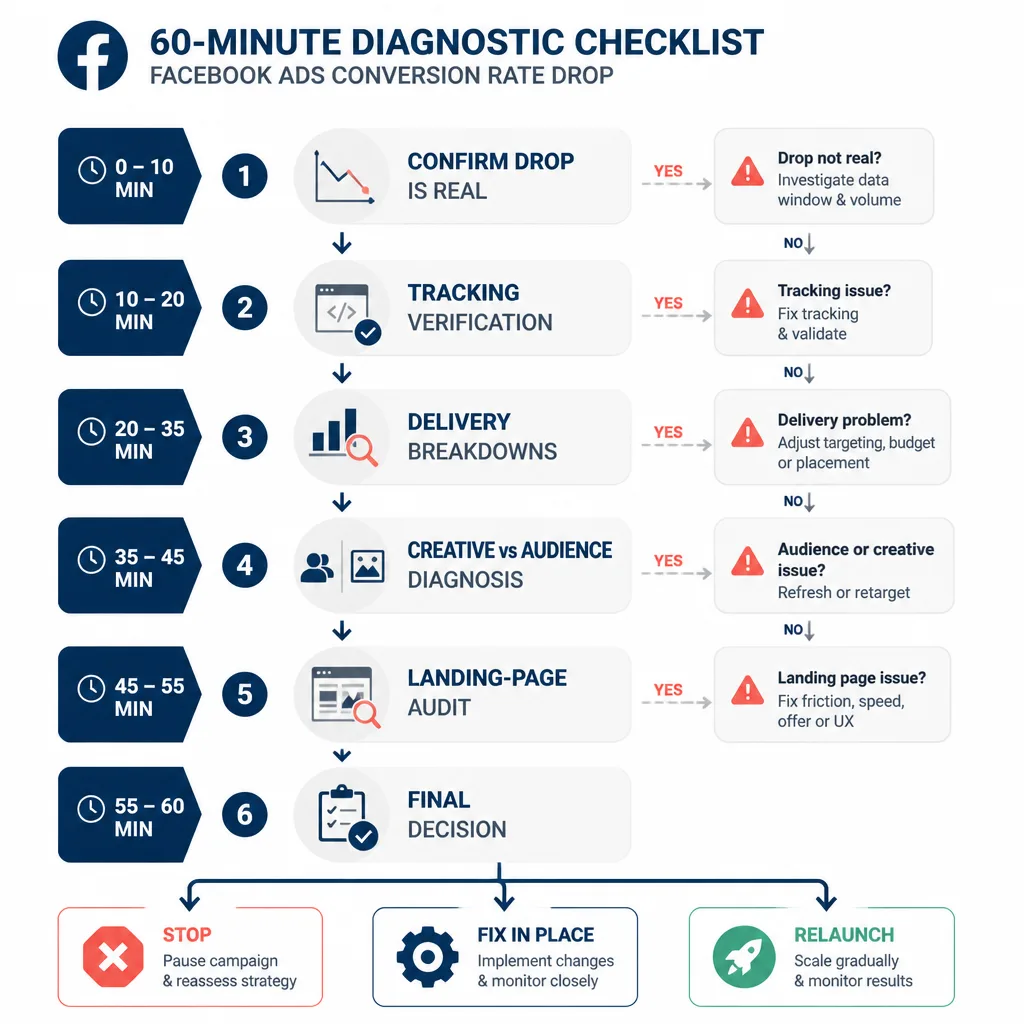
The most useful way to think about a conversion-rate drop is as a downstream failure.
People blame the ad first. Sometimes they’re right. Often they’re not.
If click-through rate is stable but purchases fall, the ad may still be doing its job. The problem could be attribution, Pixel or Conversions API continuity, a placement shift into lower-intent traffic, a mobile form bug, a price change, or even a CRM routing issue in a lead-gen funnel.
So start with this five-layer diagnostic flow:
tracking → delivery → creative → audience → landing page
That order matters.
If tracking is broken, you shouldn’t optimize from bad feedback. If delivery changed, refreshing creative may solve the wrong problem. If the landing page broke on mobile Safari, no amount of audience tweaking will rescue the campaign.
Keep one simple decision framework in mind throughout:
- Stop when data is unreliable or waste is obvious.
- Fix in place when the problem is contained and reversible.
- Relaunch when the campaign structure is too over-edited, fatigued, or noisy to recover cleanly.
Minute 0 to 10: Confirm the drop is real before touching the campaign
Before diagnosing anything, make sure you’re looking at a real signal rather than normal volatility.
Compare the right date ranges and normalize for spend, clicks, and conversion window
Don’t compare yesterday to a random strong day from last week.
Compare a meaningful recent window, usually the last 3 to 7 days, against the prior equivalent period. Then add context:
- Was spend roughly similar?
- Were clicks or landing-page views similar?
- Are you using the same attribution window?
- Did the earlier period include a sale, launch, payday effect, or email push?
A 25% drop at low volume may not mean much. The same drop across stable spend and click volume is more likely to be real.
Day-of-week patterns matter more than many advertisers admit. Plenty of accounts convert differently on weekends, and a Friday-to-Monday comparison can create a false alarm.
Check attribution changes and reporting delays
Attribution changes can make Meta performance look worse even when the business itself hasn’t changed.
That’s different from a tracking failure.
If attribution settings changed recently, or if you’re reviewing data too early in a lagging pipeline, the decline may be more apparent than real. This is common in lead-gen setups where qualified events appear later than form submissions, and in ecommerce accounts where modeled reporting settles over time.
Separate conversion rate from CTR and CPC
This is the fastest way to decide where to look next.
If CTR is down, and CPC or CPM also worsened, the issue may start before the click. That usually points to creative fatigue, audience exhaustion, or stronger auction pressure.
If CTR is stable but conversion rate falls, the problem is often post-click. That pushes tracking, delivery quality, landing-page friction, or offer mismatch higher on the list.
If clicks are stable but landing-page views fall, suspect page speed, redirects, or load failures.
A simple example:
- Last week: CTR 1.8%, landing-page view rate healthy, purchase CVR 3.2%
- This week: CTR still 1.8%, CPC similar, but purchase CVR drops to 2.0%
That is not your first clue for a creative problem. It’s a post-click problem until proven otherwise.
Minute 10 to 20: Rule out tracking problems first
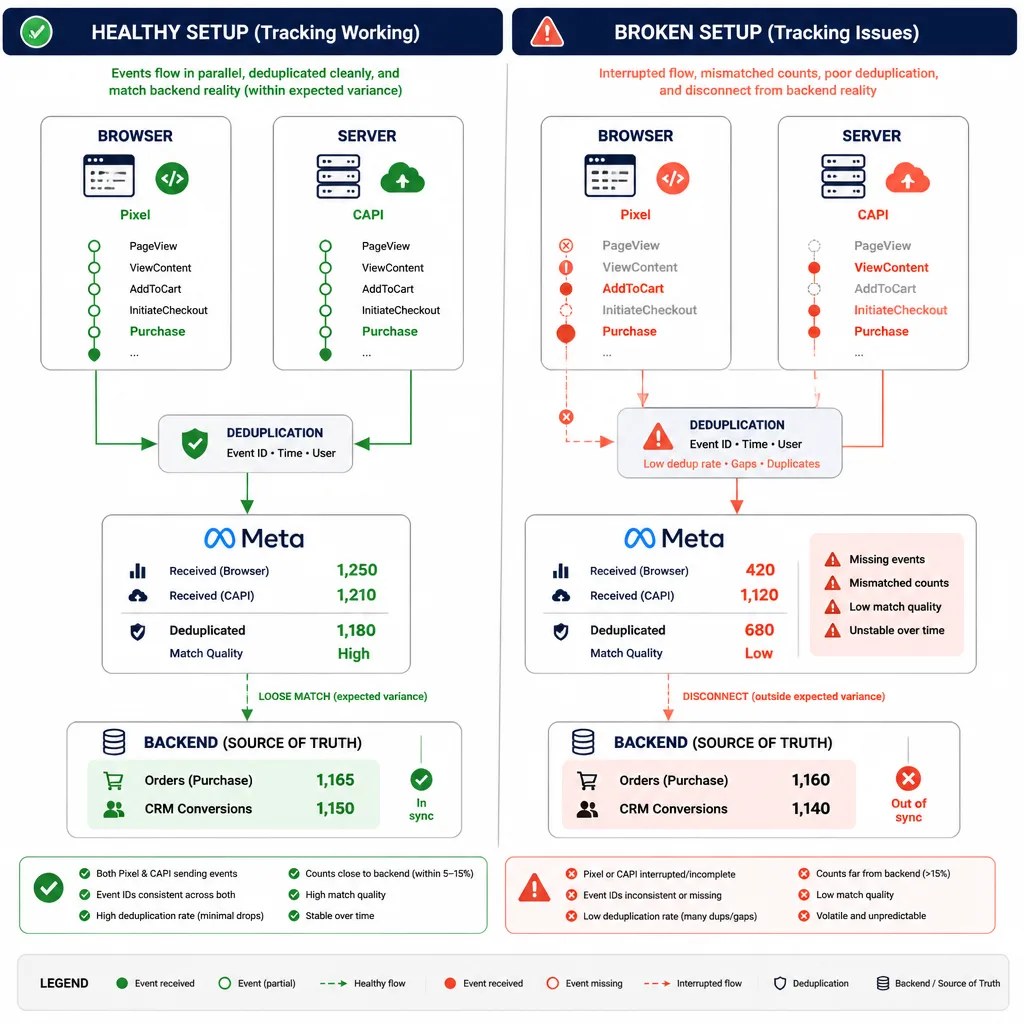
This is the step many teams skip, and it’s an expensive mistake.
Check Pixel and Conversions API event continuity
Open Event Manager and inspect your main conversion events: Purchase, Lead, CompleteRegistration, or whatever the campaign is optimizing toward.
You’re looking for sudden breaks, not minor fluctuation.
Common red flags:
- event volume drops abruptly while traffic looks normal
- browser events continue but server events weaken, or the reverse
- deduplication looks inconsistent
- purchase value disappears or becomes erratic
- warnings appear around event setup or match quality
In 2026, most resilient Meta setups rely on both Pixel and Conversions API with proper deduplication. If one side breaks, reporting can degrade before the business does.
Compare platform-reported conversions with backend reality
Now cross-check Meta against your actual source of truth.
Use whatever backend system fits the account:
- Shopify or WooCommerce for ecommerce
- GA4 for site-side trend validation
- CRM for leads and qualified pipeline events
- call tracking or internal analytics where relevant
A classic example: Meta-reported purchases fall 40% over three days, but Shopify orders from paid social stay roughly flat. That’s not a bidding emergency. It’s a measurement problem first.
The reverse can happen too. If both Meta and backend conversions are down, the decline is more likely real.
Decision point: fix tracking, don’t optimize around broken data
If measurement is compromised, pause scaling decisions immediately.
That does not always mean shutting campaigns off. It means avoiding broad optimization moves based on feedback you no longer trust.
Fix signal flow first. Repair event continuity, verify deduplication, confirm parameters, and then decide whether the campaign itself is underperforming.
Minute 20 to 35: Use Ads Manager breakdowns to find where delivery changed
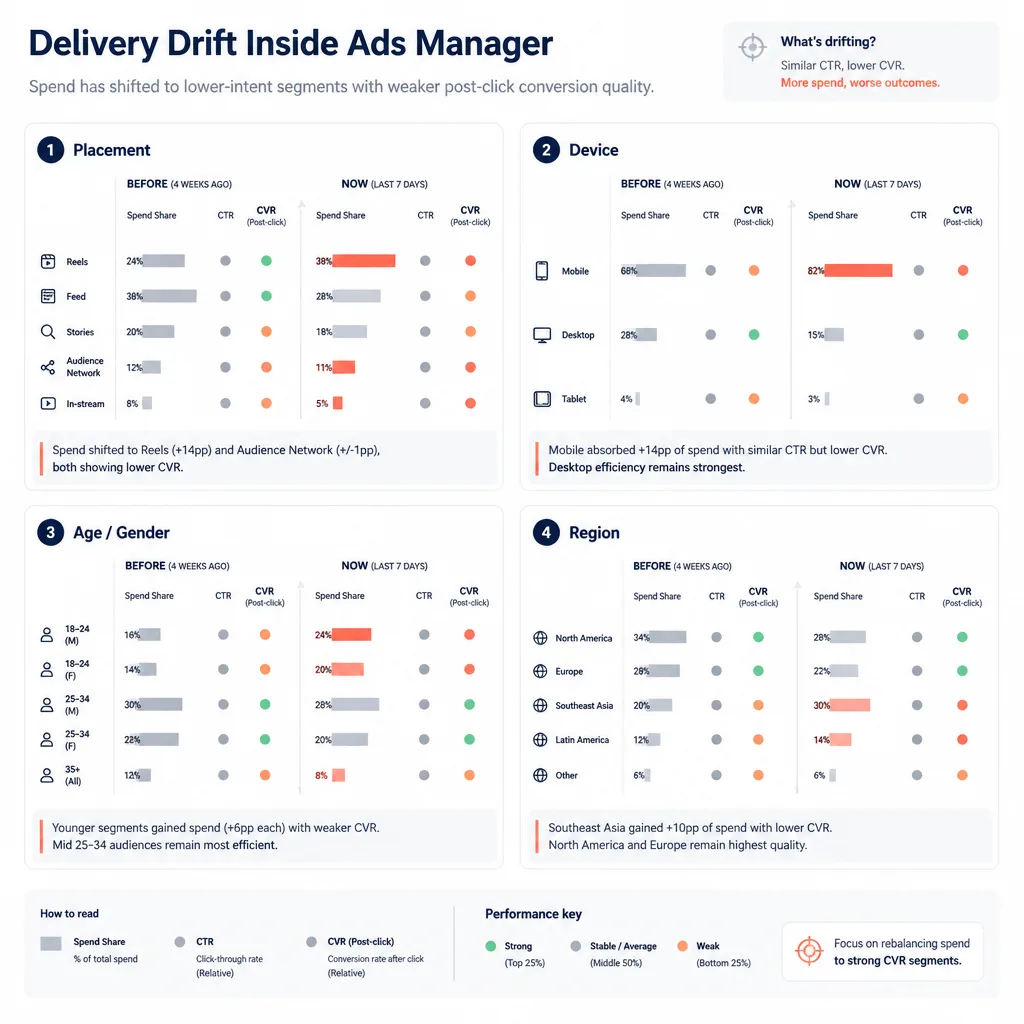
Once you trust the data enough to continue, the next question is whether Meta started finding a different kind of traffic.
Check breakdown by placement
Placement drift is one of the most common hidden causes of falling conversion rate.
Top-line performance can weaken even when CTR and CPM still look acceptable, simply because a larger share of spend moved into cheaper, lower-intent inventory.
In Ads Manager, break performance down by placement and compare the recent period with the prior one. You’re looking for shifts in spend share and post-click efficiency.
A common pattern looks like this:
- overall spend stable
- CPM still acceptable
- CTR still decent
- conversion rate down
- one or two placements now absorbing much more spend with much weaker post-click outcomes
The traffic volume remains. The traffic quality changes.
Check breakdown by age, gender, region, and device
This is where delivery drift often becomes visible.
If an account expands into weaker age bands or geographies, Meta may preserve volume while hurting conversion quality. That doesn’t always mean the targeting strategy was wrong. Sometimes delivery simply expands into segments that click cheaply but convert poorly.
Device breakdown deserves special attention because it often exposes site-side problems.
If desktop conversion rate is stable but mobile CVR collapses, that is rarely a pure creative issue. It may be a form bug, checkout issue, wallet failure, or rendering problem on certain devices or browsers.
Review learning status, CPM shifts, and auction pressure
Also check whether the campaign has been stable.
If ad sets keep re-entering learning, or if there has been a streak of budget changes, targeting edits, or ad replacements, unstable delivery may be part of the drop. Meta’s system generally performs better when it can settle around a clean signal.
Then look at CPM and auction context. Rising CPM doesn’t directly cause a lower conversion rate, but it can reflect a more competitive environment where the account wins less efficient impressions at the same budget.
Before blaming the algorithm, check recent edit history. Many “sudden” problems are self-inflicted.
Minute 35 to 45: Decide whether the problem is creative fatigue or audience saturation
These two issues overlap, but they aren’t the same.
Read frequency in context, not as a standalone number
There’s no universal frequency threshold that means “bad.”
Retargeting can sustain higher frequency than cold traffic. Small niche audiences fatigue faster than large broad audiences. Urgent offers can tolerate more repetition than generic brand ads.
What matters is the pattern.
If frequency rises while CTR falls, that usually suggests fatigue or saturation. If frequency rises while CTR holds but CVR drops, people may still be clicking out of familiarity, but intent has weakened or the post-click experience has worsened.
A mature retargeting pool often shows this clearly: frequency climbs over several days, CTR softens, and conversion rate follows.
Compare ad-level CTR, thumb-stop metrics, and post-click conversion rate

The sequence of decline matters.
If ad-level CTR drops first, the creative is probably losing its ability to earn attention. That points to fatigue, weaker hooks, or an overworked audience.
If CTR stays fairly steady but post-click conversion rate falls, the ad may still be selling the click while the page, offer, or traffic quality fails to close the visit.
This distinction saves a lot of wasted creative work.
Decision point: refresh, rotate, or relaunch
Use judgment here.
Refresh in place if:
- one or two ads are clearly tiring
- there are still winners in the set
- the audience itself looks healthy
Rotate more aggressively if:
- the audience is still valuable but engagement has softened across multiple creatives
- frequency is climbing in a contained segment like retargeting
Relaunch if:
- nearly everything is fatigued
- the audience has been overworked for too long
- edit history is messy enough that clean testing is no longer possible
A relaunch is not magic. It’s just cleaner than trying to rescue a badly over-edited structure.
Minute 45 to 55: Audit the landing page like a conversion bottleneck, not a design asset
A lot of Meta performance problems are really site problems wearing an ad-account mask.
Check page speed, errors, form issues, and mobile rendering
Do a fast but real landing-page audit.
Check the page on desktop and mobile. Then test the full conversion path, not just the first screen.
Look for:
- slow load times
- broken buttons
- form submission failures
- checkout errors
- pop-up conflicts
- consent banners blocking progress
- browser-specific failures
One practical example: the page loads fine on desktop Chrome, but a plugin update breaks form submission on mobile Safari. Traffic quality hasn’t collapsed. Your mobile users just can’t complete the action.
Match ad promise to page message
Message mismatch can quietly destroy conversion rate.
If the ad promises a discount, lead magnet, shipping offer, product variant, or booking angle that the page no longer reflects, users arrive with the wrong expectation. Meta still wins the click, but the page fails the handoff.
This is especially common after merchandising or offer updates that the media team wasn’t told about.
Look for offer, price, or inventory changes
Sometimes the ad account is innocent.
For ecommerce, check:
- price increases
- out-of-stock products
- coupon failures
- payment method outages
- longer shipping windows
For lead gen, check:
- form changes
- slower sales follow-up
- CRM routing issues
- tighter qualification standards
A drop in conversion rate may reflect a business-side change more than an ads-side one.
Minute 55 to 60: Make the right call — stop, fix, or relaunch
Once you know where the break is, act proportionally.
When to stop
Stop or sharply limit spend when:
- tracking is badly compromised
- the landing page or checkout path is broken
- spend has drifted into clearly weak segments and waste is accelerating
- the team can’t trust the feedback loop enough to optimize safely
This is about preventing further waste, not panicking.
When to fix in place
Fix in place when the problem is contained.
Examples:
- one placement is dragging down blended performance
- one device segment exposes a site issue
- one creative is clearly fatigued inside an otherwise healthy ad set
- one page state or form path is broken
This is usually the best option when the account structure is still clean.
When to relaunch
Relaunch when in-place recovery is slower than rebuilding.
That usually means:
- too many overlapping edits
- widespread creative fatigue
- overused audiences
- degraded optimization signals
- a structure that no longer allows clean diagnosis
If you manage multiple accounts or need tighter ongoing monitoring, this is also the point where outside support can help. For some advertisers, a managed team such as Traffics.io can shorten the time between signal loss and corrective action, especially when Meta performance needs active oversight.
A practical diagnostic checklist you can reuse
Here is the condensed version.
-
Confirm the drop is real
- compare the last 3 to 7 days against the prior equivalent period
- normalize for spend, clicks, and attribution window
- account for day-of-week effects, promotions, and lag
-
Check attribution and reporting context
- confirm no recent attribution-setting change
- rule out reporting delays
-
Verify tracking continuity
- inspect Pixel and CAPI event flow in Event Manager
- look for event drops, deduplication issues, or parameter problems
-
Compare Meta with backend data
- cross-check Shopify, GA4, CRM, or internal sales data
- decide whether the decline is reporting-only or business-real
-
Inspect delivery drift in Ads Manager
- break down by placement
- then device, age, gender, and region
- find where spend shifted and where CVR weakened
-
Review campaign stability
- check learning status
- review recent edits
- note CPM inflation or auction pressure
-
Separate creative fatigue from audience saturation
- read frequency in context
- compare CTR trends with post-click CVR trends
-
Audit the landing page
- test speed, forms, checkout, mobile rendering, and browser-specific behavior
- verify ad-to-page message match
-
Check the offer itself
- confirm inventory, pricing, coupons, shipping, and lead-routing health
-
Choose the action
- stop if data or site is broken
- fix in place if the issue is localized
- relaunch if the structure is too noisy or exhausted
How to reduce the odds of the next drop
Most conversion-rate drops aren’t fully preventable. But many are easier to catch early.
Audit Pixel and Conversions API health after site changes, checkout updates, consent tool changes, and CRM integrations. Rotate creatives before aggregate performance forces the issue. Watch placement and device drift, not just blended account metrics. Run mobile QA regularly, especially after releases.
It also helps to document major campaign edits and promotion periods. A surprising number of “algorithm problems” become obvious when you can see exactly what changed and when.
If your spend level justifies it, alerts and automated rules can help flag sudden drops in conversion events, landing-page view rates, or suspicious spend concentration before the problem becomes expensive.
Conclusion
A Facebook Ads conversion-rate drop feels urgent because it often is. But urgency is exactly why random edits do damage.
The fastest path back to stable performance isn’t guessing. It’s isolation. Confirm the drop is real, verify that tracking is trustworthy, inspect delivery shifts, separate creative fatigue from audience saturation, and then audit the landing page and offer.
That sequence matters because conversion rate is a downstream metric. Diagnose upstream first, and the right action becomes easier to see.
One rule is worth keeping: don’t optimize what you haven’t localized. In Meta, that habit saves more budget than almost any tactic.
FAQ
How do I know if a Facebook Ads conversion-rate drop is real?
Compare an equivalent recent period, such as the last 3 to 7 days, against the prior matching period. Normalize for spend, clicks, and conversion window. Also account for day-of-week patterns, promotions, and reporting delays before assuming performance truly deteriorated.
What should I check first when Meta conversion rate drops?
Check whether the drop is a measurement problem before changing campaigns. Review attribution settings, Event Manager warnings, Pixel and Conversions API event continuity, and compare Meta-reported conversions with Shopify, GA4, CRM, or internal sales data.
Can tracking issues make Meta look worse than it really is?
Yes. A campaign can show fewer reported purchases or leads in Meta even when backend orders or form submissions stay stable. That usually points to a Pixel, Conversions API, deduplication, or event-parameter issue rather than a true conversion collapse.
Which Ads Manager breakdowns help diagnose a conversion-rate drop fastest?
The most useful breakdowns are placement, device, age, gender, and region. These views often reveal delivery drift into weaker traffic segments, mobile-specific issues, or spend concentration in lower-intent placements.
How do I tell the difference between creative fatigue and a landing-page problem?
If CTR falls first, creative fatigue or audience exhaustion is more likely. If CTR holds relatively steady but post-click conversion rate drops, the issue often sits on the landing page, in the offer, or in traffic quality after the click.
Does high frequency always mean audience saturation?
No. Frequency has to be read in context. A higher number can be normal in retargeting or smaller audiences. What matters more is the pattern: if frequency rises while CTR and conversion rate fall, saturation or fatigue becomes more likely.
When should I pause a campaign instead of optimizing it?
Pause or sharply limit spend when data integrity is compromised, the landing page or form is broken, or spend has clearly drifted into poor segments and waste is accelerating. Don’t keep optimizing around broken tracking or a broken site.
When should I fix a campaign in place versus relaunch it?
Fix in place when the problem is localized, such as one weak placement mix, one exhausted ad, or a page issue. Relaunch when the account has accumulated too many edits, creative is broadly worn out, audiences are overused, or the structure is too messy for a clean recovery.
What does a placement-driven conversion-rate drop usually look like?
You may see stable or acceptable CPM and CTR, but overall conversion rate declines because more spend shifted into cheaper, lower-intent placements. The traffic volume remains, but the quality of that traffic gets worse after the click.
What landing-page issues most often cause sudden Meta conversion drops?
Common causes include slower page loads, broken forms, checkout problems, mobile rendering issues, pop-up conflicts, consent banner interference, message mismatch, price changes, coupon failures, or out-of-stock products.