Build a Real-Time Bidder in Python: A Step-by-Step Guide
Real-time bidding often gets explained with diagrams but not enough working code. You hear terms like OpenRTB, bid request, seatbid, and win notice, yet the actual request-response loop stays abstract. That gap is where most of the confusion starts.
If you want to build a real-time bidder in Python, the key idea is simple: RTB is a latency-constrained decision loop. A request arrives, you inspect the impression opportunity, decide whether to buy it, and respond before the deadline runs out.
This guide walks through a minimal Python bidder you can run locally. It accepts an OpenRTB-style request, applies simple bidding rules, returns either a bid or a no-bid, and logs win notices.
This is a learning prototype, not a production DSP. It leaves out pacing, creative workflows, identity, attribution, and large-scale infrastructure. What it gives you instead is a working foundation you can inspect and extend.
The RTB Mental Model Before You Write Code
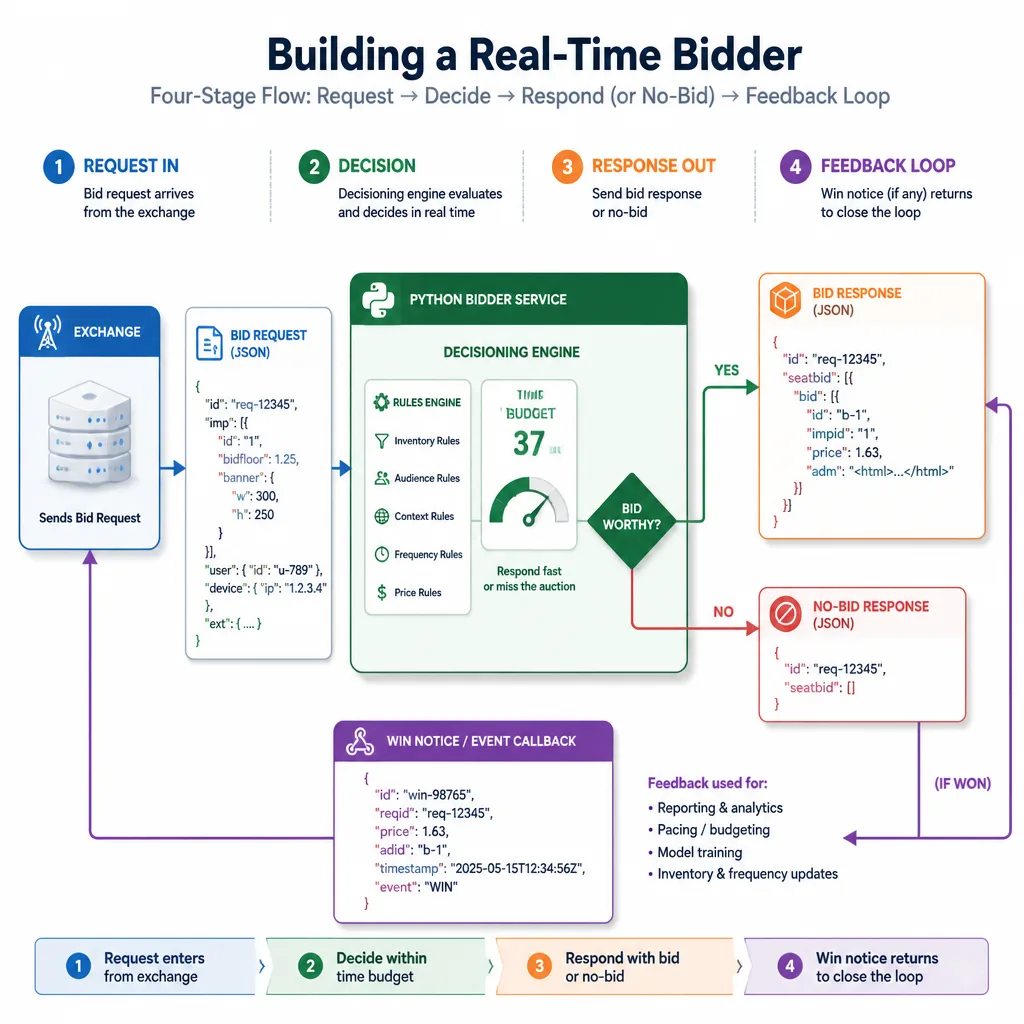
Before opening Python, get the auction flow straight. Most implementation mistakes come from misunderstanding what the bidder must do under time pressure.
The four-stage flow: request → decision → response → win notice
A basic RTB interaction looks like this:
- An exchange sends your bidder a bid request
- Your bidder evaluates the request against targeting and pricing rules
- Your bidder returns either a bid response or no-bid
- If your bid wins, the exchange may send a win notice
That is the core loop.
A useful mental model is to treat each request as a tiny buying decision with an expiration timer attached. You are not browsing inventory. You are making a fast yes-or-no decision on one impression at a time.
Who does what
| Actor | Role | What they send |
|---|---|---|
| Exchange / SSP | Offers auction opportunities | Bid request |
| Bidder | Evaluates and bids | Bid response or no-bid |
| Advertiser logic | Defines goals and constraints | Campaign rules, bid caps, targeting |
| Tracking / analytics | Records outcomes | Win, impression, click, conversion logs |
In this tutorial, your Python app is the bidder. Advertiser logic is just a few hard-coded rules.
Why latency changes the design
In many systems, you can afford extra validation, a database lookup, or another API call. In RTB, those choices can make your bid miss the auction.
The tmax field in OpenRTB defines the exchange’s maximum response window.[^1] Even if tmax is 120 milliseconds, your app does not get all of it. Network overhead and exchange-side processing consume part of that budget.
Key Insight: In RTB, a correct answer that arrives late is effectively the same as no answer.
That is why a fast no-bid is often better than a slow bid.
Bottom Line: RTB is best understood as a deadline-driven decision engine, not just an auction format.
What a Minimal Bidder Needs to Do
A first bidder only needs to handle five responsibilities.
Accept an HTTP POST with a bid request
Your bidder needs an endpoint, usually POST /bid, that accepts JSON.
Parse the core OpenRTB fields
You do not need the full specification to get started. You only need enough data to answer one question:
Should I bid on this impression, and if so, how much?
Decide whether to bid
This is the core decision function. In a first version, use transparent rules rather than machine learning.
Construct a valid bid response
If the request qualifies, return JSON that references the right impression ID and includes price and creative details.
Handle win notifications and logging
A local /win endpoint is enough to show the feedback loop. Even simple logging teaches the right architecture.
Decision Rule: If your first bidder can receive, evaluate, respond, and record, it already covers the essential system boundaries.
OpenRTB Essentials: Start Small
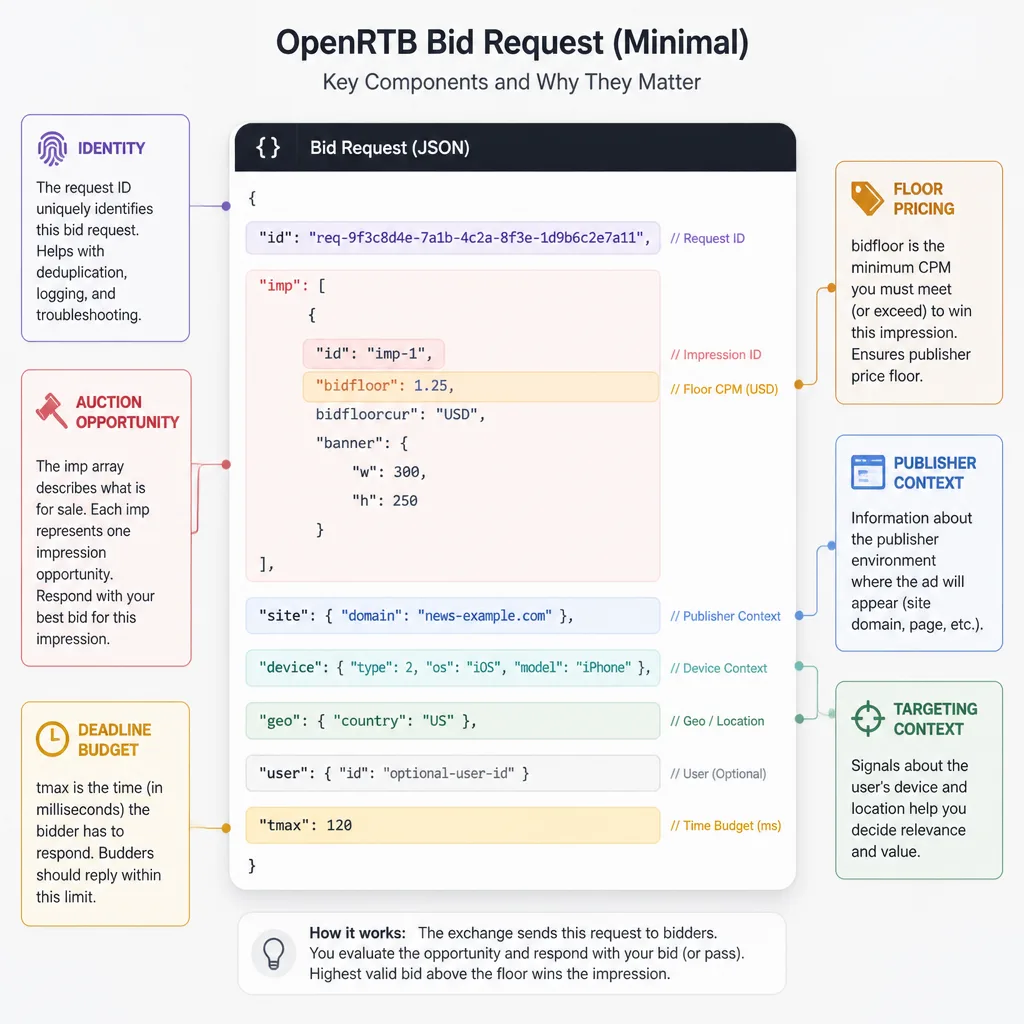
The OpenRTB spec is broad.[^1] A beginner build should focus on a small subset.
Bid request fields that matter first
| Field | Why it matters | Notes |
|---|---|---|
id |
Identifies the auction request | Echo this in the response |
imp |
Contains one or more impression opportunities | Usually the most important object |
imp[].id |
Identifies the impression | Used as impid in the bid |
imp[].bidfloor |
Minimum acceptable bid | Do not bid below it |
site or app |
Shows where the impression comes from | This tutorial uses site |
device |
Helps with targeting | Device type, user agent, geo hints |
user |
Optional user context | Often sparse or privacy-limited |
tmax |
Response deadline budget | Critical for timeout logic |
Bid response fields that matter
| Field | Why it matters | Notes |
|---|---|---|
id |
Ties response to request | Usually set to request ID |
seatbid |
Holds bids | Top-level array |
seatbid[].bid |
Actual bid list | At least one bid to participate |
bid.id |
Unique bid ID | Can be generated locally |
bid.impid |
Ties bid to impression | Must match imp[].id |
bid.price |
Bid amount | Must respect floor |
bid.adm |
Ad markup | Placeholder only in this demo |
bid.crid |
Creative ID | Hard-coded is fine for a demo |
bid.nurl |
Win notice URL in some integrations | Exchange-specific; verify docs |
How to think about imp
A request may contain multiple imp objects. Each one is a possible auction opportunity.
In production, you might evaluate several impressions with different pricing or creative logic. In this tutorial, we keep it simple and bid on the first compatible impression.
That is not a best practice for every case. It is just a useful simplification for learning.
When to skip fields instead of guessing
If a field is optional and your bidder does not need it, ignore it.
Guessing is worse than skipping. For example, if you do not know how an exchange expects adm or notification fields to behave, do not invent production assumptions. Use clearly labeled demo placeholders and check the partner documentation later.[^1]
Common Mistake: Trying to model the whole OpenRTB schema before building the first working request-response loop.
Bottom Line: Start with the fields that affect eligibility, pricing, and response validity. Add the rest later.
A Simple Framework: Receive, Evaluate, Respond, Record
To keep the system understandable, use this four-part framework throughout the build.
The framework
| Stage | What it does | What can go wrong |
|---|---|---|
| Receive | Accept JSON, validate shape, normalize fields | Malformed JSON, missing imp, missing id |
| Evaluate | Apply fast bidding rules | Slow logic, bad targeting assumptions, ignored floors |
| Respond | Return a compliant bid or no-bid | Invalid JSON, wrong impid, late response |
| Record | Log decisions and outcomes | No debugging trail, no learning loop |
This framework maps directly to how a real bidder behaves under load.
Receive
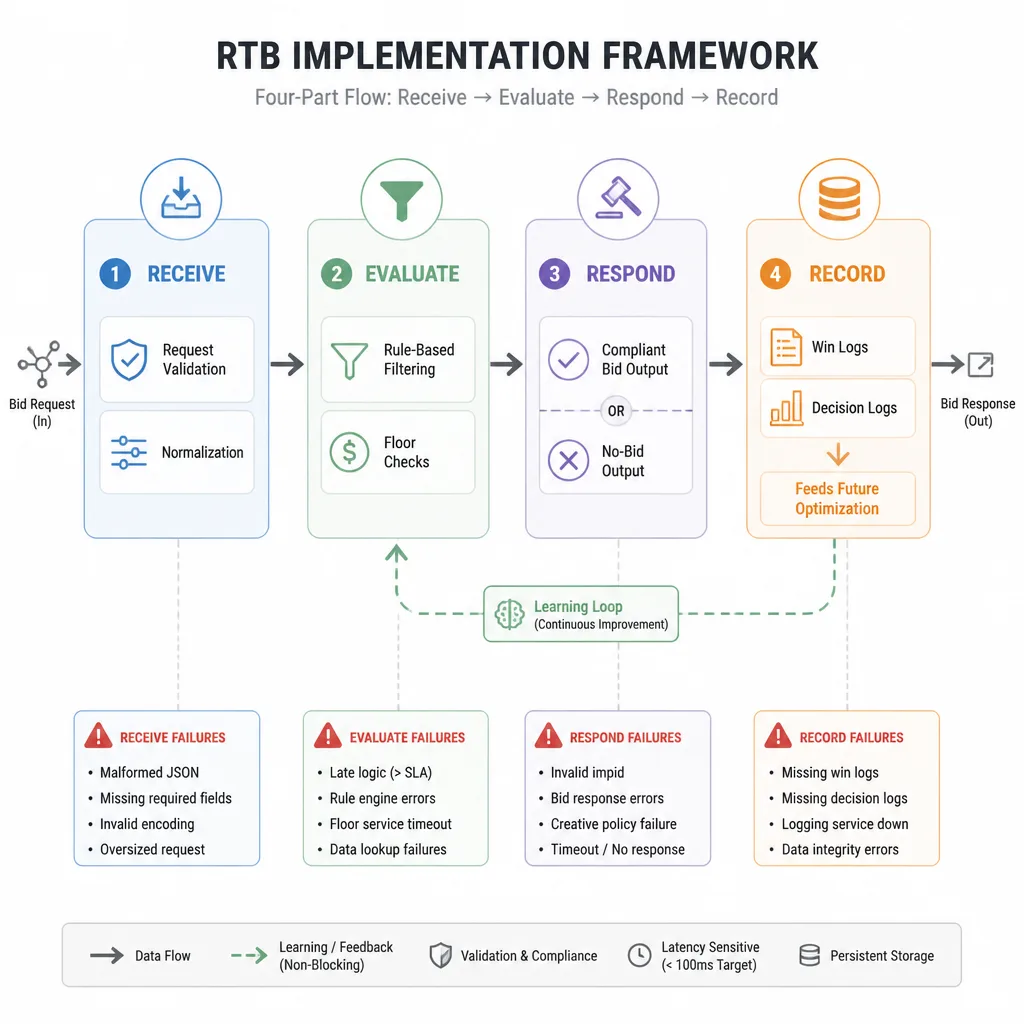
Validate just enough to avoid crashing or bidding blindly.
Evaluate
A first bidder should use rules you can explain easily. That makes testing and debugging far simpler.
Respond
A no-bid is a valid outcome, not a failure.
Record
Without logs, you cannot improve targeting, pricing, or win rate later.
Bottom Line: Keeping these four stages separate makes the bidder easier to test, debug, and extend.
Set Up the Python Project
For readability, this guide uses FastAPI[^2] and Uvicorn[^3].
Recommended stack
- FastAPI for the HTTP API and JSON handling
- Pydantic for lightweight typed validation
- Uvicorn for running the app locally
You could use Flask, but FastAPI keeps typed request handling cleaner for this kind of tutorial.
Project structure
rtb-bidder/
├── app/
│   └── main.py
├── sample_payloads/
│   ├── bid_request_us_mobile.json
│   └── bid_request_nobid.json
└── requirements.txt
Install dependencies
Create requirements.txt:
fastapi
uvicorn
pydantic
Install them:
python -m venv venv
source venv/bin/activate   # Windows: venv\Scripts\activate
pip install -r requirements.txt
Setup checklist
- Create the project folder
- Install FastAPI, Uvicorn, and Pydantic
- Add
app/main.py - Add sample JSON payloads
- Start the local server with Uvicorn
Checkpoint: If you can run a FastAPI app locally, you are ready to build the bidder.
Step 1: Create the Bid Request Endpoint
The first goal is modest: accept a request safely and fail cleanly.
Create app/main.py
import time
import uuid
import logging
from typing import Any, Dict, Optional

from fastapi import FastAPI, Request, Response
from fastapi.responses import JSONResponse
from pydantic import BaseModel


logging.basicConfig(level=logging.INFO)
logger = logging.getLogger("rtb_bidder")

app = FastAPI(title="Minimal Python RTB Bidder")


ALLOWED_COUNTRIES = {"USA", "US"}
ALLOWED_PUBLISHERS = {"example.com", "news.example.com"}
MAX_BID_CPM = 1.35
MAX_ACCEPTABLE_FLOOR = 1.20
INTERNAL_TMAX_CAP_MS = 100


class BidDecision(BaseModel):
    should_bid: bool
    reason: str
    impid: Optional[str] = None
    price: Optional[float] = None
    creative_id: Optional[str] = None


def get_country(payload: Dict[str, Any]) -> Optional[str]:
    device = payload.get("device", {}) or {}
    geo = device.get("geo", {}) or {}
    return geo.get("country")


def get_domain(payload: Dict[str, Any]) -> Optional[str]:
    site = payload.get("site", {}) or {}
    return site.get("domain")


def is_mobile_web(payload: Dict[str, Any]) -> bool:
    site = payload.get("site")
    app_obj = payload.get("app")
    if not site or app_obj:
        return False

    device = payload.get("device", {}) or {}
    devicetype = device.get("devicetype")
    ua = (device.get("ua") or "").lower()

    mobile_by_type = devicetype in {1, 4, 5}
    mobile_by_ua = "iphone" in ua or "android" in ua or "mobile" in ua
    return mobile_by_type or mobile_by_ua


def choose_impression(payload: Dict[str, Any]) -> Optional[Dict[str, Any]]:
    impressions = payload.get("imp", [])
    if not isinstance(impressions, list):
        return None

    for imp in impressions:
        if isinstance(imp, dict) and imp.get("id"):
            return imp
    return None
Why this structure works
This is not a full OpenRTB schema. It is minimal structural validation.
That matters because exchange payloads are often sparse, and different integrations add different extensions.
Return no-bid when essentials are missing
Now add the evaluation logic:
def evaluate_request(payload: Dict[str, Any], deadline_ms: float) -> BidDecision:
    now_ms = time.time() * 1000
    if now_ms >= deadline_ms:
        return BidDecision(should_bid=False, reason="timeout_before_evaluation")

    request_id = payload.get("id")
    if not request_id:
        return BidDecision(should_bid=False, reason="missing_request_id")

    imp = choose_impression(payload)
    if not imp:
        return BidDecision(should_bid=False, reason="missing_impression")

    impid = imp.get("id")
    bidfloor = float(imp.get("bidfloor", 0.0) or 0.0)
    country = get_country(payload)
    domain = get_domain(payload)

    if country not in ALLOWED_COUNTRIES:
        return BidDecision(should_bid=False, reason="geo_not_allowed")

    if not is_mobile_web(payload):
        return BidDecision(should_bid=False, reason="not_mobile_web")

    if domain not in ALLOWED_PUBLISHERS:
        return BidDecision(should_bid=False, reason="publisher_not_allowed")

    if bidfloor > MAX_ACCEPTABLE_FLOOR:
        return BidDecision(should_bid=False, reason="floor_too_high")

    now_ms = time.time() * 1000
    if now_ms >= deadline_ms:
        return BidDecision(should_bid=False, reason="timeout_after_filters")

    bid_price = max(bidfloor, MAX_BID_CPM)

    return BidDecision(
        should_bid=True,
        reason="eligible",
        impid=impid,
        price=round(bid_price, 2),
        creative_id="creative-001"
    )
Decision Rule: If the request is malformed or missing essentials, return no-bid quickly instead of trying to infer meaning.
Step 2: Parse a Minimal Bid Request
Now make the parsing logic explicit.
Extract the fields that drive the decision
The most important parts of the request are:
idimp[].idimp[].bidfloorsite.domaindevice.uadevice.devicetypedevice.geo.countrytmax
That is enough for a first policy such as:
“Bid only on US mobile web traffic from approved publishers if the floor is acceptable.”
Handle multiple impressions simply
This prototype uses choose_impression() to pick the first valid impression.
That is a deliberate simplification. Real implementations may evaluate several impressions or return multiple bids depending on the integration.
Normalize optional fields safely
Notice how the helper functions default to empty dicts. That keeps the bidder from crashing when site, device, or geo is missing.
A common beginner mistake is assuming every request has the same shape. In RTB, sparse payloads are normal.
Bottom Line: Defensive parsing matters more than complete parsing in a first bidder.
Step 3: Implement a Minimal Bidding Strategy
This is where many tutorials get too ambitious. Do not start with machine learning. Start with a rule you can explain in one sentence.
Use a rule-based strategy first
Our demo strategy is:
- bid only on US mobile web
- bid only on an approved publisher allowlist
- bid only when
bidfloor <= 1.20 - bid 1.35 CPM when eligible
These values are illustrative, not market guidance.
Why these rules are useful
Imagine a startup advertiser that only wants mobile web visitors from a small set of known publishers because those placements have already been tested.
That is realistic. It is narrow enough to debug and selective enough to make no-bid decisions common.
Respect floors and cap spend
If the floor is 1.50 and your max acceptable floor is 1.20, do not bid.
If the floor is 0.80, the demo bidder can return 1.35.
This works because:
- the floor check protects spend discipline
- the allowlist protects inventory quality
- geo and device filters keep traffic aligned with campaign intent
When no-bid is the right answer
Return no-bid when:
- the country is unsupported
- the publisher is not allowed
- the traffic is not mobile web
- the floor is too high
- required fields are missing
- there is not enough time left to respond
Key Insight: A healthy bidder is selective. Most opportunities should be rejected quickly if they do not fit the strategy.
Step 4: Build the Bid Response
Now turn an eligible decision into a valid response.
Add the response builder
def build_bid_response(request_id: str, decision: BidDecision) -> Dict[str, Any]:
    return {
        "id": request_id,
        "seatbid": [
            {
                "seat": "demo-seat",
                "bid": [
                    {
                        "id": str(uuid.uuid4()),
                        "impid": decision.impid,
                        "price": decision.price,
                        "crid": decision.creative_id,
                        "adm": "<div>Demo Creative</div>",
                        "nurl": f"http://localhost:8000/win?impid={decision.impid}&price=${{AUCTION_PRICE}}"
                    }
                ]
            }
        ]
    }
A few practical notes
- price should be at or above the floor
- crid can be hard-coded in a demo
- adm is only a placeholder here
- nurl varies by exchange and OpenRTB version, so treat it as illustrative and verify integration docs before production[^1]
For display traffic, markup and macros can vary a lot across exchanges and media types. This example teaches response structure, not creative compliance.
Wire the endpoint together
@app.post("/bid")
async def bid_endpoint(request: Request):
    start_ms = time.time() * 1000

    try:
        payload = await request.json()
    except Exception:
        logger.info("invalid_json")
        return Response(status_code=204)

    tmax = payload.get("tmax", INTERNAL_TMAX_CAP_MS)
    try:
        tmax = int(tmax)
    except Exception:
        tmax = INTERNAL_TMAX_CAP_MS

    effective_tmax = min(tmax, INTERNAL_TMAX_CAP_MS)
    deadline_ms = start_ms + effective_tmax

    decision = evaluate_request(payload, deadline_ms)
    logger.info(
        "request_id=%s should_bid=%s reason=%s",
        payload.get("id"),
        decision.should_bid,
        decision.reason
    )

    if not decision.should_bid:
        # Some exchanges prefer 204 No Content for no-bid.
        # Verify your partner's expected behavior.
        return Response(status_code=204)

    response_payload = build_bid_response(payload["id"], decision)
    return JSONResponse(content=response_payload)
Common Mistake: Returning malformed JSON, using the wrong
impid, or bidding below the floor. Any one of those can get the bid rejected.
Checkpoint: Your bidder now has a complete request → decision → response path.
Step 5: Add Timeout Awareness
A bidder that ignores time budgets is not really an RTB bidder.
Understand tmax
tmax is the maximum response time budget sent in the request.[^1] It is not a suggestion.
In practice, your internal deadline should be lower than the full tmax, because the total round trip includes more than your Python code.
Design for fast decisions
This tutorial uses:
- a small internal cap:
INTERNAL_TMAX_CAP_MS = 100 - in-memory rules
- no database calls
- no remote services
- no large models
That is the right shape for a first prototype.
What to do when time is almost gone
Do not try to rescue a request that is already timing out. Return no-bid.
A late bid wastes resources and creates misleading logs. You think you participated, but the exchange may never have considered the bid.
Decision Rule: If you are close to the deadline and still uncertain, no-bid is the safer choice.
Step 6: Implement a Win Notice Endpoint
Winning matters because it closes the loop.
Why win notices matter
If your bid wins, some integrations send a callback or fire a notification URL. That tells your bidder which bids actually cleared the auction.
Log wins in the prototype
In production, you would store win events for optimization, reconciliation, and budget tracking.
For a local prototype, logging is enough:
@app.get("/win")
async def win_notice(impid: Optional[str] = None, price: Optional[str] = None):
    logger.info("win_notice impid=%s price=%s", impid, price)
    return {"status": "logged", "impid": impid, "price": price}
This is simple, but it teaches the right concept: your bidder should not stop caring after it sends a bid.
Bottom Line: Bid submission is not the end of the system. Outcome logging is part of the architecture.
Full Example: Minimal RTB Bidder in Python
import time
import uuid
import logging
from typing import Any, Dict, Optional

from fastapi import FastAPI, Request, Response
from fastapi.responses import JSONResponse
from pydantic import BaseModel

logging.basicConfig(level=logging.INFO)
logger = logging.getLogger("rtb_bidder")

app = FastAPI(title="Minimal Python RTB Bidder")

ALLOWED_COUNTRIES = {"USA", "US"}
ALLOWED_PUBLISHERS = {"example.com", "news.example.com"}
MAX_BID_CPM = 1.35
MAX_ACCEPTABLE_FLOOR = 1.20
INTERNAL_TMAX_CAP_MS = 100


class BidDecision(BaseModel):
    should_bid: bool
    reason: str
    impid: Optional[str] = None
    price: Optional[float] = None
    creative_id: Optional[str] = None


def get_country(payload: Dict[str, Any]) -> Optional[str]:
    device = payload.get("device", {}) or {}
    geo = device.get("geo", {}) or {}
    return geo.get("country")


def get_domain(payload: Dict[str, Any]) -> Optional[str]:
    site = payload.get("site", {}) or {}
    return site.get("domain")


def is_mobile_web(payload: Dict[str, Any]) -> bool:
    site = payload.get("site")
    app_obj = payload.get("app")
    if not site or app_obj:
        return False

    device = payload.get("device", {}) or {}
    devicetype = device.get("devicetype")
    ua = (device.get("ua") or "").lower()

    mobile_by_type = devicetype in {1, 4, 5}
    mobile_by_ua = "iphone" in ua or "android" in ua or "mobile" in ua
    return mobile_by_type or mobile_by_ua


def choose_impression(payload: Dict[str, Any]) -> Optional[Dict[str, Any]]:
    impressions = payload.get("imp", [])
    if not isinstance(impressions, list):
        return None

    for imp in impressions:
        if isinstance(imp, dict) and imp.get("id"):
            return imp
    return None


def evaluate_request(payload: Dict[str, Any], deadline_ms: float) -> BidDecision:
    now_ms = time.time() * 1000
    if now_ms >= deadline_ms:
        return BidDecision(should_bid=False, reason="timeout_before_evaluation")

    request_id = payload.get("id")
    if not request_id:
        return BidDecision(should_bid=False, reason="missing_request_id")

    imp = choose_impression(payload)
    if not imp:
        return BidDecision(should_bid=False, reason="missing_impression")

    impid = imp.get("id")
    bidfloor = float(imp.get("bidfloor", 0.0) or 0.0)
    country = get_country(payload)
    domain = get_domain(payload)

    if country not in ALLOWED_COUNTRIES:
        return BidDecision(should_bid=False, reason="geo_not_allowed")

    if not is_mobile_web(payload):
        return BidDecision(should_bid=False, reason="not_mobile_web")

    if domain not in ALLOWED_PUBLISHERS:
        return BidDecision(should_bid=False, reason="publisher_not_allowed")

    if bidfloor > MAX_ACCEPTABLE_FLOOR:
        return BidDecision(should_bid=False, reason="floor_too_high")

    now_ms = time.time() * 1000
    if now_ms >= deadline_ms:
        return BidDecision(should_bid=False, reason="timeout_after_filters")

    bid_price = max(bidfloor, MAX_BID_CPM)

    return BidDecision(
        should_bid=True,
        reason="eligible",
        impid=impid,
        price=round(bid_price, 2),
        creative_id="creative-001"
    )


def build_bid_response(request_id: str, decision: BidDecision) -> Dict[str, Any]:
    return {
        "id": request_id,
        "seatbid": [
            {
                "seat": "demo-seat",
                "bid": [
                    {
                        "id": str(uuid.uuid4()),
                        "impid": decision.impid,
                        "price": decision.price,
                        "crid": decision.creative_id,
                        "adm": "<div>Demo Creative</div>",
                        "nurl": f"http://localhost:8000/win?impid={decision.impid}&price=${{AUCTION_PRICE}}"
                    }
                ]
            }
        ]
    }


@app.post("/bid")
async def bid_endpoint(request: Request):
    start_ms = time.time() * 1000

    try:
        payload = await request.json()
    except Exception:
        logger.info("invalid_json")
        return Response(status_code=204)

    tmax = payload.get("tmax", INTERNAL_TMAX_CAP_MS)
    try:
        tmax = int(tmax)
    except Exception:
        tmax = INTERNAL_TMAX_CAP_MS

    effective_tmax = min(tmax, INTERNAL_TMAX_CAP_MS)
    deadline_ms = start_ms + effective_tmax

    decision = evaluate_request(payload, deadline_ms)
    logger.info(
        "request_id=%s should_bid=%s reason=%s",
        payload.get("id"),
        decision.should_bid,
        decision.reason
    )

    if not decision.should_bid:
        return Response(status_code=204)

    response_payload = build_bid_response(payload["id"], decision)
    return JSONResponse(content=response_payload)


@app.get("/win")
async def win_notice(impid: Optional[str] = None, price: Optional[str] = None):
    logger.info("win_notice impid=%s price=%s", impid, price)
    return {"status": "logged", "impid": impid, "price": price}
What each function does
get_country()extracts country fromdevice.geoget_domain()reads the publisher domain fromsiteis_mobile_web()distinguishes mobile web from app or desktopchoose_impression()selects a compatible impressionevaluate_request()applies bidding rulesbuild_bid_response()formats a minimal response/bidhandles the auction request/winlogs win notices
Sample Payloads
Sample bid request
Save as sample_payloads/bid_request_us_mobile.json:
{
  "id": "req-1001",
  "imp": [
    {
      "id": "imp-1",
      "bidfloor": 0.8
    }
  ],
  "site": {
    "domain": "example.com",
    "page": "https://example.com/article/123"
  },
  "device": {
    "ua": "Mozilla/5.0 (iPhone; CPU iPhone OS 16_0 like Mac OS X) AppleWebKit/605.1.15 Mobile/15E148",
    "devicetype": 4,
    "geo": {
      "country": "USA"
    }
  },
  "tmax": 120
}
Sample bid response
{
  "id": "req-1001",
  "seatbid": [
    {
      "seat": "demo-seat",
      "bid": [
        {
          "id": "f3d2e86c-4f6c-4e8a-a6f8-11f7f0f2bdb2",
          "impid": "imp-1",
          "price": 1.35,
          "crid": "creative-001",
          "adm": "<div>Demo Creative</div>",
          "nurl": "http://localhost:8000/win?impid=imp-1&price=${AUCTION_PRICE}"
        }
      ]
    }
  ]
}
Sample no-bid request
Save as sample_payloads/bid_request_nobid.json:
{
  "id": "req-1002",
  "imp": [
    {
      "id": "imp-2",
      "bidfloor": 1.5
    }
  ],
  "site": {
    "domain": "example.com",
    "page": "https://example.com/article/999"
  },
  "device": {
    "ua": "Mozilla/5.0 (iPhone; CPU iPhone OS 16_0 like Mac OS X) AppleWebKit/605.1.15 Mobile/15E148",
    "devicetype": 4,
    "geo": {
      "country": "USA"
    }
  },
  "tmax": 120
}
This one should return no-bid because the floor is above the configured threshold.
How to Test the Bidder Locally
Start the server
uvicorn app.main:app --reload
Test a bid case
curl -X POST "http://127.0.0.1:8000/bid" \
  -H "Content-Type: application/json" \
  --data @sample_payloads/bid_request_us_mobile.json
Test a no-bid case
curl -i -X POST "http://127.0.0.1:8000/bid" \
  -H "Content-Type: application/json" \
  --data @sample_payloads/bid_request_nobid.json
Expected outcomes
| Scenario | Expected result | Why |
|---|---|---|
| US mobile web, allowed domain, floor 0.8 | Bid response | Meets all rules |
| US mobile web, allowed domain, floor 1.5 | No-bid | Floor too high |
| Canada mobile web | No-bid | Geo not allowed |
| Desktop traffic | No-bid | Not mobile web |
| Unknown publisher | No-bid | Not in allowlist |
Debugging checklist
-
Content-Type: application/jsonis set - Request has
id -
impis present and is a list -
imp[].idexists - Response
impidmatches the request impression - Bid price is not below
bidfloor - JSON is valid
- Code does not assume missing fields exist
Common Mistake: Treating a 204 no-bid as an error. In many integrations, that is the normal and preferred no-bid signal. Always confirm partner docs.
Common Mistakes in a First RTB Bidder
Ignoring latency until late in the build
If the design depends on slow calls in the hot path, it will eventually miss auctions.
Assuming every request has the same structure
OpenRTB payloads are often sparse. Your parser needs to tolerate missing optional fields.
Returning invalid bid objects
A valid strategy with an invalid response is still a failed bid.
Bidding below floor or on unsupported inventory
A bidder should reject impossible or unqualified auctions immediately.
Treating the demo as production-ready
This tutorial is intentionally educational. A real bidder needs much more than a clean local API.
Bottom Line: The fastest path to a useful first bidder is disciplined simplification.
What This Prototype Does Not Solve
A working local bidder is useful, but still far from a production traffic-buying system.
Missing production concerns
- Budget pacing and spend controls
- Creative approval and rendering rules
- User identity, frequency capping, and attribution
- Model-based bidding and win-rate optimization
- Security, scaling, and observability
What production systems usually need
- Metrics and tracing
- Structured event logs
- Rate limiting and abuse protection
- Resilience under load
- Exchange-specific validation
- Integration testing
- Secure configuration management
Decision Rule: If your goal is learning or controlled experimentation, this prototype is enough. If your goal is dependable spend at scale, it is not.
Build vs. Buy: When a Custom Bidder Makes Sense
Not every advertiser or startup should build RTB infrastructure.
Good reasons to build
| Reason | Why it makes sense |
|---|---|
| You want to learn RTB deeply | Building exposes the real mechanics |
| You need custom optimization logic | Managed tools may be too opinionated |
| You are testing a niche traffic strategy | A custom prototype can validate assumptions quickly |
| You need full control over auction decisions | Internal logic stays transparent |
When managed infrastructure is the better choice
| Reason | Why it often wins |
|---|---|
| You need speed to market | Infrastructure already exists |
| You do not want to maintain bidder operations | Lower engineering burden |
| You need compliance and operational support | Managed providers handle more edge cases |
| You care more about outcomes than system ownership | Better fit for most advertisers |
Where Traffics.io can fit
If your real goal is not to run bidding infrastructure but to buy traffic efficiently, managed services may be the better option.
For advertisers and business owners who want acquisition outcomes without maintaining their own RTB stack, Traffics.io can be a practical fit. That is especially true when the cost of building, maintaining, and integrating a bidder outweighs the value of owning the system.
Bottom Line: Build when learning or custom logic is the priority. Buy when reliability, speed, and operational simplicity matter more.
Next Steps
Once the first version works, do not add everything at once. Add the next constraint that matters.
Add campaign rules and targeting layers
Move from hard-coded constants to campaign configuration.
Examples:
- per-publisher bid caps
- separate geo rules
- device-specific pricing
- blocklists and allowlists
Store win and loss events
Even simple persistence changes the system. Once you record outcomes, you can evaluate:
- which publishers win most often
- where floor filters reject too much inventory
- which bid levels are competitive
Introduce pacing and budget management
This is where a bidder starts acting like a buying system instead of a request parser.
Move from fixed rules to predictive bidding
Only after you have data should you consider models for:
- estimated click probability
- conversion likelihood
- dynamic pricing
- win-rate-adjusted bids
Practical Next Step: Refactor the constants into a config file or campaign object before adding more logic. That one change will make future growth much easier.
Conclusion
The main takeaway is simpler than the jargon suggests: a bidder receives an auction opportunity, evaluates it under a deadline, responds with a bid or no-bid, and records the outcome.
You now have a working foundation for a real-time bidder in Python. More importantly, you should understand why each part exists: imp represents the opportunity, bidfloor shapes pricing, tmax shapes architecture, no-bid is normal, and win notices close the loop.
From here, the most useful next steps are campaign configuration, event storage, pacing, and richer targeting. Once those are in place, you are no longer just returning JSON. You are starting to build real traffic-buying logic.
FAQ
What is a real-time bidder in Python?
A real-time bidder in Python is an application that receives ad auction requests, evaluates them under strict time limits, and returns either a bid or a no-bid. In practice, it usually processes OpenRTB bid requests over HTTP and applies simple or advanced bidding logic.
Do I need the full OpenRTB specification to build a basic bidder?
No. You can start with a small subset of fields, including request ID, impression data, bid floor, site or app context, device details, and tmax. The full specification matters later when you handle more inventory types, exchange-specific extensions, and production requirements.
Which fields matter most in a minimal bid request?
A useful starting set is id, imp, imp[].id, imp[].bidfloor, site or app, device, geo when available, and tmax. That is usually enough to identify the auction, inspect the opportunity, apply a simple strategy, and decide whether to bid.
What does no-bid mean in RTB?
No-bid means the bidder intentionally chooses not to participate in that auction. This is normal behavior. A bidder should return no-bid quickly when the traffic does not match targeting rules, the floor is too high, required fields are missing, or there is not enough time left to respond safely.
Why is tmax important?
tmax defines the maximum response time budget the exchange allows. It matters because RTB is latency-sensitive. If your bidder responds too slowly, the exchange may ignore the bid even if your logic was correct.
Can I build a production DSP from this tutorial?
No. This is a learning prototype, not a production DSP. It can teach the request-response loop, parsing, response structure, and basic strategy design, but production systems also need pacing, budgets, creative compliance, identity handling, attribution, observability, scaling, fraud controls, and exchange-specific certification.
What is the simplest bidding strategy for a first prototype?
A good first strategy is rule-based and deterministic. For example, bid only on US mobile web traffic from an approved publisher allowlist when the bid floor is below a configured maximum CPM. That keeps the logic easy to test and improve.
How do I test a Python bidder locally?
Run the bidder with FastAPI and Uvicorn, then send sample OpenRTB JSON payloads with curl or Postman to a local /bid endpoint. Test both a bid scenario and a no-bid scenario so you can confirm parsing, floor checks, response formatting, and timeout handling.
What should a minimal bid response include?
At minimum, a learning example should include the request ID, a seatbid array, and a bid object with bid ID, impression ID, price, creative ID, and any demo markup or notification fields used in the example. Exact requirements vary by exchange and media type, so production integrations should follow official documentation.
When should I build my own bidder instead of using managed infrastructure?
Building your own bidder makes sense when you need custom experimentation, unique optimization logic, or a deeper understanding of programmatic systems. Managed infrastructure is usually the better choice when speed, operational support, compliance, and reduced engineering burden matter more than full control.
[^1]: OpenRTB behavior and field usage can vary by version and exchange implementation. Always verify against official partner documentation. [^2]: FastAPI documentation: https://fastapi.tiangolo.com/ [^3]: Uvicorn documentation: https://www.uvicorn.org/